

how i can mute/unmute during zoom meeting using my airpods pro controls? | Community
Skip to main content
Newcomer
December 4, 2023
Solved

how i can mute/unmute during zoom meeting using my airpods pro controls?

  • December 4, 2023
  • 18 replies
  • 14 views

Hi, 


While in a zoom meeting on my macbook, when i try to mute/unmute myself using airpods call control (press once by default) it doesn't work and give me a message "Can't control mic with Airpod Pro" . Why is that? Is it a bug? 


The same functionality works when i join zoom from iPhone or iPad, so how we can make it work on macs also?


Please help this is really very useful for productivity when zoom window is buried somewhere (it could be in different desktop or under so many windows) and i need to unmute quickly 


Thanks

Aiman 
Best answer by MGSR

hi mark,


assuming the issue has been fixed, can you confirm that the fix works for all airpods including:

In-ear
AirPods 4
AirPods 4 with Active Noise Cancellation
AirPods Pro 2
AirPods (2nd generation)
AirPods (3rd generation) with Lightning Charging Case
AirPods (3rd generation) with MagSafe Charging Case
Over-ear
AirPods Max


thanks,  eliot


Hello @Eliot,

Thank you for your patience. 

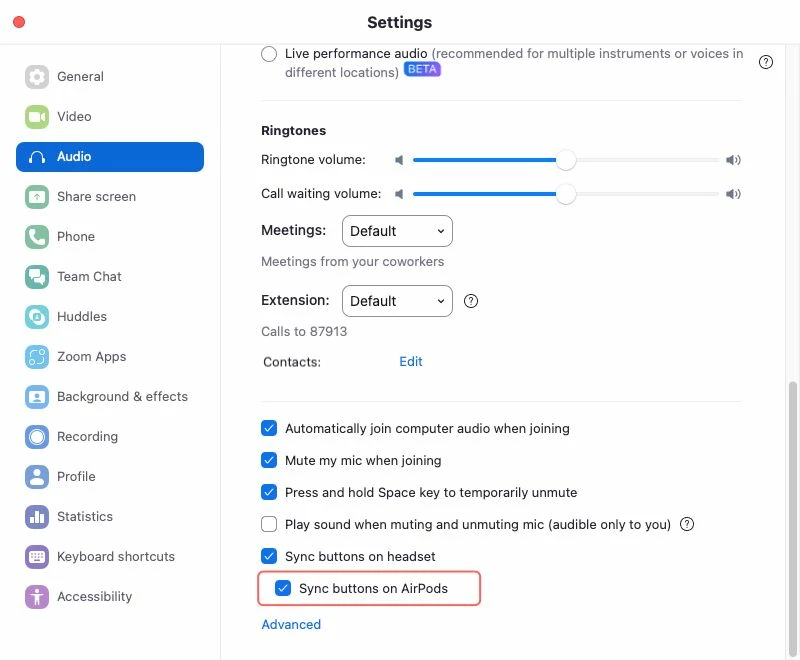
Yes, the issue has been fixed on the 6.4.0 release, and it is for all AirPods models.
There is a new option in the audio settings to let customers decide if they want the sync feature for AirPods.


Please let us know if you have further concerns. 

18 replies

ExpertswhoJohn
Community Super Champion | Customer
December 4, 2023

Hello @akhammash ,


You can not mute your Zoom device with Airpods or USB-type devices with a mute3 button. Those mute functions will work within the device, not Zoom.


I believe it works on the iPhone and iPad because Apple made it that way.


The mute command within Zoom is separate and requires a separate command. People can mute Zoom 

using additional apps. You can also mute it by pressing the space bar. But to unmute, you would then need to hold down the space bar.

akhammashAuthor
Newcomer
December 5, 2023

Hi John 


What do you mean by mute3 button? 


I'm able to mute/unmute using the mute button on my jabra headset connected to the same mac, so it's possible 


they should be same right ? 


Thanks

Aiman 

ExpertswhoJohn
Community Super Champion | Customer
December 5, 2023

Hi @akhammash 

Not always. I have used a number of USB devices, and some will make the zoom mute by muting the zoom mic icon. Others mute the audio within their own electronics and leave the Zoom microphone open.
Then last month I had a USB headset which stopped reacting to the physical mute switch.
I am more towards blaming a Windows update for this problem, which went away a month later.

The best advice is to check and validate each device yourself, as there is no easy way to contact the developers of the device, zoom and Windows and even if you could, they would blame each other for anything not working as expected.
all the best

John

akhammashAuthor
Newcomer
December 7, 2023

Thanks John. the reason i'm posting here is that Zoom gave this message ""Can't control mic with Airpod Pro" when i tried to mute. So this tells me Zoom disabled this functionality and i was hoping to know why and help influence or find a way to enable it 


do you know how we can open a bug to zoom development ? 


Aiman

Newcomer
January 19, 2024

@ExpertswhoJohn  You don't know what you're talking about.
Apple added a feature to control mute/unmute directly from the AirPods. See this post in the apple knowledge base (search for "mute").


Also there's already a request to implement this in the zoom dev forum

ExpertswhoJohn
Community Super Champion | Customer
January 22, 2024

@ulope 
Apple may have added a feature but I still see people have problems with., even one person yesterday. I will watch Zoom updates to see any reference to this change.
And a feature request to Zoom does not give us a working solution today.

Newcomer
March 1, 2024

Well, it works in WebEx. So someone's cracked that nut. 

Newcomer
April 16, 2024

Microsoft teams did too, and I would expect Zoom to be way ahead of anything Microsoft builds on the conference meeting space.


Newcomer
April 17, 2024

Does it work with the latest "Zoom Workplace" update? 

(This is now working for my AirpodsMax)

Newcomer
April 17, 2024

Release notes for macOS (zoom.com):


Support for USB headsets 
Supervisors and agents can use supported USB headsets to mute/unmute, accept/decline, or adjust the volume. This is only supported for voice engagements.

akhammashAuthor
Newcomer
April 17, 2024

to close the loop on this thread, after updating to Zoom workspace Version: 6.0.1 (33290) , this functionality works for my airpod pro . also INV_JoshF reported it works for AirpodMax headset. 


to who ever fixed it , thanks for listening 🐵 

Newcomer
December 19, 2024

Hi Zoom tech team,   can you review the changes in Zoom Workspace Version: 6.3.0 (44805) as I am no longer able to control mute/unmute with my Airpod Max headset.   This was working in prior to upgarding to 6.3.0.  Thanks!  

Newcomer
December 23, 2024

I'm having the same issue as well.  It worked before I upgraded my zoom to 6.3.0 (44805).

Newcomer
December 23, 2024

Yeah, this seems to be a regressive bug, in that it's cropped up in two separate updates after the "fix" and disappears with a subsequent update.

Newcomer
January 10, 2025

I actually have been using this on 6.2.* or something like that with the AirPods Max (lightning). However Apple just replaced mine with new ones due to hardware issues. Now with the AirpodsMax (USB-C) this does not work! I update to the latest 6.3.5 and still not working. I've been trying to find a work around as I have also recently switch to using Beats Studio Pro at the office and they don't work either. This is frustrating and so I have just programmed my mouse to have a button toggle my mute functionality. But this far from ideal.

Newcomer
January 10, 2025

I am using AirPods Max (Lightning) and feature hasn't worked since upgrading to 6.3.0,  still doesn't work on 6.3.5 as you are experiencing.   

Newcomer
January 15, 2025

Hello there, 

We do apologize for the inconvenience. 

As per our engineering team, we did support this feature in the past, but due to some user feedback indicating that it was easy to trigger mute/unmute on the AirPods accidentally, we disabled this feature again in version 6.3.0. 

In the future, we plan to add a sub-option under "Sync buttons on headset," along with clearer instructions, and then re-enable the feature, allowing users to choose whether or not to sync the button functionality on AirPods.

For now, thank you for your patience and understanding.


I, like others here, also appreciated when "Sync buttons on headset" supported AirPods Max. The setting seemed fairly intuitive as it was – though I support you adding additional functionality over time. 

Please note for your teams that disabling the feature did have a negative impact on a number of users. 

Thanks,

Newcomer
March 1, 2025

Bring back the feature. Why punish the people who know how to use the function properly. 

Newcomer
March 6, 2025

Another vote to bring this back as soon as possible!  I can no longer control mute/unmute without being directly in front of my Mac.