
cancel
Showing results for 
Search instead for 
Did you mean: 
Effective January 9th, 2026 through January 22nd, 2026: The Zoom Community is currently in read-only mode with login disabled, to deliver you a new and improved community experience!

The site is still accessible to view, however, the ability to login, create content, or access your community account is temporarily unavailable. We appreciate your patience during this time. If seeking support, please browse existing community content or ask our Zoom Virtual Agent.

host to unmute participants

Laulau1
Explorer
Explorer

Hello,


I have enabled the request to unmute in personal and account settings but I still can't unmute participants as a host.


Anybody has an idea?


Thanks 

1 ACCEPTED SOLUTION

JepZoom
Creator I
Creator I

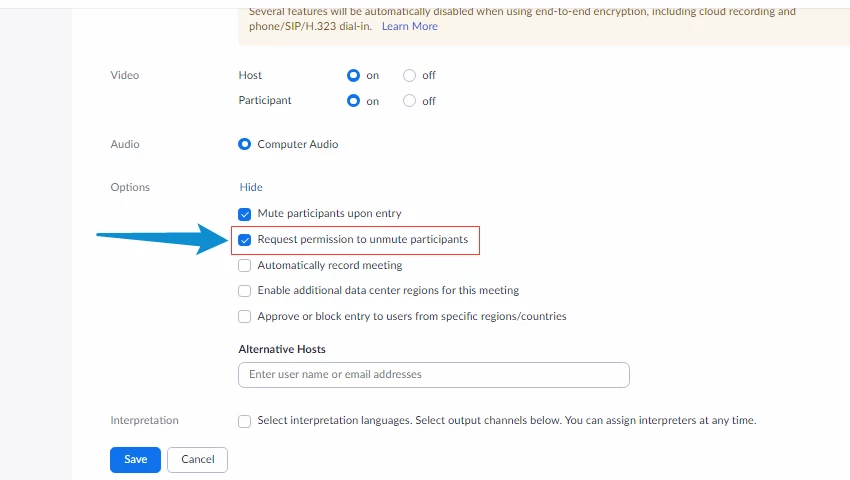
You need to enable this on your scheduled meeting/s: 
JepZoomie_0-1650278599521.png


When you create a schedule meeting, click Show beside Option and enable 'Request permission to unmute participants'.

Here is the related article that I found: https://support.zoom.us/hc/en-us/articles/203435537-Muting-unmuting-participants-in-a-meeting


View solution in original post

3 REPLIES 3

JepZoom
Creator I
Creator I

You need to enable this on your scheduled meeting/s: 

JepZoomie_0-1650278599521.png


When you create a schedule meeting, click Show beside Option and enable 'Request permission to unmute participants'.

Here is the related article that I found: https://support.zoom.us/hc/en-us/articles/203435537-Muting-unmuting-participants-in-a-meeting


Thanks a lot JepZoomie, you sorted my problem !😀


laulau1

Can anybody think of a reason why I can't find this option on the web portal (nor on the app) Mac OSX

Screen Shot 2022-04-30 at 10.18.07.png