

attendee display of chat response. filed of view very narrow. | Community
Skip to main content
Newcomer
January 8, 2022
Question

attendee display of chat response. filed of view very narrow.

  • January 8, 2022
  • 2 replies
  • 0 views

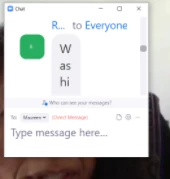
attendee display of chat response. Field of view very narrow.  I am not able to read it.  I wish to resize the response so that it is horizontal and not vertical.

This is what I see:
 

    2 replies

    Dan_ZoomSE
    Employee
    Employee
    January 8, 2022

    Hello @cherylweinstein,


    You should be able to drag the edge of the window to resize it.  Additionally, if you click the three dots in the upper corner of the section where you type you will see an option to merge to your meetings window.  Then you can grab the left edge and resize it left to right as well.


    If this has answered your question, please click the Accept as Solution button below so that others in the Community may benefit as well.

    Thanks!

    Newcomer
    January 9, 2022

    Dan

    Replying a second time since I cannot view response from a few minutes ago.

    Unfortunately this advice did NOT solve my issue. I do not have a problem with resizing or locating the chat box itself. The problem is the light blue, rounded corner, text box within the chat response box. This area is very narrow and I am not able to read the text in it.

    Newcomer
    February 27, 2022

    I have the same problem.  For a few weeks now my chat message display 2 characters wide so that I have  to read downwards. Where is the command to change the width, please?  The border did not respond to dragging but the saved chat is perfectly readable.  I  will have to wait until my next Zoom to try Dan's suggestions and/or take a screenshot.