
cancel
Showing results for 
Search instead for 
Did you mean: 

adding profile image in a free account how to do this

FILMEDITOR
Newcomer
Newcomer

With a free account, how do I set up the profile image? I do not see the steps to do this.  also, with the free account, how to set up a background image? thanks

1 ACCEPTED SOLUTION

Ray_Harwood
Community Champion | Customer

Welcome to the Zoom Community, @FILMEDITOR.


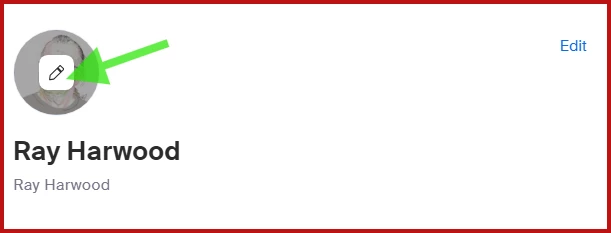
The Profile Image is uploaded by going to your profile https://zoom.us/profile and hovering over the image area above your Display Name.  Click the pencil icon and pick an image to upload.
Ray_Harwood_0-1759962603715.png

The Background Image is set in the Desktop or Mobile app.  

  1. Go to Settings in the Zoom desktop or mobile app.
  2. Select Video & effects > Virtual backgrounds.
  3. Choose a default background or click the add icon to upload your own image or video.
  4. The background will be applied automatically.

If you don’t see this option, sign out and sign back in.


See this Support article for additional details:
https://support.zoom.com/hc/en/article?id=zm_kb&sysparm_article=KB0060387 


Ray -- check out the GoodClix website.

View solution in original post

2 REPLIES 2

Ray_Harwood
Community Champion | Customer

Welcome to the Zoom Community, @FILMEDITOR.


The Profile Image is uploaded by going to your profile https://zoom.us/profile and hovering over the image area above your Display Name.  Click the pencil icon and pick an image to upload.

Ray_Harwood_0-1759962603715.png

The Background Image is set in the Desktop or Mobile app.  

  1. Go to Settings in the Zoom desktop or mobile app.
  2. Select Video & effects > Virtual backgrounds.
  3. Choose a default background or click the add icon to upload your own image or video.
  4. The background will be applied automatically.

If you don’t see this option, sign out and sign back in.


See this Support article for additional details:
https://support.zoom.com/hc/en/article?id=zm_kb&sysparm_article=KB0060387 


Ray -- check out the GoodClix website.

MGSR
Community Moderator | Employee

Hi @FILMEDITOR! I wanted to let you know that I’ve marked @Ray_Harwood's response as the accepted solution, as I believe it answers your question. If you have any more questions or need further clarification, feel free to ask.


Mark
Zoom Community Team
Have you heard of Zoom AI Companion?