

Zoom screen or widnow share immediately pauses, and can't be un-paused. Any solutions? | Community
Skip to main content
Newcomer
July 12, 2025
Question

Zoom screen or widnow share immediately pauses, and can't be un-paused. Any solutions?
  • July 12, 2025
  • 5 replies
  • 1 view

I recently responded to an automatic update for zoom workplace for windows 10, to 6.4.12


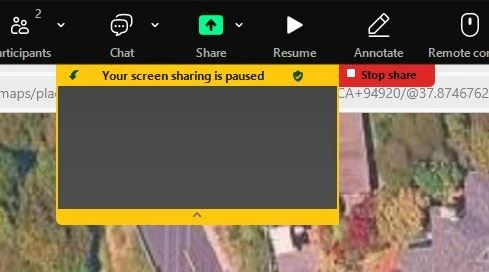
Since that update, when I start screen sharing the session immediately pauses.
"Your screen sharing is paused" and "[x] Stop"
Pressing play and it blips, then goes right back to paused.
I've tried changing host and sharing settings, allowing everyone to share, etc.  No dice.


5 replies

storyhub
Community Super Champion | Customer
July 27, 2025

First, I would recommend updating to the latest version of Zoom - currently 6.5.6. Also, be sure you have the latest version of Win 10 (which Microsoft stops supporting this year).

Second, it is not clear what you did before screen share paused.

General troubleshooting

https://support.zoom.com/hc/en/article?id=zm_kb&sysparm_article=KB0058730

If this works please click accept as a solution.

Newcomer
July 27, 2025

I got into this problem by upgrading.

While in various zoom sessions I pressed "share screen", and selected a window.
The other side saw I was sharing, but it was blank.  On my side Zoom decided to "pause" sharing and pressing "resume" did nothing but flicker and leave it paused.

Newcomer
August 5, 2025

Things that did not work:
* Rebooting
* Clearing zoom's cache
* Uninstalling and Reinstalling Zoom
* Every possible setting

Others on my zoom calls can share screen, just I have the "Your screen sharing is paused" message.

Newcomer
August 14, 2025

this problem solve sir? i have the same problem

Newcomer
September 16, 2025

Hi, I have the same issue on my machine. Win11, Zoom 6.6.0 (15547). Never had an issue before but since the previous and most recent update, Zoom automatically pauses my shared windows, regardless of content shown, also does not allow resuming the share either. Quite annoying when teaching on Zoom, I must say. Never in 5 years have I had any issue with screen sharing, never touched the settings beyond the defaults. 

Note: Full screen sharing works. But that is annoying in that I then cannot prepare things in the background for the next learning activity. 

Found one (presently working) workaround: 

Try going to your settings/Share screen/Advanced (at the very bottom).

In my case, it helped to change the Screen capture mode from "Auto" to "Secure share with window filtering".

The different options are described here https://support.zoom.com/hc/en/article?id=zm_kb&sysparm_article=KB0063824

None but "Secure share" worked for me. At least this works it for now. 

Maybe this works for some of the others in this thread with the same issue.