

Zoom keeps crashing when someone shares their screen | Community
Skip to main content
Newcomer
August 20, 2021
Solved

Zoom keeps crashing when someone shares their screen

  • August 20, 2021
  • 4 replies
  • 3 views

My Zoom keeps crashing whenever someone in the meeting shares their screen. It usually happens when the number of people in the meeting is high. I tried with the latest & some older versions of zoom. I even tried to see the performance of the stats of the system when screen sharing is enabled. But I couldn't really see anything different. I've just bought this laptop, so older specs shouldn't be an reason for this.
Does anyone know how I can resolve this?
 

    Best answer by shakti-chitnis

    Hey @RN52_2
    Thank you so much for your reply.


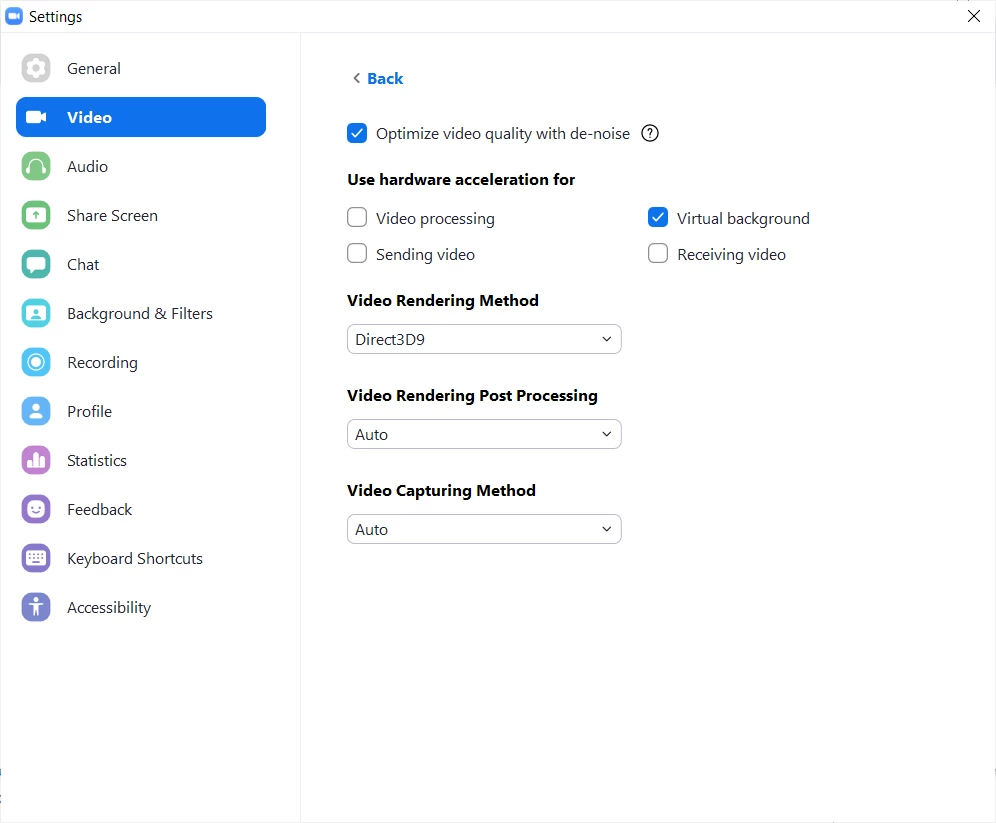
    I've found a solution which is working for me now. I  had a 3 hour meeting with no interruptions (thankfully!). I'm attaching the screenshot of the changes I have made to my zoom settings. 

    I switched off the hardware acceleration for sending video, receiving video & video processing. I did it by going to Settings -> Video -> Advanced. 

    Hope this helps if someone else is also facing this sort of an issue.


    4 replies

    Community Manager
    August 20, 2021

    Hey @shakti-chitnis, within your Zoom desktop client settings under Shared Screen > Advanced.

    Try applying the same settings seen in the screenshot and see if that helps. 😄


    Also, do you mind sharing the specs of your laptop as well the version of Zoom you're running? 

    Newcomer
    January 11, 2022

    Hello,

    I have been encountering the same problem, lately more than 3-4 times in the same meeting. I can't use my whiteboard anymore, because in a few minutes after typing in some information, it just turns black and everything is lost. I can't even return to a white color board anymore. I have to restart my meeting, but it's all in vain. The same happens when sharing or editing while sharing. I think I will have to give up Zoom and try and find another solution, unless someone here helps me with some pieces of advice...:((

    I have tried all the above and it still happens.

    Thank you!

    Community Manager
    January 11, 2022

    Hey @gerligi are you up to date running the latest version of Zoom or have you tried uninstalling/reinstalling?  

    shakti-chitnisAuthorAnswer
    Newcomer
    August 20, 2021

    Hey @RN52_2
    Thank you so much for your reply.


    I've found a solution which is working for me now. I  had a 3 hour meeting with no interruptions (thankfully!). I'm attaching the screenshot of the changes I have made to my zoom settings. 

    I switched off the hardware acceleration for sending video, receiving video & video processing. I did it by going to Settings -> Video -> Advanced. 

    Hope this helps if someone else is also facing this sort of an issue.


    Community Manager
    August 20, 2021

    Awesome! 🚀

    Newcomer
    October 20, 2021

    So, I'm facing the same problems whenever someone else in my meeting shares a screen. I've applied all of the tips you've given, but it didn't work... Anyone has any other tips? Maybe something off the Zoom app settings?

    Newcomer
    November 16, 2021

    I'm having the same issue arievilo1.


    Did you find a solution?

    Newcomer
    November 9, 2022

    I have been watching this thread for about six months.   I think I finally figured it out. I beg someone to test it!


    I went to my video card and added ZOOM and ZOOM SHARE.  Apparently, all the video and such was not going directly to the card, causing 61.1% loss in the screen sharing “statistics”.  It is now down to 0.0%.


    Please let me know!  

    Newcomer
    November 18, 2022

    Where is this setting?

    CarlaA
    Community Manager
    Community Manager
    December 12, 2022

    Hi @brauchma , 


    It is likely that you are running the 32 bit Zoom Client currently. If so, please uninstall the current 32-bit Zoom Client for Windows following this article: https://support.zoom.us/hc/en-us/articles/201362983-How-to-uninstall-Zoom

    - And then install the 64-bit client. Please select the 64-bit Client below the Download sign


    Let me know if that helps!

    Carla,
    Zoom Community Team

    Please click Accept as Solution if you found this reply helpful. Thank you!