

Zoom keeps crashing when someone shares their screen | Community
Skip to main content
Newcomer
August 20, 2021
Solved

Zoom keeps crashing when someone shares their screen

  • August 20, 2021
  • 4 replies
  • 2 views

My Zoom keeps crashing whenever someone in the meeting shares their screen. It usually happens when the number of people in the meeting is high. I tried with the latest & some older versions of zoom. I even tried to see the performance of the stats of the system when screen sharing is enabled. But I couldn't really see anything different. I've just bought this laptop, so older specs shouldn't be an reason for this.
Does anyone know how I can resolve this?
 

    Best answer by shakti-chitnis

    Hey @RN52_2
    Thank you so much for your reply.


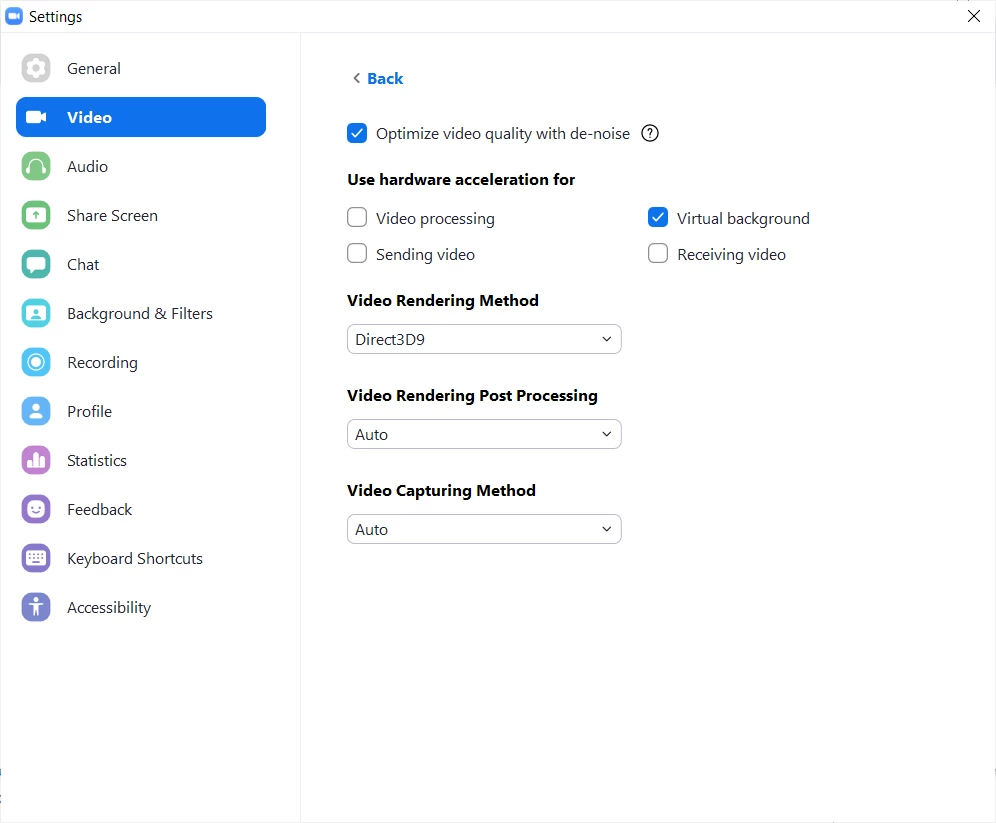
    I've found a solution which is working for me now. I  had a 3 hour meeting with no interruptions (thankfully!). I'm attaching the screenshot of the changes I have made to my zoom settings. 

    I switched off the hardware acceleration for sending video, receiving video & video processing. I did it by going to Settings -> Video -> Advanced. 

    Hope this helps if someone else is also facing this sort of an issue.


    4 replies

    Community Manager
    August 20, 2021

    Hey @shakti-chitnis, within your Zoom desktop client settings under Shared Screen > Advanced.

    Try applying the same settings seen in the screenshot and see if that helps. 😄


    Also, do you mind sharing the specs of your laptop as well the version of Zoom you're running? 

    Newcomer
    January 11, 2022

    Hello,

    I have been encountering the same problem, lately more than 3-4 times in the same meeting. I can't use my whiteboard anymore, because in a few minutes after typing in some information, it just turns black and everything is lost. I can't even return to a white color board anymore. I have to restart my meeting, but it's all in vain. The same happens when sharing or editing while sharing. I think I will have to give up Zoom and try and find another solution, unless someone here helps me with some pieces of advice...:((

    I have tried all the above and it still happens.

    Thank you!

    Community Manager
    January 11, 2022

    Hey @gerligi are you up to date running the latest version of Zoom or have you tried uninstalling/reinstalling?  

    shakti-chitnisAuthorAnswer
    Newcomer
    August 20, 2021

    Hey @RN52_2
    Thank you so much for your reply.


    I've found a solution which is working for me now. I  had a 3 hour meeting with no interruptions (thankfully!). I'm attaching the screenshot of the changes I have made to my zoom settings. 

    I switched off the hardware acceleration for sending video, receiving video & video processing. I did it by going to Settings -> Video -> Advanced. 

    Hope this helps if someone else is also facing this sort of an issue.


    Community Manager
    August 20, 2021

    Awesome! 🚀

    Newcomer
    October 20, 2021

    So, I'm facing the same problems whenever someone else in my meeting shares a screen. I've applied all of the tips you've given, but it didn't work... Anyone has any other tips? Maybe something off the Zoom app settings?

    Newcomer
    December 4, 2021

    Hi @arievilo1@cjtoomey , I was having the same problem with a brand new laptop as well.  When I read @shakti-chitnis I unchecked the things they posted and it still kept crashing.  But I missed the one detail about changing the "Video Rendering Method".  I did a test on all the ones in my meeting and the only one that worked for me is the one show "Direct3D9"  After that changed and I restarted Zoom, I no longer crash when a host shares the screen.  Hope this helps!


    Newcomer
    December 6, 2021

    Thank you so much! This seems to have fixed the problem. Appreciate it 😊

    Newcomer
    November 9, 2022

    I have been watching this thread for about six months.   I think I finally figured it out. I beg someone to test it!


    I went to my video card and added ZOOM and ZOOM SHARE.  Apparently, all the video and such was not going directly to the card, causing 61.1% loss in the screen sharing “statistics”.  It is now down to 0.0%.


    Please let me know!  

    Newcomer
    November 18, 2022

    Where is this setting?

    CarlaA
    Community Manager
    Community Manager
    December 12, 2022

    Hi @brauchma , 


    It is likely that you are running the 32 bit Zoom Client currently. If so, please uninstall the current 32-bit Zoom Client for Windows following this article: https://support.zoom.us/hc/en-us/articles/201362983-How-to-uninstall-Zoom

    - And then install the 64-bit client. Please select the 64-bit Client below the Download sign


    Let me know if that helps!

    Carla,
    Zoom Community Team

    Please click Accept as Solution if you found this reply helpful. Thank you!