

Zoom creates empty folder on my Mac, while in other people’s meetings and I didn’t record | Community
Skip to main content
Newcomer
September 25, 2021
Solved

Zoom creates empty folder on my Mac, while in other people’s meetings and I didn’t record

  • September 25, 2021
  • 8 replies
  • 0 views

Zoom creates a folder with the name and time of the meeting, but it is empty. I do not record the meeting. This doesn’t happen all the time, only for some meetings, but always for a meeting someone else hosted. 
Best answer by CosminU

Hi all,


   I think I found the solution, at least for me it works.

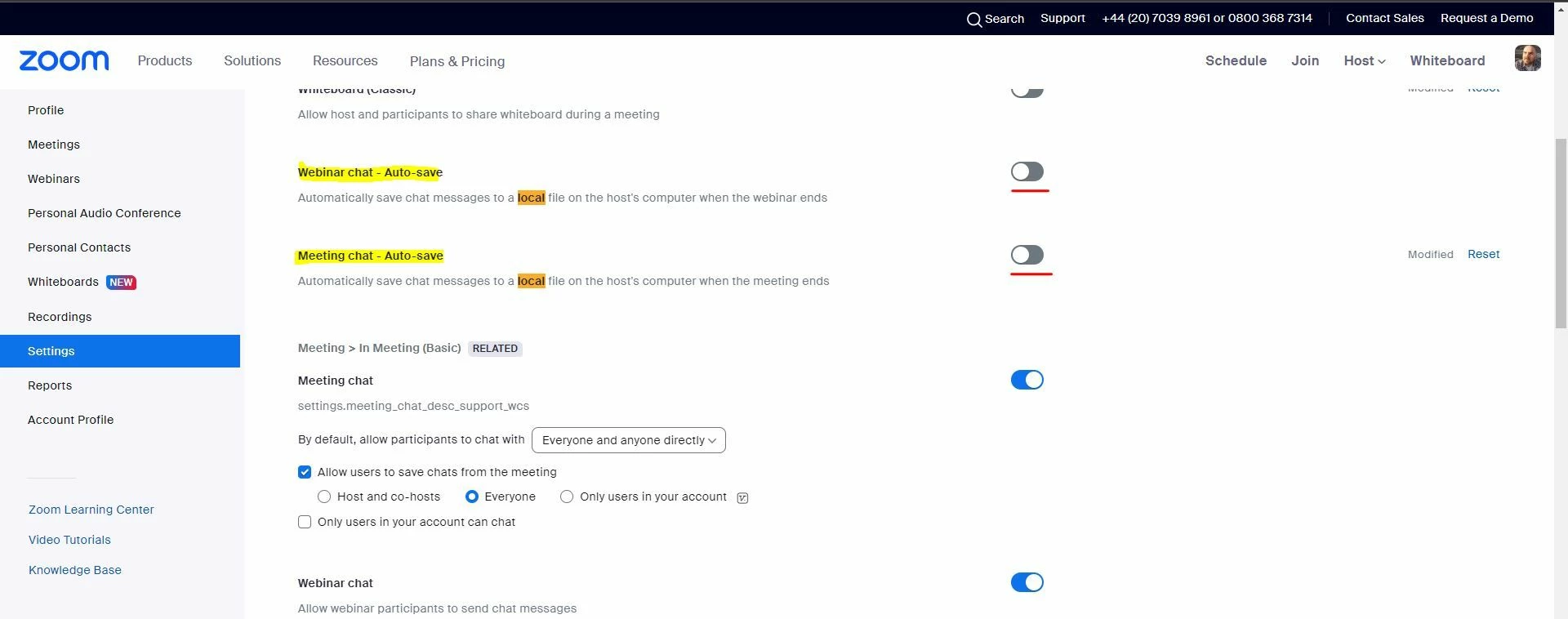
Below a screenshot of the 2 settings that need to be changed on ZOOM Settings portal, so this can stop from happening.


Hopefully this solves you problem too.

Good luck.


best wishes,

Cosmin U.


8 replies

Bri
Community Manager
Community Manager
October 18, 2021

Hi @Sharo! So sorry for the late response, but are you still having this issue on your Mac?

SharoAuthor
Newcomer
October 18, 2021

Thank you for the reply. Yes it happens occasionally.

Do you have any idea what could be causing this? 

Newcomer
December 2, 2021

I have the same problem but I'm on a PC.  It started 3 days ago.  A date-stamped folder is created but it's empty.

Newcomer
December 1, 2022

Me too! I have an iMac and it creates and empty folder for EVERY meeting I am hosting...since I am a music teacher, this is a lot of folders on any given day and I cannot find the ones I actually did recordings in easily since they are mixed in with empty ones. How do I get this to stop? It didn't used to do this!

Newcomer
January 6, 2023

Same here. Zoom automatically creates empty folders on my mac after each of my meetings. It's been happening for a few months. any ideas?

Newcomer
February 3, 2023

Hello!

I also have this issue on Windows. @Bri, please let us know when a solution is available.

Have a nice day!

Newcomer
February 3, 2023

hi,


   it started to act the same for me, but on windows laptop, yesterday was the first time experiencing this kind of behavior, out of nowhere.

can please someone from Zoom step in and help, it gets very annoying !!!


thanks,

Cosmin.


CosminUAnswer
Newcomer
February 3, 2023

Hi all,


   I think I found the solution, at least for me it works.

Below a screenshot of the 2 settings that need to be changed on ZOOM Settings portal, so this can stop from happening.


Hopefully this solves you problem too.

Good luck.


best wishes,

Cosmin U.


Newcomer
February 3, 2023

Thanks so much.  It's unfortunate because I need to save the chatbox following a meeting, but I'll just have to remember to do it manually.  Have a great day!


Teresa

Newcomer
March 30, 2023

Same problem here! Zoom, please help!