Zoom camera flashing and glitching after update | Community
Skip to main content
Newcomer
January 11, 2023
Solved

Zoom camera flashing and glitching after update

  • January 11, 2023
  • 37 replies
  • 1 view

I updated my Zoom on my Mac and started having my camera flash, glitch, go black and white, funky colors, reflect my screen during my Zoom calls when not screen sharing. 

I DO NOT have an external camera connected. 

I have never had these problems with Zoom before. When I open photo booth or other apps that use my camera  I do not have this problem. I have restarted my computer and redownloaded Zoom. Both have not worked. 
    Best answer by CarlaA

    Hi everyone!


    I understand that some users are having an issue with their camera while using Zoom.
     
    Our Engineering team has been alerted of this issue and this issue should be fixed in 5.13.5 version of Zoom desktop client which was released this week. You may follow the steps here on how you can update your Zoom app Upgrading Zoom to the latest version – Zoom Support. As an additional step, I would suggest to completely uninstall Zoom (to remove bad app cache) , reboot device, and then reinstall to the latest version .
     
    They have reproduced the issue and found out the root cause, the video de-noise function goes wrong when the CPU usage is high on some computers with low-performance CPUs. If your Zoom desktop client version is currently in 5.13.4, you may follow the workaround below to fix the issue.
     
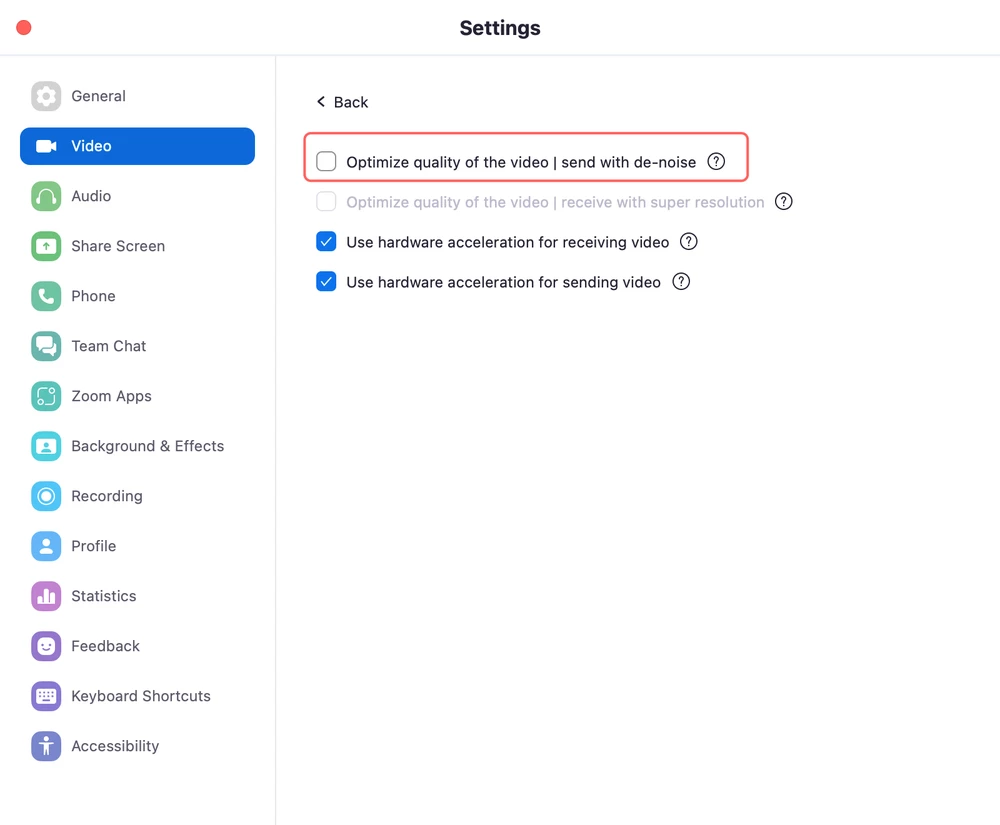
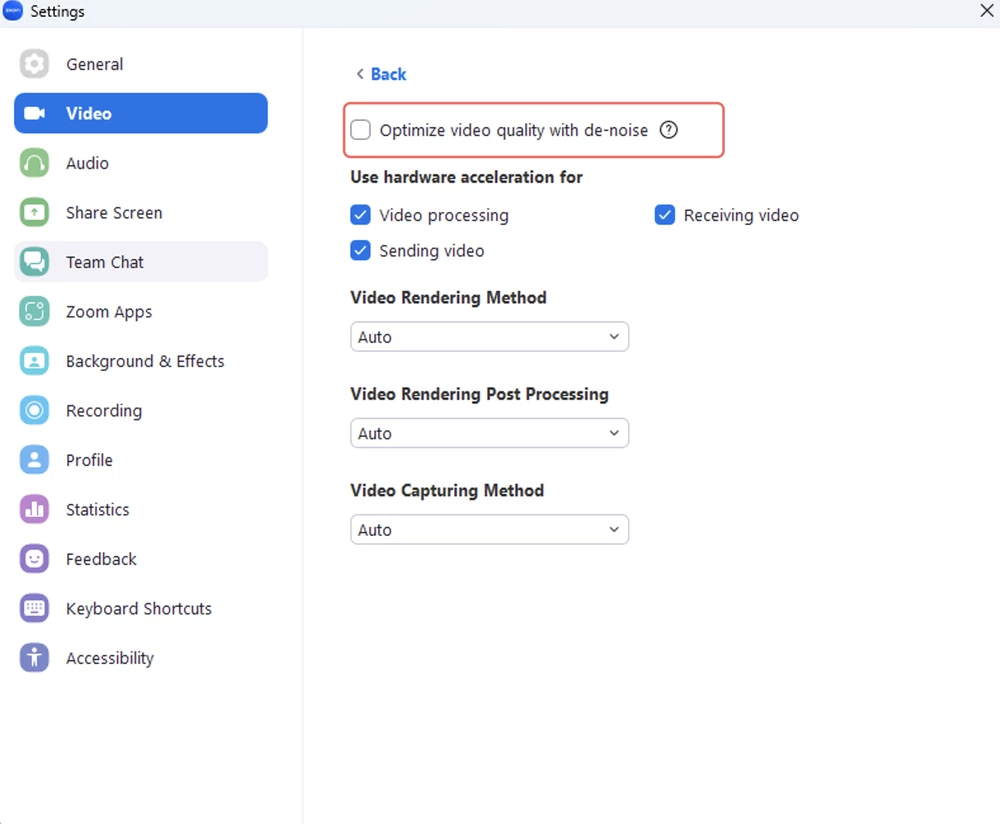
    As a workaround, disabling video de-noise in the advanced video settings on your Zoom desktop client (pic1:Windows, pic2:Mac) can avoid the issue. 


    I hope this helps!

    Carla,
    Zoom Community Team

    37 replies

    Newcomer
    January 16, 2023

    same here


    Newcomer
    January 17, 2023

    Have you tried the following? Worked for me (Windows):

    Go to your (Zoom) settings, Video, (bottom of the menu) Advanced, Uncheck the "Optimize Video quality with de-noise".

    Newcomer
    January 17, 2023

    ok thanks, i will try it

    Newcomer
    January 18, 2023

    I have the same problem 

    Went to run a mental health group today and had to spend the whole time with my video off as it kept flashing and crashing. 

    Really unprofessional and this needs sorting as I'm paying for the subscription so I can support people online.

    Newcomer
    January 18, 2023

    Same - I am a therapist as well.  


    Newcomer
    January 18, 2023

    I found a solution on  different thread!  

    Newcomer
    January 18, 2023

    Video settings:Adjust low light to manual

     In advanced Tab *un* check "optimise video quality with de-noise" 


    Seems to be working so far

    Otherwise revert back to a previous version of Zoom

    Newcomer
    January 19, 2023

    Same. I'm going to try the fix suggested by other uses but hope Zoom can correct this. It is not only distracting, it is disturbing because the glitches are so harsh.

    CarlaA
    Community Manager
    CarlaAAnswer
    Community Manager
    January 19, 2023

    Hi everyone!


    I understand that some users are having an issue with their camera while using Zoom.
     
    Our Engineering team has been alerted of this issue and this issue should be fixed in 5.13.5 version of Zoom desktop client which was released this week. You may follow the steps here on how you can update your Zoom app Upgrading Zoom to the latest version – Zoom Support. As an additional step, I would suggest to completely uninstall Zoom (to remove bad app cache) , reboot device, and then reinstall to the latest version .
     
    They have reproduced the issue and found out the root cause, the video de-noise function goes wrong when the CPU usage is high on some computers with low-performance CPUs. If your Zoom desktop client version is currently in 5.13.4, you may follow the workaround below to fix the issue.
     
    As a workaround, disabling video de-noise in the advanced video settings on your Zoom desktop client (pic1:Windows, pic2:Mac) can avoid the issue. 


    I hope this helps!

    Carla,
    Zoom Community Team

    Newcomer
    March 8, 2023

    Well, I did all the things, and my test video has already improved. I also dumbed down ALL the video settings to minimum quality, now I'm just waiting for my meeting host to turn my video back on. Might be a while.

    Newcomer
    April 26, 2023

    I am happy to report I have had no further problems with video glitching since turning off denoise, "touch up my appearance", hardware acceleration, and backgrounds.

    the only person in my recurring meeting it hasn't worked for is the one who did not try it. 

    Newcomer
    January 20, 2023

    Both the initial fix and the reinstall worked for me. Thank you


    Newcomer
    January 30, 2023

    It's annoying it's just randomly glitching and making me repeat what ever i was doing before it gliched. 

    Newcomer
    February 1, 2023

    We also found that unchecking "HD" in video settings helped. My guess is that it reduces more CPU usage.