Zoom app 100% CPU | Community
Skip to main content
Newcomer
September 6, 2021
Question

Zoom app 100% CPU

  • September 6, 2021
  • 5 replies
  • 0 views

. . .


Win10/64 build 19043


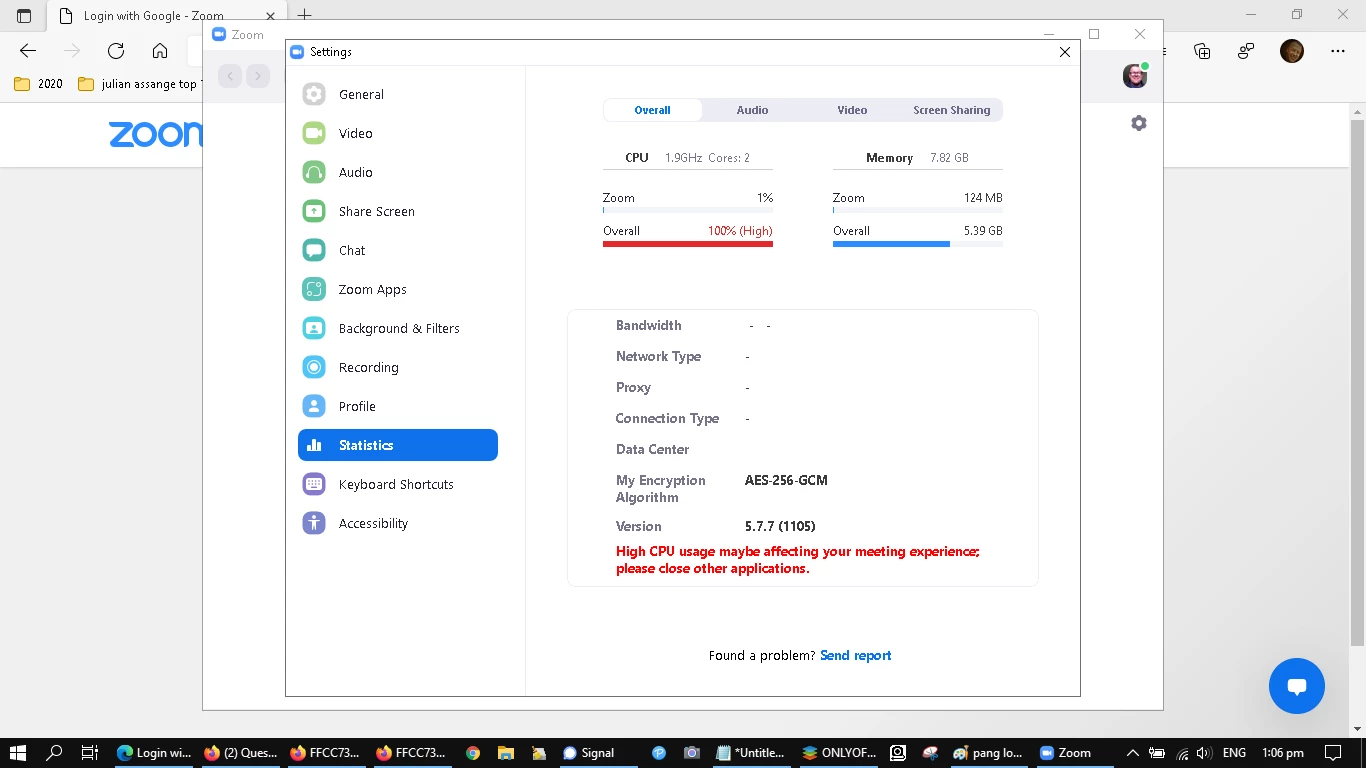
As the Statistics tab shows, opening the Zoom app skyrockets CPU usage to 100% causing crashes, as also noted here.  Also here, and here. Oh, and, here


Rather than just refer users to your help desk, it might be more helpful to discuss issues here, so that other people experiencing the same issue can implement any suggested changes?


thanks,


jason


AV: Windows Security centre

Malware: Malwarebytes, HitmanPro (on demand only)

Win10 updates: all applicable + sfc/dism checks


. . .

    5 replies

    Community Champion | Employee
    September 16, 2021

    Hi @jasonbrown1965 ,


    Thanks for posting on the Zoom Community Forum! We appreciate your update on how your Zoom Application skyrockets the CPU usage and prompts crashes. Apologies for the inconveniences.


    As you mentioned you had Windows Security Centre ant-virus enabled, can you please try disabling it - if possible - to see if that has a positive impact? Sometimes we see firewall/anti-virus being the underlying root of this behavior. You may also try whitelisting your firewall. 


    Hope this helps!


    Take care.


    Thanks,

    Stephanie

    Newcomer
    May 17, 2022

    its not a user problem. its a zoom change. 

    xndr
    Newcomer
    Newcomer
    January 10, 2022

    Indeed. Most of the "help" on offer boils down to reinstall/close apps/upgrade your PC.


    It's not good. 😮


    That said, temporarily disabling/stopping services for Windows Security Centre provided us some relief although Zoom can still very easily get tipped into the redline.


    It never used to be like this. 🤔 🤔


    Newcomer
    May 17, 2022

    I am so glad you posted this. Zoom has definitely changes something and its not being addressed or talked about. Reinstalling is not the answer or turning all other applications off. We need to know what they did and they need to come up with a fix.


    Italiangen2022
    Explorer
    Explorer
    May 26, 2022

    Is it possible to have webinar statistics saved as a Report?  What Windows report is available?


    Thanks,

    Peter D


    Newcomer
    January 13, 2025

    Hi everyone,


    I've been having the same trouble since Nov. 2024. Any solutions yet?


    Thanks in advance.

    Dudu

    xndr
    Newcomer
    Newcomer
    January 17, 2025

    It would seem not.


    Those people at Zoom have largely ignored this issue and all of us here who have reported (it's what they do).


    In our case, the primary terminal is running Linux, on which we found that removing the LUKS full disk encryption (going back to plain unencrypted) helped immensely - but was not a cure; this does not explain however, why Zoom performed so poorly on our Windows machines which never had disk encryption anyway.


    Maybe others have their own nostrums?