Zoom Waiting Room not working when enabled | Community
Skip to main content
Newcomer
June 10, 2022
Solved

Zoom Waiting Room not working when enabled

  • June 10, 2022
  • 3 replies
  • 0 views

Hello all,

My meeting room waiting room isn't working and I have people from other calls walking directly into my other meetings which is super distracting.

I have already gone through the web portal to Settings > Meeting> Waiting Room, toggled on. Everyone is set to go to the waiting room.

However, this doesn't happen. I also noticed that whenever I start a meeting, I could manually enable the waiting room from the call, but I'll forget. Is there a way to have it automatically enabled? I've seen waiting rooms be the default on other zoom meetings, but I'm not sure how it works

Thanks!

    Best answer by Ray_Harwood

    Hey, @jeffchen,


    The settings for throughout Zoom can be a bit complex!  First of all, I’ll point you to this Zoom Support article which you may have already been through – but just in case someone comes along to view this and hasn’t read the article:

    https://support.zoom.us/hc/en-us/articles/115000332726-Using-Waiting-Room


    Next, you mention having set the Waiting Room switch on the Settings page, like this:

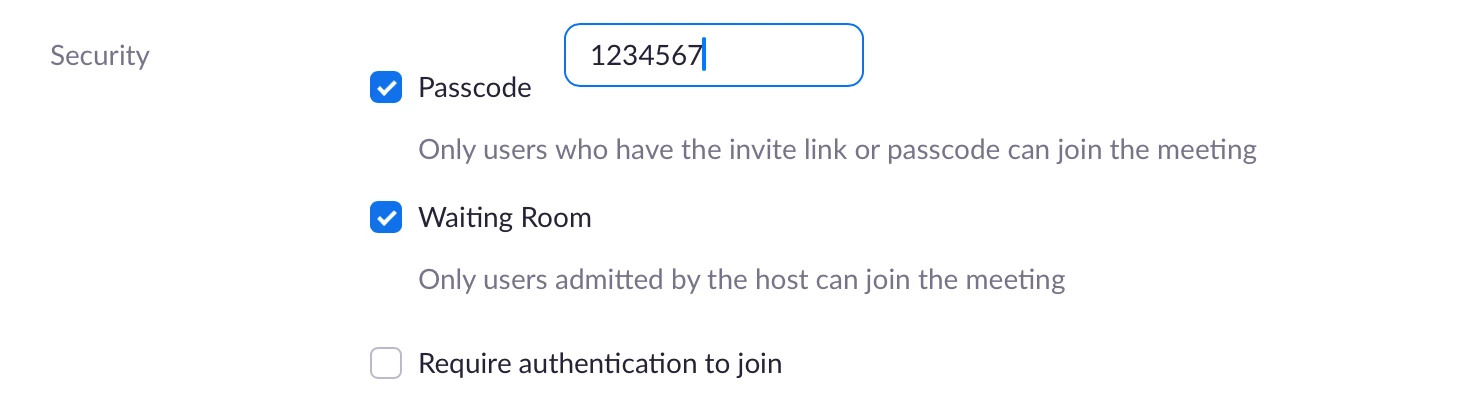
    This option does not require that Waiting Room be set for all meetings. Instead, it sets Waiting Room to On as the default when scheduling a meeting, like this:

    You can unset the Waiting Room option when scheduling a meeting, and you can edit a meeting to turn this setting off if it was previously on. Also note that any recurring meetings that were previously scheduled are not affected by changing the Settings-level switch. 

    I recommend you take some time and go through all of your existing meetings – including your PMI – and check the Waiting Room setting in each individual meeting.


     Also note that you can disable the Waiting Room setting in the Security icon once the meeting has started – but sounds like you already know about that. Still, it’s easy to check now and then just to reassure yourself that it is set properly. 

    3 replies

    Ray_Harwood
    Community Super Champion | Customer
    Community Super Champion | Customer
    June 11, 2022

    Hey, @jeffchen,


    The settings for throughout Zoom can be a bit complex!  First of all, I’ll point you to this Zoom Support article which you may have already been through – but just in case someone comes along to view this and hasn’t read the article:

    https://support.zoom.us/hc/en-us/articles/115000332726-Using-Waiting-Room


    Next, you mention having set the Waiting Room switch on the Settings page, like this:

    This option does not require that Waiting Room be set for all meetings. Instead, it sets Waiting Room to On as the default when scheduling a meeting, like this:

    You can unset the Waiting Room option when scheduling a meeting, and you can edit a meeting to turn this setting off if it was previously on. Also note that any recurring meetings that were previously scheduled are not affected by changing the Settings-level switch. 

    I recommend you take some time and go through all of your existing meetings – including your PMI – and check the Waiting Room setting in each individual meeting.


     Also note that you can disable the Waiting Room setting in the Security icon once the meeting has started – but sounds like you already know about that. Still, it’s easy to check now and then just to reassure yourself that it is set properly. 

    Newcomer
    August 18, 2022

    How can we ask Zoom to improve their settings? This is extremely confusing.

    jeffchenAuthor
    Newcomer
    June 11, 2022

    Amazing this sounds like the right solution!

    You were correct, I checked my upcoming meetings and it looked like the waiting room was not enabled for whatever reason so you need to go through all your upcoming meetings and enable manually

    I'll have to see if this happens again, but for now I'm excited that this might be the solution - thanks!

    Newcomer
    December 19, 2023

    I enable my Waiting room manually for all meetings that require it and the Waiting Room function is not preventing attendees to join before being manually admitted.  This is happening time and time again - some people are held in the Waiting Room and others are not.  ???

    Newcomer
    September 20, 2024

    I have had this issue all week and is very distracting.  All my clients have my meeting id and they used to go directly into the waiting room and I would let them in when I was finished with other meeting.  Waiting room is enabled.  Why did this change?