cancel
Showing results for 
Search instead for 
Did you mean: 

Zoom VDI Media Synchronization Problems: Mac-to-Windows 365 Cloud PC Configuration

Prabh768
Explorer
Explorer

Problem Statement

We're experiencing media desynchronization when conducting Zoom meetings through a Windows 365 Cloud PC environment accessed from Mac endpoints. The primary symptom is audio-video timing misalignment during video conferences, suggesting potential issues with media processing pipeline optimization.

Technical Configuration

  • Client Hardware: Mac Mini (macOS Sonoma 14.5/14.6 & 15)
  • Virtual Environment: Windows 365 Cloud PC with Zoom VDI client
  • Zoom Architecture:
    • Zoom VDI Client (Windows 365 cloud PC)
    • Zoom VDI Plugin for Mac (local endpoint)
  • Network Infrastructure: Consistent high-bandwidth connection verified
  • Software Versions: Latest software releases of both VDI components

Symptom Analysis

  • Primary Issue: Persistent audio-video desynchronization with noticeable camera feed latency
  • Secondary Effects: Intermittent echo artifacts requiring session restart
  • Configuration Impact: Mac-side Zoom adjustments yield no improvement
  • Plugin Effectiveness: No observable performance differential with/without VDI plugin
  • Comparative Baseline: Identical Windows 11 endpoint configurations operate without synchronization issues

Technical Investigation Areas

1. Plugin Integration Verification

  • What diagnostic methods can confirm successful VDI plugin initialization and client-server handshake?
  • Which logging mechanisms or system indicators validate media redirection engagement?

2. Mac Plugin Capability Assessment

  • Does the current Mac VDI plugin implement equivalent media optimization compared to Windows counterparts?
  • What is the media processing architecture—hardware acceleration vs. software fallback rendering?

3. Platform-Specific Constraints

  • Are there documented macOS compatibility issues affecting VDI plugin performance?
  • What is Zoom's development timeline for achieving feature parity between Mac and Windows VDI implementations?
1 ACCEPTED SOLUTION

bstrelko
Community Champion | Customer

To the best of my knowledge, MacOS cannot use AVD (including W365) for Zoom VDI - the installer will actually fail (tested as recently as a few weeks back) if Citrix/VMware is not found on the local endpoint.

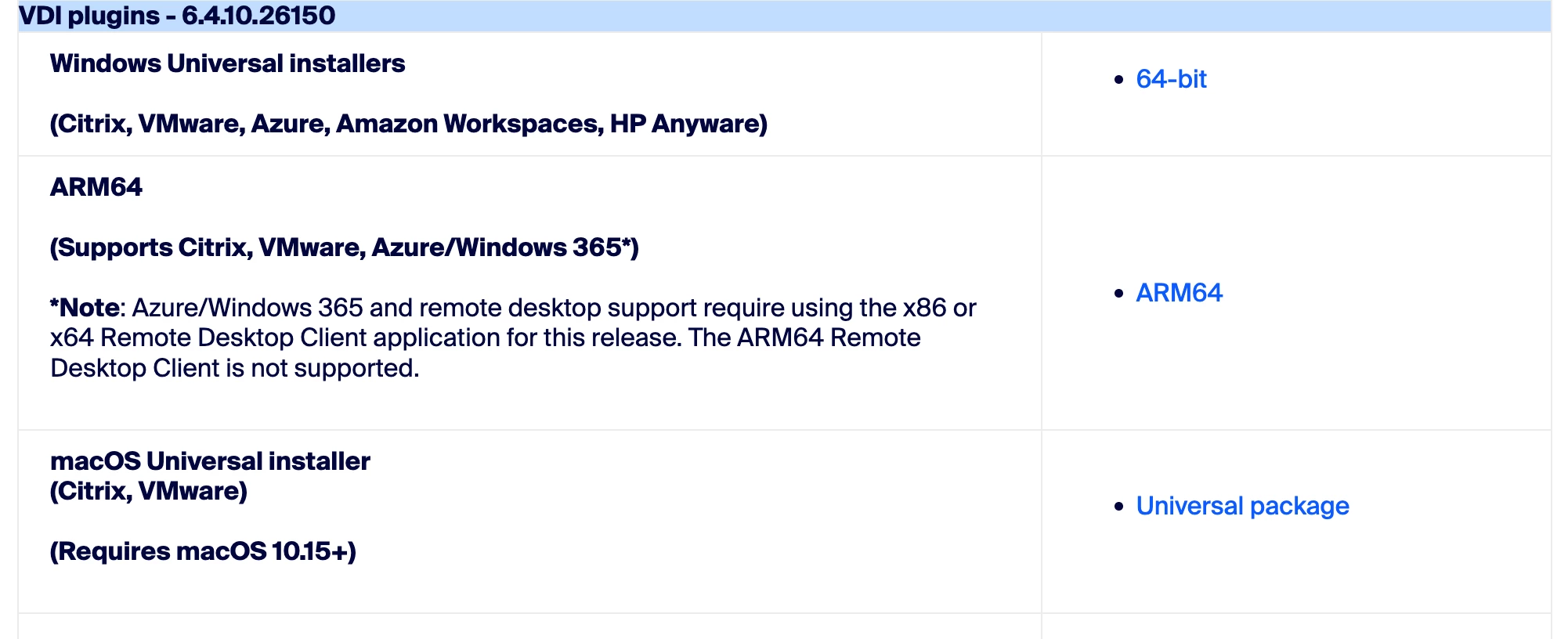
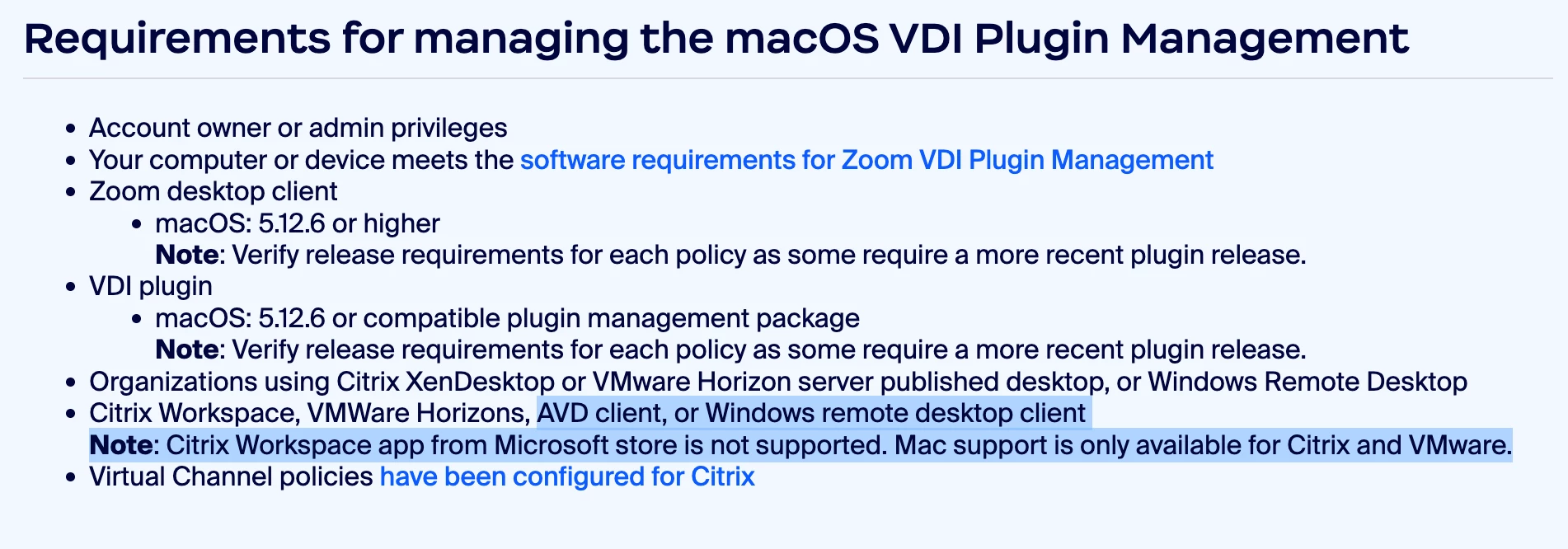
So curious to hear what Zoom has to say on this, as we've got a ton of Mac users who can't use Zoom VDI based almost entirely on documentation from Zoom. SO much conflicting data, see below:

https://support.zoom.com/hc/en/article?id=zm_kb&sysparm_article=KB0058417

bstrelko_1-1749736213538.png


bstrelko_0-1749736137542.png


View solution in original post

8 REPLIES 8

bstrelko
Community Champion | Customer

To the best of my knowledge, MacOS cannot use AVD (including W365) for Zoom VDI - the installer will actually fail (tested as recently as a few weeks back) if Citrix/VMware is not found on the local endpoint.

So curious to hear what Zoom has to say on this, as we've got a ton of Mac users who can't use Zoom VDI based almost entirely on documentation from Zoom. SO much conflicting data, see below:

https://support.zoom.com/hc/en/article?id=zm_kb&sysparm_article=KB0058417

bstrelko_1-1749736213538.png


bstrelko_0-1749736137542.png


tommy
Zoom Employee
Zoom Employee

Hello @Prabh768 , @bstrelko ,


Good news, we are in the process of rolling out support for Zoom VDI for AVD / Windows 365 on macOS. I will share the documentation when it is published.


Best,

Tommy

PM for Web and VDI

@tommy Nice to hear from you after a long time. Could you please let me know the timeline for when this will be published and rolled out?

tommy
Zoom Employee
Zoom Employee

@Prabh768 , it is published now, here is the documentation. Please let me know if you have any questions or need to have it be enabled for your account:


https://support.zoom.com/hc/en/article?id=zm_kb&sysparm_article=KB0082954


Best,

Tommy

PM for Web and VDI

@tommy Great!, Thank you for sharing the link. One question — will this work on Windows 365 when accessed from macOS?

@tommy , Great! Thank you for sharing the link. One question — will this work on Windows 365 when accessed from macOS?

Yes!

PM for Web and VDI

@tommy , Thanks, just want to confirm, could you help me understand what caused the lag and distortion and what steps fixed it for AVD and Windows 365 Cloud PCs?