
cancel
Showing results for 
Search instead for 
Did you mean: 
The Zoom Community will be placed in read-only mode January 9th, 2026 through January 22nd, 2026 to deliver you a new and improved community experience!

The community will still be accessible, however, the creation of any new discussions or replies will be temporarily unavailable. We appreciate your patience during this time.

Zoom Summary Meeting

Monalqadi
Newcomer
Newcomer

Why I did not receive a meeting summary although the AI summary is activated?

 

1 ACCEPTED SOLUTION

daltonjcurry
Zoom Partner
Zoom Partner

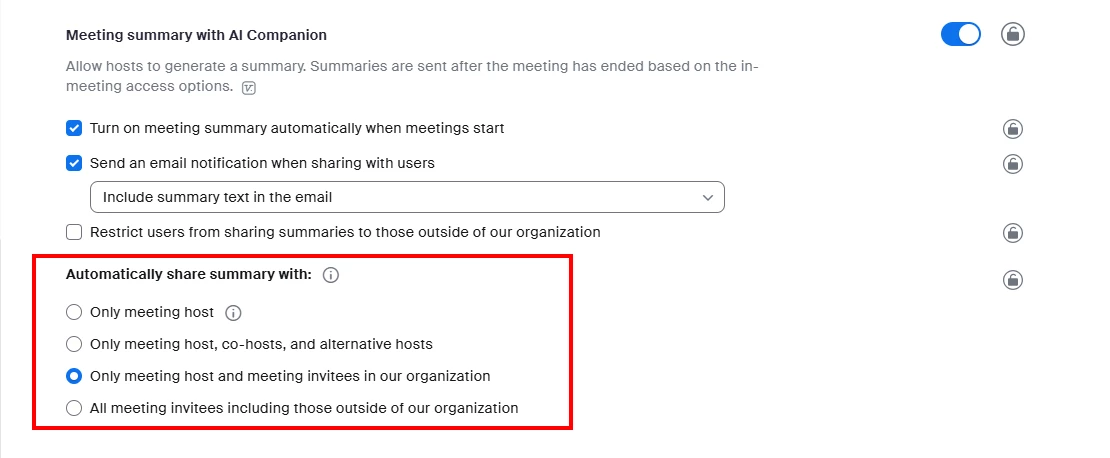
Hey @Monalqadi - This could be for a number of reasons but if I had to guess it is most likely due to the "Automatic Share" settings that are enabled on your account. Some organizations limit this to only internal users or even just the host of the meeting (see screenshot from an account settings perspective). 
daltonjcurry_0-1746020108298.png

You can check your own individual settings by logging into zoom.us and then navigating to settings on the left hand section under Personal. There will be a section for Meeting Summary With AI Companion and as long as your organization does not have this setting locked at an account or group level you should be able to edit it for meetings that you personally host. 

You can also find information about using meeting summary from the support.zoom.us site > https://support.zoom.com/hc/en/article?id=zm_kb&sysparm_article=KB0058013

View solution in original post

1 REPLY 1

daltonjcurry
Zoom Partner
Zoom Partner

Hey @Monalqadi - This could be for a number of reasons but if I had to guess it is most likely due to the "Automatic Share" settings that are enabled on your account. Some organizations limit this to only internal users or even just the host of the meeting (see screenshot from an account settings perspective). 

daltonjcurry_0-1746020108298.png

You can check your own individual settings by logging into zoom.us and then navigating to settings on the left hand section under Personal. There will be a section for Meeting Summary With AI Companion and as long as your organization does not have this setting locked at an account or group level you should be able to edit it for meetings that you personally host. 

You can also find information about using meeting summary from the support.zoom.us site > https://support.zoom.com/hc/en/article?id=zm_kb&sysparm_article=KB0058013