
cancel
Showing results for 
Search instead for 
Did you mean: 
The Zoom Community will be placed in read-only mode January 9th, 2026 through January 22nd, 2026 to deliver you a new and improved community experience!

The community will still be accessible, however, the creation of any new discussions or replies will be temporarily unavailable. We appreciate your patience during this time.

Zoom Poll as people join?

lpaine85
Newcomer
Newcomer

I want to run a poll in a zoom meeting while people are joining. If I run the poll, will people who join after the poll has started be able to see it and vote?

1 ACCEPTED SOLUTION

Humashankar
Community Champion | Customer

Great observation and for this the terms are not captured in the reference page:


However, this is how Zoom operates:


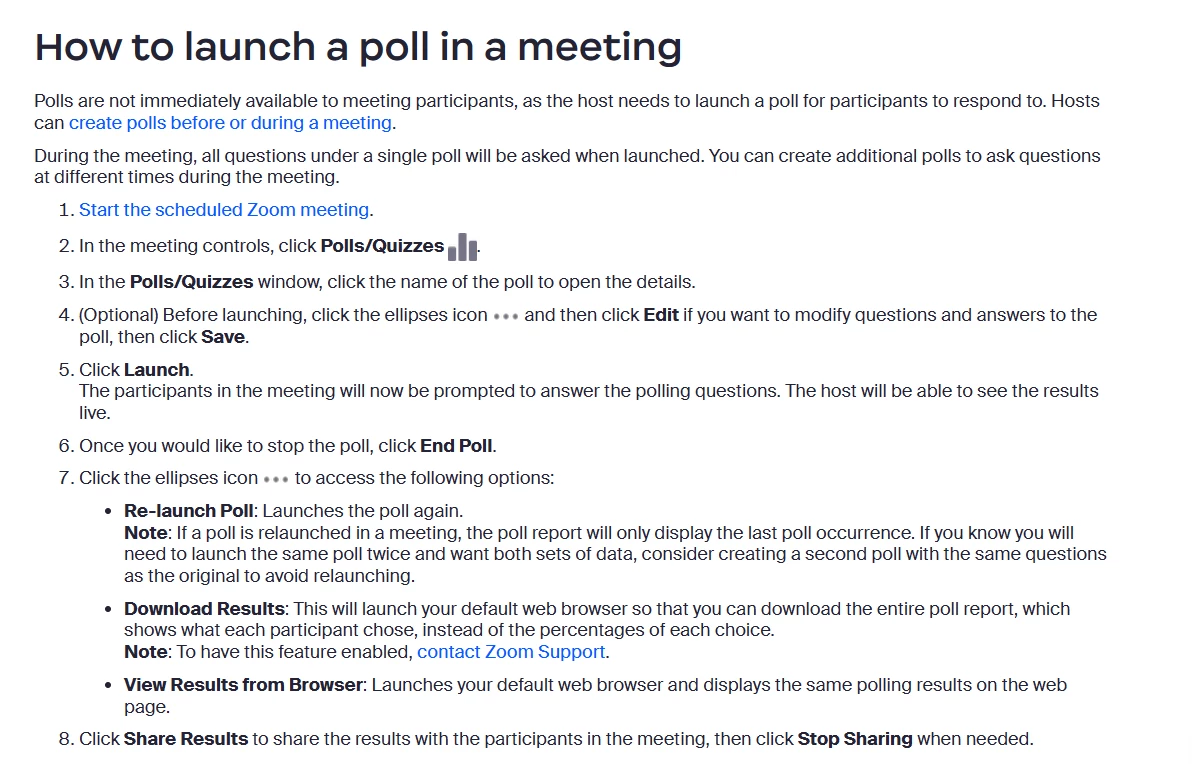
If you start a poll in a Zoom meeting, only the people who are already in the meeting when you start the poll can see it and vote.

Anyone who joins the meeting after you've started the poll won't be able to take part in that poll.
 

Humashankar_0-1709849051876.png


Conducting polls in meetings - Zoom Support


Hope this helps - Happy to help further!!
Thank you very much and have a great one!

Warm regards


Huma

View solution in original post

2 REPLIES 2

Humashankar
Community Champion | Customer

Great observation and for this the terms are not captured in the reference page:


However, this is how Zoom operates:


If you start a poll in a Zoom meeting, only the people who are already in the meeting when you start the poll can see it and vote.

Anyone who joins the meeting after you've started the poll won't be able to take part in that poll.


Humashankar_0-1709849051876.png


Conducting polls in meetings - Zoom Support


Hope this helps - Happy to help further!!
Thank you very much and have a great one!

Warm regards


Huma

Bri
Community Moderator | Employee

Hi @lpaine85 ! I have reviewed your post and @Humashankar has provided the answer, so I've marked his response as an accepted solution. Please let us know if you have any additional questions!


Bri
Zoom Community Team
Have you heard of Zoom AI Companion?