


cancel
Showing results for 
Search instead for 
Did you mean: 
Effective January 9th, 2026 through January 22nd, 2026: The Zoom Community is currently in read-only mode with login disabled, to deliver you a new and improved community experience!

The site is still accessible to view, however, the ability to login, create content, or access your community account is temporarily unavailable. We appreciate your patience during this time. If seeking support, please browse existing community content or ask our Zoom Virtual Agent.

Zoom Meeting Bleeds Green Screen

TheSoulRider
Newcomer
Newcomer

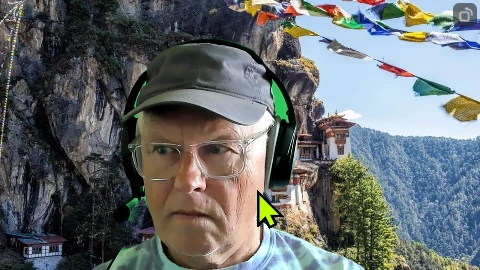
Zoom bleeds the background image with my green screen during a meeting. See the image I've provided. This looks to me like a Zoom software failure. What will solve this? New Logitech Brio webcam so I will not assign the problem to that. Zoom_jdNzKZlB35.png
2 REPLIES 2

storyhub
Community Champion | Customer

Chromakeying requires very even lighting of the green screen. The lighting in this image appears to be too bright on the R side of the image. Whenever possible, the green screen should be lit separately from the foreground. If this is not possible then try using several softer light sources to get more even lighting of the green screen and try to light the face so that the face lighting does not spill onto the green screen. Try to distance the green screen if possible to separate lighting. Watch out for shadows showing in camera on the green screen since shadows will alter the green screen's lighting.

CarlaA
Community Moderator | Employee

Hi @TheSoulRider! Did you find @storyhub's reply helpful? If so, please mark it as an accepted solution. Thank you!


Carla (she/her/hers)
Zoom Community Team
Have you heard of Zoom AI Companion?