
Zoom Meeting 300 participants with 1 licenses | Community
Skip to main content
Newcomer
February 20, 2023
Solved

Zoom Meeting 300 participants with 1 licenses

  • February 20, 2023
  • 2 replies
  • 0 views

Hi

Pls guide me on how can i purchase Zoom Meeting 300 participants with 1 licenses for one Month

    Best answer by Ray_Harwood

    Hey, @3018242965.


    @anissat provided some information which indicates that a 300-attendee license is available in the Business Plan account, but what's not immediately apparent is that a Business Plan is only for accounts with 10 or more paid users.  If you are on your own plan by yourself, this will not be a good option for you.


    If you are on your own plan, or less than 10 users and still on a Pro plan, you can still acquire a 1-month, non-renewing Large Meeting add-on.  Note that the Large Meeting add-ons are in two sizes: 500 attendees, and 1,000 attendees.


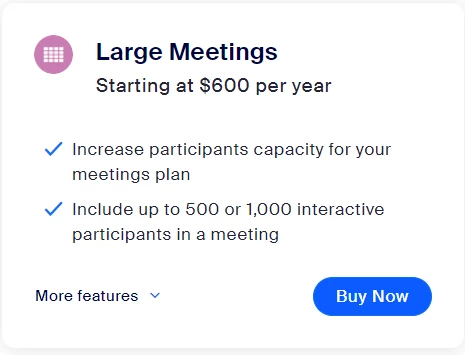
    Go to the Zoom Pricing page (https://zoom.us/pricing) and look for this:
    Click Buy Now, and see this:
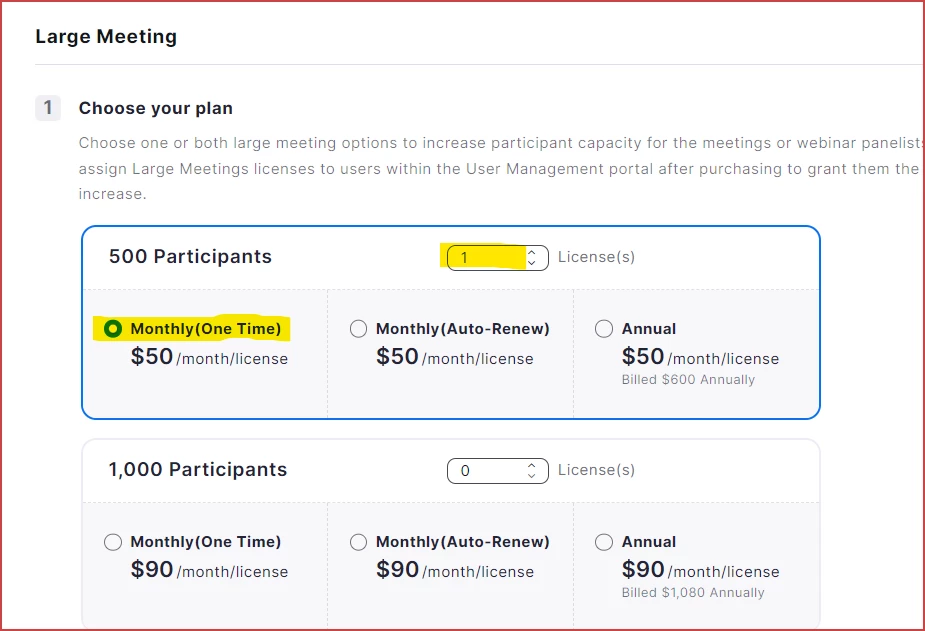
    Then click the number of licenses and the Monthly (One Time) button, then click Continue to proceed through the license process.  This license will be good for one month from purchase, and will not renew.


    THEN, once acquired, you have to assign that license to the user -- probably yourself.  Go to Admin -> User Management -> Users, select your name, and you should see the available Large Meeting license available to be assigned to you.

    2 replies

    anissat
    Community Champion | Customer
    Community Champion | Customer
    February 20, 2023

    Visit the Plans & Pricing page and select the appropriate plan:


    Ray_Harwood
    Community Super Champion | Customer
    Community Super Champion | Customer
    February 21, 2023

    Hey, @3018242965.


    @anissat provided some information which indicates that a 300-attendee license is available in the Business Plan account, but what's not immediately apparent is that a Business Plan is only for accounts with 10 or more paid users.  If you are on your own plan by yourself, this will not be a good option for you.


    If you are on your own plan, or less than 10 users and still on a Pro plan, you can still acquire a 1-month, non-renewing Large Meeting add-on.  Note that the Large Meeting add-ons are in two sizes: 500 attendees, and 1,000 attendees.


    Go to the Zoom Pricing page (https://zoom.us/pricing) and look for this:

    Click Buy Now, and see this:

    Then click the number of licenses and the Monthly (One Time) button, then click Continue to proceed through the license process.  This license will be good for one month from purchase, and will not renew.


    THEN, once acquired, you have to assign that license to the user -- probably yourself.  Go to Admin -> User Management -> Users, select your name, and you should see the available Large Meeting license available to be assigned to you.

    Newcomer
    June 4, 2023

    I think this is the perfect answer. 

    Newcomer
    July 30, 2023

    Buen día, necesito ayuda cuando voy a la sección para adquirir el plan de LARGE MEETING me sale inhabilitado,  ingreso desde plans & pricing y me envía a la parte de administración de planes de mi cuenta y cuando ubico a LARGE MEETING me sale como se ve en la imagen y no logro añadir al carrito para la compra.


    Si a alguien le ha ocurrido y me puede muchas gracias.