

Zoom Email // Someone I don't know has entered my Personal Meeting Room | Community
Skip to main content
Newcomer
April 23, 2022
Question

Zoom Email // Someone I don't know has entered my Personal Meeting Room

  • April 23, 2022
  • 7 replies
  • 8 views

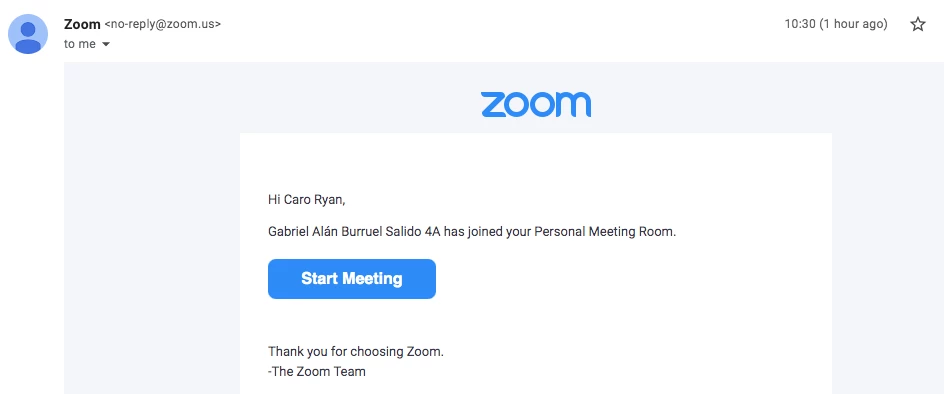
I got an email from Zoom today, (address looks legit), saying that "Gabriel Alan Burruel" has entered my personal meeting room. 


I don't know this person.


Is it a) scam OR b) a common thing that happen if someone accidentally enters the wrong number?
 

    7 replies

    Ray_Harwood
    Community Super Champion | Customer
    Community Super Champion | Customer
    April 23, 2022

    Hi, @CarlaR –


    I certainly don’t think this is common, but it is worrisome. 

    My first question would be, do you make the URL to your Personal Meeting ID (PMI) available to other people via social media, web sites, or other easily accessible means?  If so, and you only have a passcode for security, anyone with access to that URL can get into the room if you also have Waiting Room turned off, since the URL has the passcode embedded in it. 


     With the latest Zoom security measures, if you don’t have a passcode, you have to have Waiting Run turned on. If Waiting Room is on, nobody can get into the room, unless you let them in after you join. So that’s not the issue. 

    I would recommend changing the passcode on your PMI. This will invalidate any URL that already exists on the internet. Then, for extra security, turn Waiting Room on OR turn off the option to Join before host

    Read this Zoom Support article for some additional ideas and information. 

    Try to only share your PMI URL with trusted individuals; change the passcode frequently, like monthly. And schedule meetings without your PMI whenever possible. 

    Thanks for asking – always good to learn a little more about security measures. 

    Newcomer
    January 21, 2024

    I do think it is rather a very common problem.

    CarlaRAuthor
    Newcomer
    April 23, 2022

    Thanks Ray. It's very odd, as I've never used my PMI (that I can think of) and only share meeting (with meeting rooms) in emails to known colleagues, (never socials) that is wierd.


    Either way, I've changed the passcode for the PMI and checked that waiting room is still on.


    Appreciate your support. Ta.

    C

    Newcomer
    September 30, 2022

    I had the same thing happen to me today - at 2am! weird. 

    Newcomer
    March 8, 2023

    This happened to me today, I also have never publicly shared my URL.  She sat on the call for 56 minutes alone and recorded it as I got the copy of it.  Presumably waiting for me to join out of curiosity?

    Newcomer
    April 10, 2023

    S_Pollard,

    As you'll see in my posted response to CarlaR, a similar thing happened to me.

    Just to clarify your experience,  do you mean that your unwanted "visitor" recorded the the "wait to be admitted " page for 56 minutes, and then sent you a 56 min video of the "wait to be admitted " screen?


    Newcomer
    April 10, 2023

    A VERY similar thing happened to me this week. I received an email message from an unknown person, named Mavi, saying that Mavi had joined a meeting using the correct Meeting ID for a Zoom I had schedule with one person/colleague/  However, the meeting in question was scheduled for an entirely a different day and on an different week. So, there was no way they could have "joined" but what creeps me out is that they had the right Meeting ID, and my colleague did not share that information with anyone.  I do not make my ZOOM information public. I always invite participants to Zoom privately one-on-one. I never send a Zoom link as a group email and I never post a Zoom link on a URL posting.  I use the Zoom "Waiting Room" feature so , even if they had tried to join the meeting on the correct date I would have been able to screen them out. But I still have NO IDEA how they got the Meeting ID -- CREEPY! 

    Ray_Harwood
    Community Super Champion | Customer
    Community Super Champion | Customer
    April 10, 2023

    Welcome to the Zoom Community, @Gia1.


    I agree – it’s creepy. It’s only happened to me once. But it’s no secret that Meeting IDs are generally 11 digit numbers. Anyone can randomly pick a number to join and see what they get.


    Here’s a Zoom Support article which describes the notification process when someone joins a meeting before you’re there; it might help understand process:

    https://support.zoom.us/hc/en-us/articles/201362713

    Note that it mentions that an email will be triggered even when they are waiting in the Waiting Room for the Host to start a meeting. Including a Passcode even when using the Waiting Room will stop random attempts to join – they won’t reach the Waiting Room unless they have the Passcode or are joining from a Join URL which has the Passcode embedded in it. 


    I now ignore any notifications I get way before a meeting is scheduled. Usually it’s a person I know… but when it isn’t, I’m glad I have Waiting Room turned on. 


    Newcomer
    July 13, 2023

    Grateful for this thread--just had the same thing happen. Disconcerting.

    Newcomer
    December 31, 2023

    I just had the same issue and received an email to modify a board. How do I report the issue? I have a screenshot of the email. 

    Newcomer
    January 21, 2024

    We have a team of twenty accounts. This happens to us all the time. We assume it's bots. Zoom better should do something about it. They can reach out to me for ideas. It's not too tricky to stop such random logins at their end.