
Zoom Crashes when I connect my bluetooth headphones | Community
Skip to main content
Newcomer
August 26, 2021
Solved

Zoom Crashes when I connect my bluetooth headphones

  • August 26, 2021
  • 23 replies
  • 9 views

Can somebody help me with this problem. When I join a zoom meeting, I get joined but when I join the computer audio the zoom client crashes. 

    Best answer by llevine329

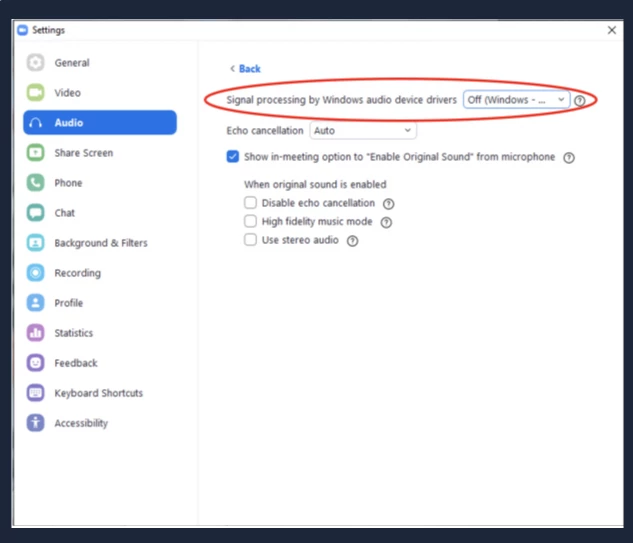
    I had the same, infuriating problem and tried about 20 solutions recommended by Zoom support and other users. The solution that finally worked for me was to Set "Signal processing by Windows audio device drivers" to the "Off" position under desktop client Settings > Audio > Advanced.  See screenshot below. Hope this helps some of you avoid a world of frustration, and I hope Zoom can fix the issue themselves.


    23 replies

    Newcomer
    November 1, 2021

    I've been having the same problem as well. Installed latest version of Zoom.  Reported it to our IT department and still no resolution after many attempts. I have to use my Jabra Bluetooth headphone instead which has NO issues. Please help. Thanks!

    Newcomer
    November 12, 2021

    To clarify, this only happens with Airpods thanks to Apple! Still using Jabra and no crash issues. I miss my Airpods! 

    Newcomer
    November 12, 2021

    When is zoom fixing this issue? Im experiencing the exact same issues described by multiple people here. a solution is needed!!

    Community Manager
    November 12, 2021

    Hey @mdpaige @Ayush_Shinde @egarcia1 @redmike @joedoe@wardi_iswali @Awilliams23 @Stringfellowww if you've attempted the above troubleshooting steps from my reply I'd advise you to double-check the following:

    • Are you able to use any other Bluetooth device?
    • If your Operating System supports Bluetooth?
    • Are there any Operating system updates whether you're running macOS, WindowsOS, Android, or iOS?
    • Ensure you're up-to-date running the latest version of Zoom or it always helps to uninstall/reinstalling
    • Attempt to use other headphones such as USB or your internal microphone in your operating system. 
    • Attempt to uninstall/reinstall your Audio Drivers on your Windows OS or any specific drivers for your device

    Try disabling the following as well in your Zoom Settings > Audio if enabled as High-fidelity music mode and stereo audio can increase your CPU utilization (more processes for your CPU) and network bandwidth. 


    I'd recommend also opening a ticket with our Zoom technical support and sending a problem report and client logs as they can further investigate what you're experiencing in-meeting and to further see what's going on with your Audio connections within Zoom. 


    Zoom uses any available and/or compatible input that your Operating system has recognized, and since there are many several different wavelengths of communication from your Bluetooth Headphones to your device and to Zoom there may be some interference within. 


    From Personal experience, I am using a macOS with Airpods and have no issues running the latest version of Zoom. 

    Newcomer
    July 31, 2022

    It's wonderful that you can use macOS with Airpods.  I have an Aftershokz and Windows and the microphone works fine but the speakers give no sound.

    That's after years of trying to update every single driver and firmware and so on until i remembered that my Aftershokz bluetooth worked fine with everything else including MS Teams, and only crashed Zoom

    Newcomer
    November 14, 2021

    I've experienced similar problems since some time in October. If I try to record a meeting, I get a message saying the recording will be without audio as my microphone and speaker are not working properly, when I'm on a call no one can hear my voice and when connected to Bluetooth headphones Zoom periodically crashes when trying to enter a meeting. I'm using Toshiba RZE-BT180H Wireless Bluetooth Headphones with Zoom 5.8.3 (145) [Free Account] through Ubuntu 20.04.3 LTS installed on a Lenovo Thinkpad E540. Before October, the headphones worked fine with Zoom on the same laptop and OS, so they're not incompatible with either and the fault is not with the headset, since it still works as expected with Telegram, Google and MS Teams calls. I don't have other Bluetooth devices to test with and my built-in microphone stopped working last year; that's why I have Bluetooth headphones.


    It seems in my case as though the problem was being caused by Zoom suddenly, for some reason, automatically using the A2DP audio sink, which then does not allow input from the headset microphone. I cleared (after backing up) the `~/.zoom/.data` directory and then, while in a (test) call went into the system sound settings and changed the output profile to  HSP/HFP and this seems to have at least temporarily resolved the issue.


    I hope this work around can help someone else as well.


    PS: To whomever maintains these forums, I posted this message before, it's my first message on the community and it then took me to a place to choose a username, and once I'd done so, my post disappeared. This is immensely infuriating, as I'd spent a long time writing the post and now had to rewrite it. Please write proper software that asks a new user to select a username before they write their first post!

    Newcomer
    November 30, 2021

    Same bug for me, even new version....

    Newcomer
    November 30, 2021

    Windows 11 fixed the issue, but not ideal

    Newcomer
    December 2, 2021

    Having the same issue - using an M5 Mpow Pro headset, fully updated Windows 10, most current version of Zoom client. Zoom, please help!!! This is a serious problem that started around 2-3 months ago and I just realized I am not the only one. There must be millions of users thinking it's just them as well. This must be fixed ASAP. Wired headsets are not a solution (they work) - so many people work with Zoom from home and need to roam around if needed. Help!!!

    Newcomer
    December 3, 2021

    I am facing the same issue with Bluetooh  freezing zoom! I have tried with my Jabra PHS002W speaker and also with Sennheiser CX400 BT TW earphones, same issue. Both these devices work perfectly fine when using any other system audio or Google Meet. I am using a latest Dell Latitude laptop with fully patched Win 10 and most upto date Zoom app. 

    With so many people complainig about this and Zoom does not seem to have any answers! This is frustrating! 

    Newcomer
    December 3, 2021

    I know, very frustrating indeed! Anyone at Zoom taking action?

    Newcomer
    January 3, 2022

    I've tried everything but still having this issue. 

    I have Sony WH-1000XM4 and for zoom calls I need to be wired....


    Newcomer
    February 3, 2022

    Yet another one who cannot get Zoom to work with BT headphones 😞  For me it's the microphone.  No matter what I try (including everything above), NOTHING works.  I have to drop back to an old USB based headset where only one earphone works.  Yuck!  


    Fix this issue please!

    Newcomer
    February 14, 2022

    Zoom updated their client about 3-4 weeks ago and caused this. The fact that they aren't fixing it is horrendous. There are a lot of people with the same issue.

    Community Manager
    February 15, 2022

    Hi @mmpdg @Ayush_Shinde @jerji @Serge_Mouthon @solemacario as everyone within this discussion is on different Zoom Versions, using different headphones, and running on different operating systems which makes all these cases unique and will need to be further investigated by our Zoom technical support


    ⬆️ If none of my replies were helpful or resolved your issue, as suggested go the route of getting our Zoom technical support team involved, thanks! 

    Newcomer
    February 15, 2022

    I told you back in November that these solutions didn't work. I followed the troubleshooting steps 6 times, and even factory reset my computer twice, to no avail. I've opened 15 tickets with no response to any of them. So what other magical solutions are you going to pull out of thin air until zoom actually fixes this nonsense?