
Zoom Crashes when I connect my bluetooth headphones | Community
Skip to main content
Newcomer
August 26, 2021
Solved

Zoom Crashes when I connect my bluetooth headphones

  • August 26, 2021
  • 23 replies
  • 9 views

Can somebody help me with this problem. When I join a zoom meeting, I get joined but when I join the computer audio the zoom client crashes. 

    Best answer by llevine329

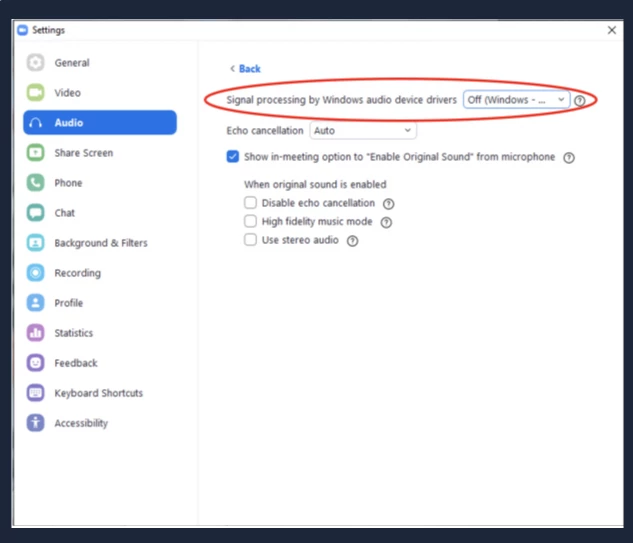
    I had the same, infuriating problem and tried about 20 solutions recommended by Zoom support and other users. The solution that finally worked for me was to Set "Signal processing by Windows audio device drivers" to the "Off" position under desktop client Settings > Audio > Advanced.  See screenshot below. Hope this helps some of you avoid a world of frustration, and I hope Zoom can fix the issue themselves.


    23 replies

    Newcomer
    July 6, 2022

    I finally found the source of the problem - Dell laptops don't seem to be compatible with audio bluetooth in Windows 11.  Every other bluetooth device works fine, and bluetooth speakers work (mostly), but bluetooth headsets connect for a few seconds and then disconnect with the message "no audio speakers or microphone connected".  Until I disconnect the bluetooth headset, the laptop can't find the Dell laptop or hardwired speakers or headset.

    I went to Dell.  Their answer - Windows 11 isn't fully supported on their XPS laptops!  This is extraordinary!  But to be fair, it isn't Zoom's fault.

    Newcomer
    July 6, 2022

    Thank you so much! Somehow I am not surprised that it is a Microsoft issue. I did recognise it occurred after an update but hadn't followed it through. Hmm, frustrating as I need it for work. Thank you again.

    Newcomer
    July 8, 2022

    Hello again. I found this online solution which worked for me. It was thanks to someone pointing out it was a Microsoft issue. Hope it is helpful for you  https://www.youtube.com/watch?v=gjGbm-pPuUQ


    Newcomer
    July 20, 2022

    I had the same, infuriating problem and tried about 20 solutions recommended by Zoom support and other users. The solution that finally worked for me was to Set "Signal processing by Windows audio device drivers" to the "Off" position under desktop client Settings > Audio > Advanced.  See screenshot below. Hope this helps some of you avoid a world of frustration, and I hope Zoom can fix the issue themselves.


    Newcomer
    August 25, 2022

    Thank you so much! this has finally worked for me, I'll keep checking in to see if the bug comes back. Many thanks!!!