
Zoom Crashes when I connect my bluetooth headphones | Community
Skip to main content
Newcomer
August 26, 2021
Solved

Zoom Crashes when I connect my bluetooth headphones

  • August 26, 2021
  • 23 replies
  • 9 views

Can somebody help me with this problem. When I join a zoom meeting, I get joined but when I join the computer audio the zoom client crashes. 

    Best answer by llevine329

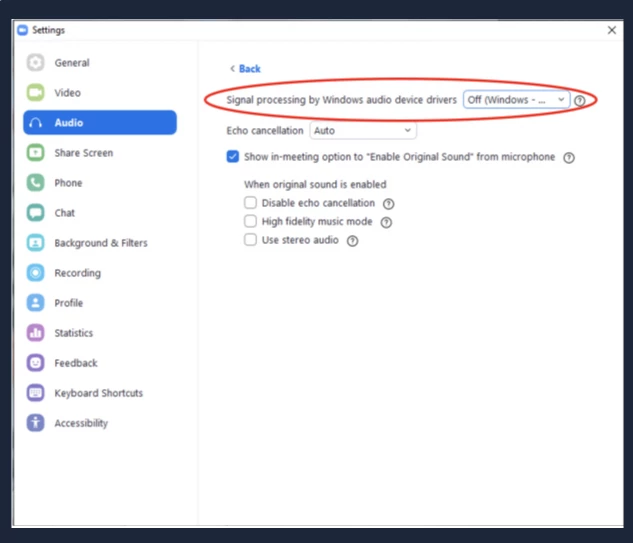
    I had the same, infuriating problem and tried about 20 solutions recommended by Zoom support and other users. The solution that finally worked for me was to Set "Signal processing by Windows audio device drivers" to the "Off" position under desktop client Settings > Audio > Advanced.  See screenshot below. Hope this helps some of you avoid a world of frustration, and I hope Zoom can fix the issue themselves.


    23 replies

    Employee
    August 26, 2021

    Hello! You can try these steps:

    1. Leave your headphones disconnected
    2. Get your Zoom meeting up and going with regular audio connected
    3. Then, connect your headphones

    Hope this helps!

    Newcomer
    October 16, 2021

    I'll try that.  Kind of reverse order.

    Newcomer
    September 22, 2021

     It doesn't help.

    Very annoying bug.

    Community Manager
    September 22, 2021

    Hey @Ayush_Shinde and @botikoo, besides using Bluetooth Headphones, are you able to use your 'Same as System' in both your speaker and microphone and see if that helps or resolves your issue? This would be using your integrated speaker and microphone. Have you also tried any USB mics or speakers as well? Lastly, ensure you're up-to-date running the latest version of Zoom or it always helps to uninstall/reinstalling


    Leaning towards something to do with your bluetooth. I've used AirPods and Beats Studio 3's with Bluetooth and haven't had any issues so far!🤞


    Looking forward to your response!

    Newcomer
    March 13, 2022

    are you able to use your 'Same as System' in both your speaker and microphone and see if that helps or resolves your issue


    The suggested solution for a bluetooth device not working is to not use the device?

    Newcomer
    October 5, 2021

    @RN52_2 I've had this same problem for weeks now even after:

    1. uninstalling & reinstalling
    2. ensuring everything is updated
    3. trying different bluetooth headphones
    4. double-checking that all system audio settings are correct

    I log into Zoom early before morning meetings to try to prevent it and the audio will work perfectly when I test everything, but as soon as I click "join audio" on a call, it crashes.  Really sucks; not a nice way to start the workday. 😞


    Def a bug from the Zoom side, since it happens with multiple types of headphones.

    Community Manager
    October 5, 2021

    Hey @AJO@Ayush_Shinde , and @botikoo. Before contacting our support team to further investigate, gather logs, etc., to see what is going on. Do you know if your Bluetooth Drivers, Audio Drivers, and Operating System are up-to-date as well? Not just Zoom?  Have you had problems before with other applications?


    Lastly, I would encourage opening a ticket with our Zoom technical support and  sending a problem report and client logs

    Community Manager
    October 18, 2021

    Hey @paulstevensqban , @AK12 , @Awilliams23, and @Stringfellowww, prior to my response ⬆️⬆️⬆️


    Do you know if your OS is up-to-date? Not Just Zoom? Are have you had any problems before with other applications? Are the Bluetooth headphones compatible with your devices? 


    In the meantime,  I'd recommend also opening a ticket with our Zoom technical support and  sending a problem report and client logs

    Newcomer
    October 6, 2021

    Hi all,


    I too am having the same issue, i have tried different Bluetooth headphones. I have the latest version of Desktop Zoom for Windows (Version: 5.8.0 (1324)

    Newcomer
    October 11, 2021

    I have the same issue and my PC is brand new. IT has had me install and reinstall Zoom. I've connected and reconnected my bluetooth headsets, but Zoom will freeze if I connect with them, even after joining the call.  Sometimes it doesn't recognize my speakers at all so then I have to join via my phone which takes a couple of minutes so I miss some of the calls.  Frustrating because I'm not that inept with technology and it does seem to be a software issue, not a user issue as I've read several threads just by Googling, spanning multiple years.

    Newcomer
    October 15, 2021

    Has this issue been resolved yet? I have not been able to fully use zoom due to this issue, and it only happened after I received a zoom update. 

    Newcomer
    October 16, 2021

    This same thing happens when I use ear buds for my iPhone.  I have to press Settings  and turn off Bluetooth.  It appears the use of these new technologies aren't ready for prime time.  More research and development is needed.


    Newcomer
    July 7, 2022

    Same issue here with Zoom and bose earbuds.  Started after last update.  Hope there is a fix soon but last ticket submitted to zoom took over six months to get response they were working on it.  Sad 

    Newcomer
    October 20, 2021

    Hi Zoom,


    I been using my bluetooth headset for almost one year with same laptop configuration. No problem at all.

    But recently, when I joined a call, the headset audio/ headphone stereo dont have any audio at all.

    When I switch to built in speaker, then you can hear it.


    FYI, the bluetooth headset is well connected to the laptop and I can play audio via Youtube or Spotify with no issue.

    If I restart my laptop, then I can hear the audio back from headset/ headphone but the issue will return after a while.


    Kindly help to address this issue and fix the problem.


    Newcomer
    October 21, 2021

    Same here. Very annoying. Zoom with BT headphones stopped working on 2 PCs of mine. 


    The issue is not cause by the BT mic but by the BT speaker part of the headphones. When I go to Zoom Audio settings, I see the "speaker" is running from max to min volume non-stop without me doing anything. 


    Are you even testing your updates??? 


    Switching to Google Meets because Zoom is not usable because of this.   Good bye.  

    Newcomer
    October 29, 2021

    I've been experiencing multiple failure modes with Bluetooth headphones and Zoom. I have a pretty simple solution.


    1. Kill all Zoom processes
    2. Toggle Bluetooth on the computer
    3. Reconnect the Bluetooth device
    4. Restart Zoom