Waiting room | Community
Skip to main content
Newcomer
January 31, 2022
Solved

Waiting room

  • January 31, 2022
  • 4 replies
  • 0 views

All my participants get allotted to waiting room, but they enter without authentication.  I dont know why this ishappening and I dont know how to solve it.   I have tried all options but still participants enter into waiting room and before host approves they are in the meeting.  Please help me.


    Best answer by jeremyjustin

    Hi thank you for your post here on the Zoom Community! It could be that your waiting room settings are allowing anyone in the meeting to add people rather than only the host being allowed to let people into the meeting from the Waiting Room.


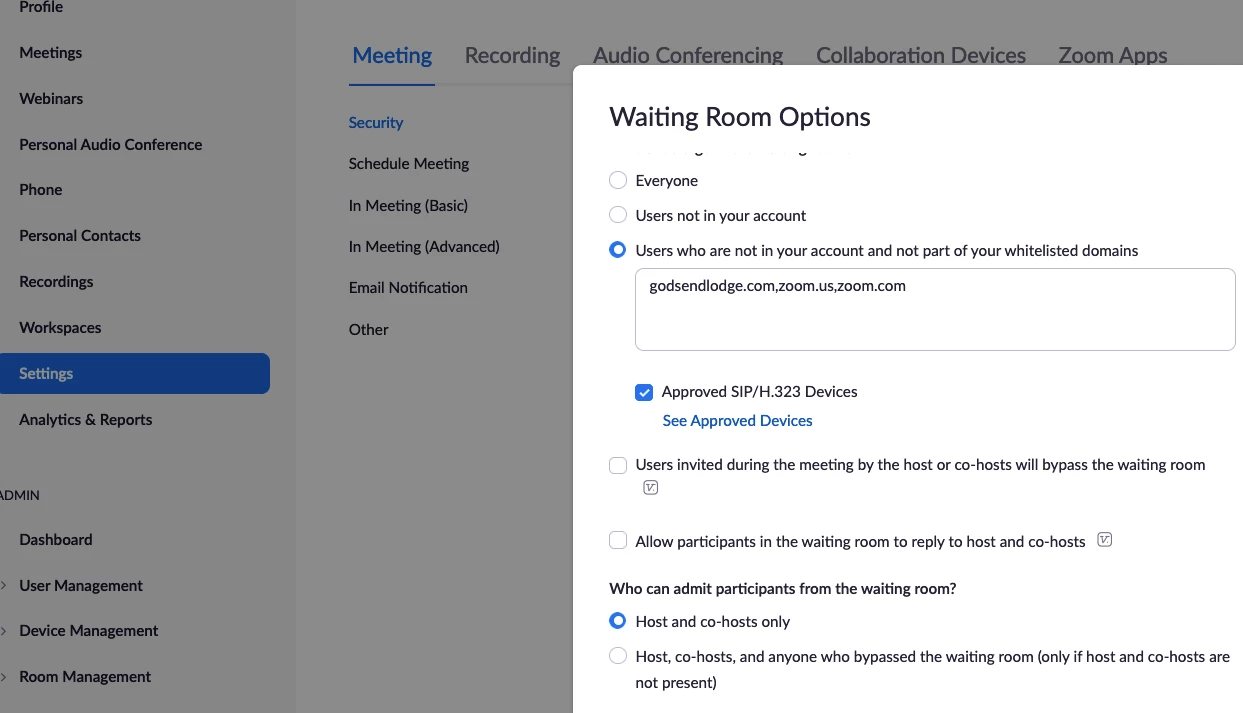
    If you can sign into https://zoom.us and in the Personal Section in the upper left, if you click on Settings, then scroll down to the Waiting Room section.  Here you can see all your Waiting Room settings, I believe once you tweak those you will be good to go! This is a screenshot to help you know where to go, you will see the section "Who can admin participants from the waiting room" and I believe this is an important one, but have a look at all those settings:
     

    If this has answered your question to your satisfaction, please click the "Accept as Solution" button below but if not please reply and we can continue the  discussion. Thank you!

     

    4 replies

    igorn
    Employee
    Employee
    January 31, 2022

    Hello!


    The reason is likely because the waiting room is enabled for the account or the meeting. Please take a look at the following link for more info: Waiting-Room 

    jeremyjustin
    Community Champion | Employee
    Community Champion | Employee
    January 31, 2022

    Hi thank you for your post here on the Zoom Community! It could be that your waiting room settings are allowing anyone in the meeting to add people rather than only the host being allowed to let people into the meeting from the Waiting Room.


    If you can sign into https://zoom.us and in the Personal Section in the upper left, if you click on Settings, then scroll down to the Waiting Room section.  Here you can see all your Waiting Room settings, I believe once you tweak those you will be good to go! This is a screenshot to help you know where to go, you will see the section "Who can admin participants from the waiting room" and I believe this is an important one, but have a look at all those settings:


    If this has answered your question to your satisfaction, please click the "Accept as Solution" button below but if not please reply and we can continue the  discussion. Thank you!

     

    suba_vasuAuthor
    Newcomer
    February 3, 2022
    Thank you for your support.  
    I have enabled all the option in my waiting room, but still i am facing this problem.  All my waiting room participants come in without my permission.  This so disturbing as other meetings are going on.  
     
    I am attaching a screen shot where it says only those approved can join.  I have a option saying REQUIRE AUTHENTICATION TO JOIN, but it i click this it saying that everybody will have to sign in to zoom.  I have participants joining from link also.  How to resolve this?  Please help me.
     
    Regards
    Subashri


    Newcomer
    March 4, 2022

    I have this same problem. Did you ever get an answer?

    suba_vasuAuthor
    Newcomer
    March 4, 2022

    No I have not got a reply yet.  Still facing the problem

    Newcomer
    March 4, 2022

    this fixed it for me, but I am using my personal meeting number:


    Thank you for contacting Zoom Support!

    We understand that you're having issues with the settings of your meetings. let me assist you on this.

    Just to clarifiy we are talking about the meeting ID 538 XX XXXX? If yes, this is your personal room and only the password is enable. Please take note that personal room has it's own settings. To change it, just go to meetings > personal room and then click edit.

    If you have more questions please advise us so that we can further assist.

    Thank you.

    Regards,
    Mac

    suba_vasuAuthor
    Newcomer
    March 7, 2022

    Actually I am not using the personal meeting room. The meeting id is 87210680831.   It automatically allows the participants from waiting room into the meeting room. This disturbs the other meetings which are going on.  Like some participants come early and they come into the meeting.  So please let me know if there is a solution for this.

    Newcomer
    May 16, 2023

    I have the same problem. waiting for answers.