

Video no longer working for Microsoft Teams Room | Community
Skip to main content
Newcomer
January 25, 2023
Solved

Video no longer working for Microsoft Teams Room

  • January 25, 2023
  • 14 replies
  • 1 view

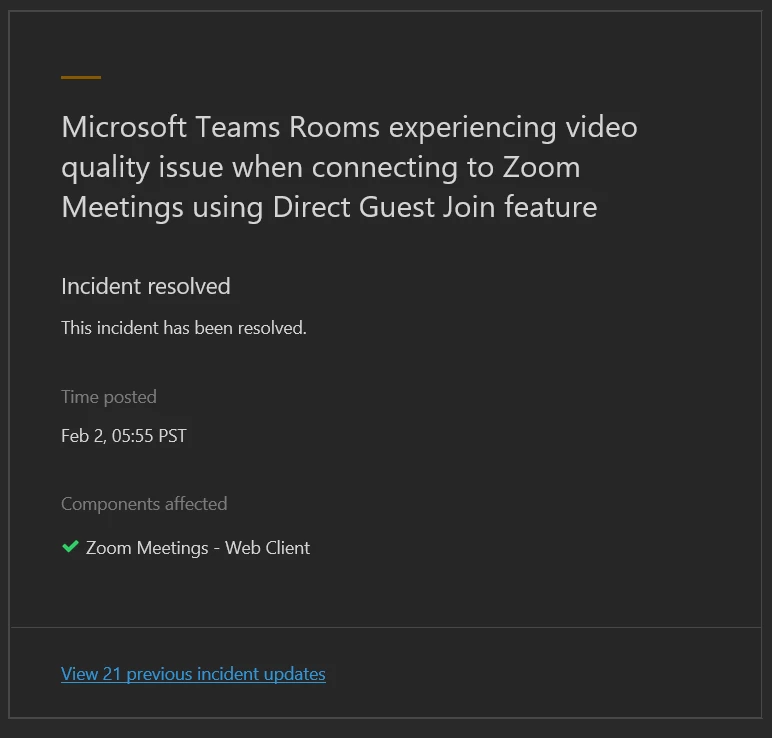
Zoom video was working in our Microsoft Teams Rooms yesterday (01/23/23). After today's "update," the video in Microsoft Teams Rooms is not working. This occurred in all of our conference rooms. The camera works for Microsoft Teams meetings, and when we hook up our laptops to the conference room camera directly. The video only freezes and then goes black during Zoom meetings connecting through our Microsoft Teams Rooms systems. No amount of restarts and settings changes have fixed this. 
    Best answer by Steve_Hinds

    Seems like the issue was Microsoft related and has now been resolved, we have tested and things are back to normal.


    14 replies

    Newcomer
    January 25, 2023

    I had a similar issue yesterday but I have not tested it today.  Any updates from your side?

    Newcomer
    January 25, 2023

    I am having the same issue

    Newcomer
    January 25, 2023

    So we weren't getting any errors messages on the screen. But after we disabled 3rd party join, restarted, then enabled it, we are seeing a error message. It's says something like "the camera is being used by another app".


    Still doesn't work, but at least we are seeing an error now.

    Newcomer
    January 30, 2023

    Hello Ekerstetter,


    I have managed to get the Zoom Video to work by resetting the device and also changing the room account password. All seems to work now via Microsoft Teams Room

    Newcomer
    January 30, 2023

    Hi there,


    Experiencing the same issue.

    Can you clarify what you mean by "Resetting". Was this just a reboot or did you do a factory reset?

    Newcomer
    January 30, 2023

    We're seeing the same thing and unable to fix it. Here's what we've tried so far:

    Rejoined meeting
    Created new meeting
    Removed and re-added zoom features
    Switched Supported meeting mode from Teams only to Skype for Business and Microsoft Teams (default)
    Factory reset device
    Changed password of room account
    Newcomer
    January 31, 2023

    Similar issues for my org too. Opened ticket with Zoom and getting through the base steps now... firewall settings, firmware, camera models etc. We will see if any of that helps, I'm not hopeful though. 

    Newcomer
    January 31, 2023

    In a support ticket with Microsoft the tech said it is a known issue that they are waiting to hear back from Zoom about. Take it with a grain of salt, I'm sure no one wants to take the blame. 

    Newcomer
    January 31, 2023

    We are having the same issue as well, seems to block all the video sending from MTR to Zoom, does anyone know if it could be Microsoft related ?


    Newcomer
    January 31, 2023

    Unfortunately, Zoom or Microsoft have not provided a solution yet. There is an update from Microsoft site see below but that's all


    Some users may intermittently see a black screen during Microsoft Teams meetings or group calls that include video
     
    TM485572, Last updated: January 30, 2023 7:37 PM
    Estimated start time: December 14, 2022 11:18 PM
    Affected services
    Microsoft Teams
    Issue type
     
    Advisory
    Issue origin
    Microsoft
    Status
    Service degradation
    Manage notifications for this issue
    User impact
    Users may intermittently see a black screen during Microsoft Teams meetings or group calls that include video.
    Are you experiencing this issue?
    Is this post helpful?

    All updates

    Newcomer
    February 1, 2023

    Do you have a link to this issue on Microsoft site? 


    This is not intermittently.  Microsoft pushed a patch update 2 weeks ago, and since 1/24, ZOOM over Teams Room, on 3 different vendor provided Teams Room systems, in 10 of our conference rooms, do not work, it is just a black screen.  All possible drivers for all hardware and software have been installed. 


    The only work around is to log directly into the Team Room device as Admin and setup a ZOOM call manually to use the Conf Room Camera/Mic and reposition all the screens to fit on the TV's.  Tested today and it is still not working.

    Newcomer
    February 1, 2023

    Does anyone know is this affecting both Zoom Free and Zoom Pro accounts ?


    Newcomer
    February 1, 2023

    I tried creating the meeting on free a and Pro license. Issue occurred for both. 

    Newcomer
    February 2, 2023

    Seems like the issue was Microsoft related and has now been resolved, we have tested and things are back to normal.


    Newcomer
    February 3, 2023

    Thanks for the update. I'm not in the office today but will on Monday when I'm back in the office.

    Newcomer
    February 6, 2023

    My two cents.....This same issue started nearly 2 weeks ago here.  I opened a ticket with Microsoft and Zoom and am still waiting to hear from either side.  I received emails from Zoom support last week confirming an issue they were aware of and working on about this.  I then received notification late last week it was fixed.  It is...mostly.  I have one Teams room with a single TV and a larger Teams room running two TVs.  Zoom hosted meetings are now only utilizing 1 TV, leaving the other one blank in a dual TV room.  Still waiting on Zoom and MS.