

Video freezing since recent update | Community
Skip to main content
Newcomer
August 19, 2021
Solved

Video freezing since recent update

  • August 19, 2021
  • 17 replies
  • 4 views

Hello, I recently updated and since then the participants video keeps freezing. Everything else is exactly the same as before the update so not an issue with internet, computer or camera. It only stops freezing if I share my screen. I’ve tried unloading and reloading but it didn’t make any difference. Can anybody help? I can’t work with it like this. Many thanks in advance, Sarah
    Best answer by ZoomVA

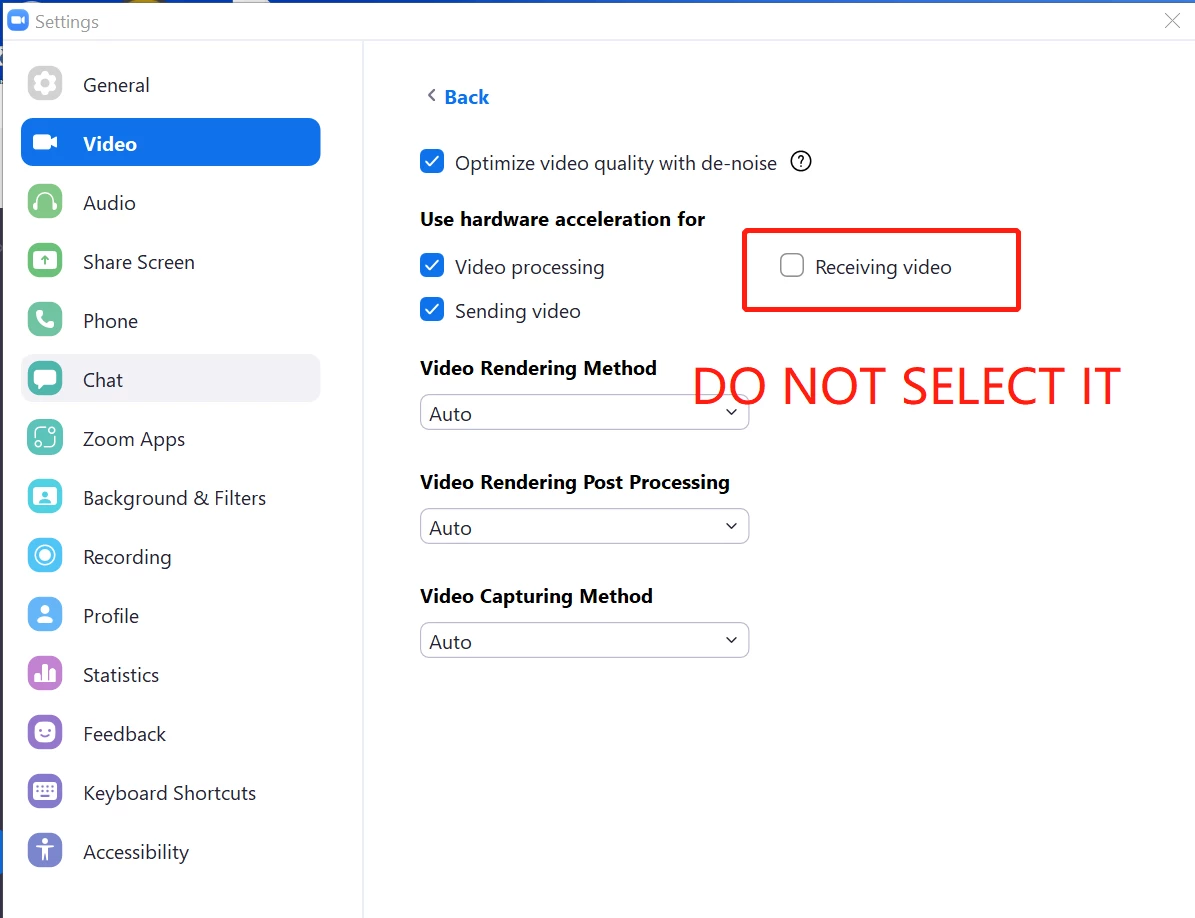
    Hi @SSH  Please try adjusting the video settings in Zoom Client -> Settings -> Video -> Advanced -> Uncheck Receiving Video in the section (Use hardware acceleration for), and see if this solves the issue. 

    17 replies

    ZoomVA
    Community Manager
    ZoomVAAnswer
    Community Manager
    August 19, 2021

    Hi @SSH  Please try adjusting the video settings in Zoom Client -> Settings -> Video -> Advanced -> Uncheck Receiving Video in the section (Use hardware acceleration for), and see if this solves the issue. 

    Newcomer
    January 17, 2023

    I'm on Windows, and this worked for me. (At least, so far). Thank you. 

    Newcomer
    August 19, 2021

    Having the same issue since an update sometime in the last few weeks. I can resize my Zoom desktop window to be smaller and it fixes it, and if I keep all the thumbnails of everyone small enough, it stays fine. But after resizing if I go back to original size, they freeze up again after some time period. No changes to hardware, but been receiving Windows updates so could be that?

    Newcomer
    August 31, 2021

    Disabling hardware acceleration for receiving video also fixed this for me. Wonder what changed in the last month to cause this to be required? Was working fine previously.

    Newcomer
    January 11, 2023

    Where do I find “hardware acceleration” to disable?

    Newcomer
    August 20, 2021

    I am having this same awful problem. VERY annoying. 

    Newcomer
    August 31, 2021

    It looks like Zoom released version 5.7.7 to solve the issue.

    HLAA-SF-EastBay
    Newcomer
    Newcomer
    September 6, 2021

    version 5.7.7 did not resolve for me

    HLAA-SF-EastBay
    Newcomer
    Newcomer
    September 6, 2021

    I been having the same problem for several weeks, both as host and as participant.

    I have experienced the problem on versions  5.7.7 and 5.7.6.  (Maybe even 5.7.5, I do not remember).


    I am running Win10, 

       - With August 10, 2021—KB5005033 (OS Builds 19041.1165, 19042.1165, and 19043.1165)

      - and September 1, 2021—KB5005101 (OS Builds 19041.1202, 19042.1202, and 19043.1202) Preview

    Another machine with Win10

    - With August 10, 2021—KB5005033 (OS Builds 19041.1165, 19042.1165, and 19043.1165)

    - without September 1, 2021—KB5005101 (OS Builds 19041.1202, 19042.1202, and 19043.1202) Preview

    A third machine with Win11 beta (via Windows Insiders)

    - With Windows 11 Insider Preview 10.0.22000 (co_release)

    - with 2021-08 Cumulative Update for Windows 11 for x64-based Systems (KB5006050)


    Newcomer
    September 8, 2021

    I have tried the "fix" listed here and i am still having the same issue.  Participants freezing up for 10-15 seconds.  VERY irritating......

    Newcomer
    October 22, 2021

    This did not work for me (unchecked the box as suggested by Virginia Johnson above).
    Zoom USED to be great.
    It's now costing my business and ruining my credibility

    Newcomer
    October 22, 2021

    I had a prolonged chat session with Zoom support after unchecking the box suggested by VA did not solve the issue.  Per chat advice I upgraded  to Zoom 5.8 and entered via the Zoom app rather than the server.  However there was no way to test this solution other than to engage in my next presentation.  And sure enough, my Keynote presentation froze after the first few slides.  Fortunately I had since learned a workaround and by exiting the slideshow I was able to continue giving the talk from the desktop but without being able to us any of the sequencing provided by the slideshow.  Yesterday I gave a presentation using Webex via Chrome and my Keynote presentation worked perfectly!  So I think I have at last found a solution.  So long, Zoom!

    Newcomer
    February 17, 2022

    hallo me name is sarah what your name


    Newcomer
    April 1, 2022

    I have same issue and the solution didn't worked for me.

    I have to join meeting again and again as it kept freezing.

    Newcomer
    January 17, 2023

    Hi

    I have had this issue on my video for a couple of days and only been able to fix it with another new update today. It seems to be working now but I will find out properly when I am in a proper session. My video was scrambling, freezing and sometimes blurring and freezing at the same time. 


    I contacted billing because since I had to reschedule a tutoring session due to this issue and had a nightmare trying to do an assessed university presentation - I asked to be reimbursed for Janurary's subscription fee due to this issue but it seems like I'm communicating with a bot and not a human as they are not understanding. Has anyone been able to get a reimbursement due to this? 


    Newcomer
    January 18, 2023

    I am having this exact problem.  As a therapist, my sessions have been challenging to say the least.  It is only when the client joins the screen share that my video on my end blurs, freezes, turns me black and white.  The client can hear me and I can see and hear them just fine.  However, they are not able to see me live at all.


    I have not attempted for reimbursement as of yet and my problem is not fixed.  It started happening with the latest update yesterday.  I cannot imagine having to do a university presentation and this occurring!  That is upsetting to hear that you went through that!