

Using phone for Zoom meeting audio: can you disable "record your name after the tone" prompt? | Community
Skip to main content
Newcomer
December 19, 2023
Solved

Using phone for Zoom meeting audio: can you disable "record your name after the tone" prompt?

  • December 19, 2023
  • 3 replies
  • 0 views

Hello!

Our organization recently migrated from GotoMeeting to Zoom; still trying to figure out all the settings.

I prefer joining Zoom meetings using my phone for audio instead of my computer mic/speakers (I like to pace) while I connect to the video with my computer as normal. I've found that depending on which colleague's meeting I'm joining, when I dial in (or have Zoom dial me) sometimes Zoom will prompt me to record my name, then hit #, other times it won't and simply says "You are in the meeting now". Where is this toggle setting located? My preference is it NOT prompt me for my name. I don't like saying my name, and usually skip it pressing #. The other meeting goers already see my name, picture or video, having an audio intro is redundant. It's also obnoxious when you're already in a meeting and you hear "_ has joined the meeting" instead of the usual doorbell. Not sure why phone audio folks have different functionality than computer mic/speakers. I get that if you are ONLY dialing in via phone, an audio intro makes sense. But can we turn it off for those of us that join meetings with two devices?


Thanks!

-Casey
 

Best answer by CarlaA

Hi @caseycp and @ZachWCI ,


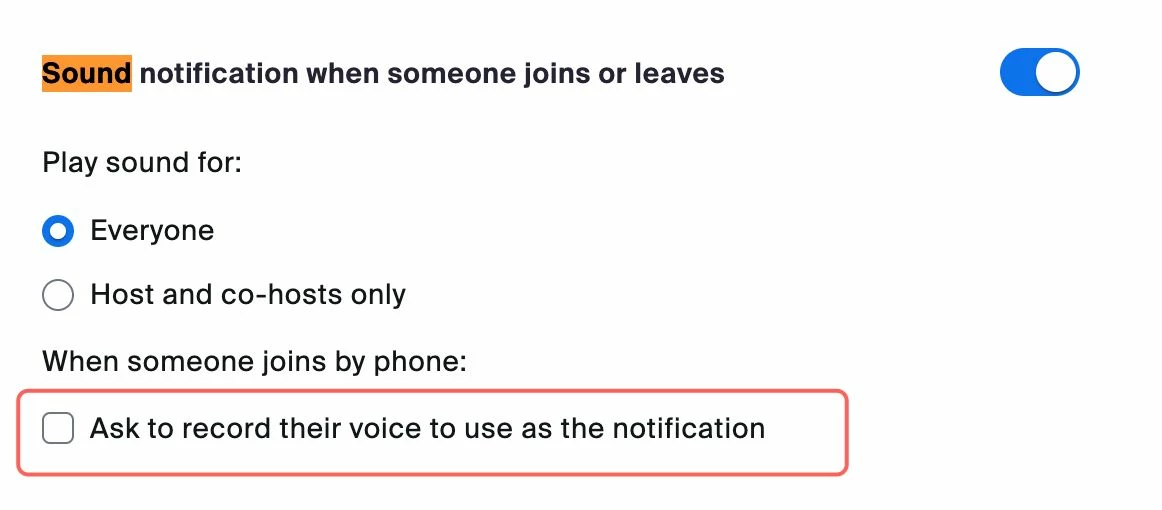
This is a feature that is currently managed by the person hosting the meeting.  Please see below:


Unfortunately, this is not a feature that can be enabled/disabled by the participants. 

I hope this helps! 


3 replies

Newcomer
February 2, 2024

Hi Casey,

Did you get this figured out? If so, can you let me in on the secret? I also want to toggle this option off, so I don't have to record my name every time I have Zoom call me. Thanks in advance!

caseycpAuthor
Newcomer
February 2, 2024

Hi Zach,

No luck yet, and no one is replying! I've also found it to be random depending on who's meeting I'm joining: sometimes it prompts me to record my name, other times it just says "You are in the meeting now".  ¯\_(ツ)_/¯


-Casey

CarlaA
Community Manager
CarlaAAnswer
Community Manager
February 9, 2024

Hi @caseycp and @ZachWCI ,


This is a feature that is currently managed by the person hosting the meeting.  Please see below:


Unfortunately, this is not a feature that can be enabled/disabled by the participants. 

I hope this helps! 


caseycpAuthor
Newcomer
February 9, 2024

HI Carla. Thanks for the reply. Where is this option found in Settings?

Also is it possible to configure it differently for people that are joining by computer coupled with phone for audio vs. those that are only dialing in on the phone?


Thanks,

-Casey

CarlaA
Community Manager
Community Manager
February 9, 2024

Hi @caseycp.


Check out this article that goes over 'Enabling sound notifications for meetings' to locate the settings as well as additional information on this feature. 


I don't believe that there is a feature that would distinguish when someone is joining from both a computer and a phone vs just a phone. I apologize for any inconvenience, but I hope this clears it up a bit. 

caseycpAuthor
Newcomer
February 9, 2024

Thanks!

CarlaA
Community Manager
Community Manager
February 9, 2024

Anytime! Glad I could help 🤗