

Using Personal ID for all Meeting | Community
Skip to main content
Newcomer
February 5, 2024
Solved

Using Personal ID for all Meeting

  • February 5, 2024
  • 2 replies
  • 2 views

Hello,


I have a licensed education account, and I've linked it to Calendly so students can set up meetings with me at their convenience. 


It used to be that all of these one-time meetings had the same link (my personal meeting ID), but now, each new appointment has a different meeting ID. How can I return to automatically generating meetings using my personal meeting ID (on the user end, not my end)?
Best answer by jaybird

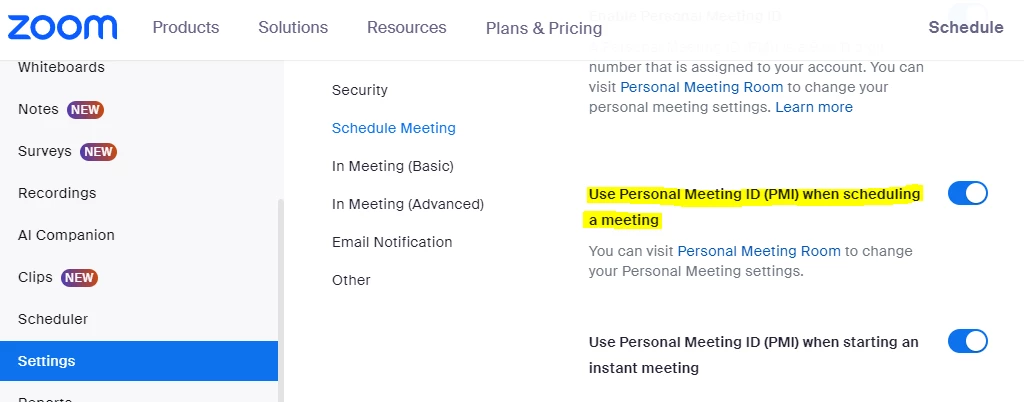
I solved it (by calling Zoom support (thank you Paul Dizon))!


This is all that needs to be done:

2 replies

Community Champion | Employee
February 5, 2024

Hello @jaybird ,


Thank you for your message. I suggest checking the settings outlined here to enable your Personal Meeting ID (PMI):


https://support.zoom.com/hc/en/article?id=zm_kb&sysparm_article=KB0066271


Let us know how it goes.

jaybirdAuthorAnswer
Newcomer
February 5, 2024

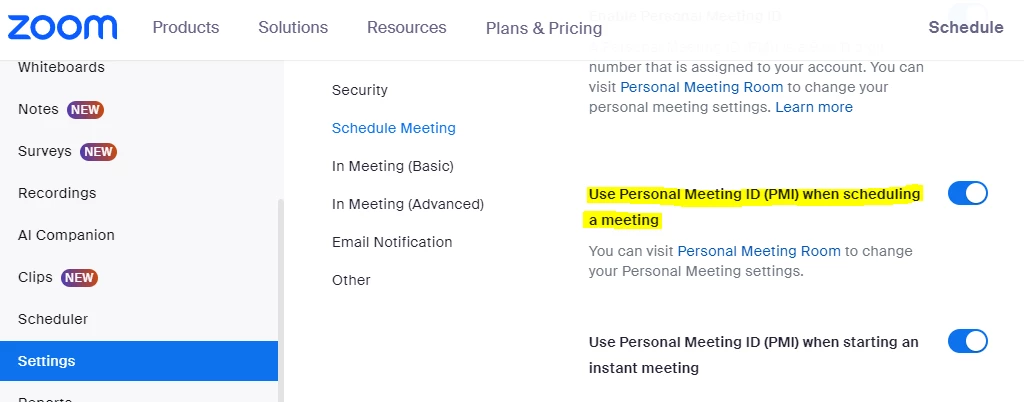
I solved it (by calling Zoom support (thank you Paul Dizon))!


This is all that needs to be done: