

Using Keynote as virtual background failing - "Keynote not installed" message | Community
Skip to main content
Newcomer
September 26, 2023
Solved

Using Keynote as virtual background failing - "Keynote not installed" message

  • September 26, 2023
  • 14 replies
  • 1 view

Several others have posted about this but there have been no replies yet so I'm boosting here!

Trying to use virtual background using a Keynote slideshow; I have Keynote installed of course, that's how I'm playing it.

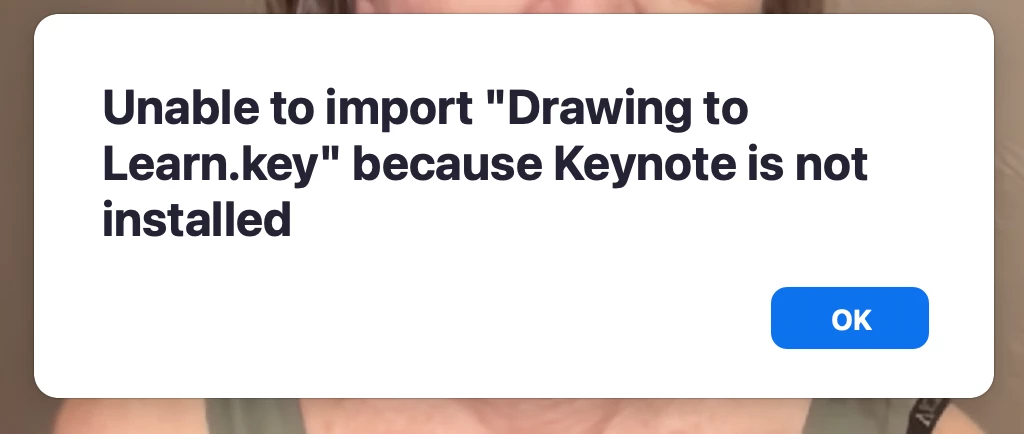
When I try to use the advanced feature, I get the error message (see screenshot) that "Unable to load XYZ.key because Keynote is not installed."

I tried with a .ppt file and same error message for "Powerpoint is not installed."

I tried to see if Zoom has an app for Powerpoint or Keynote; they do not.

Others are using this great feature, and I'd love to, but am stuck.

(I uninstalled, fully, the Zoom app and reinstalled; same issue)

(Computer and Zoom all 100% up to date)

(Running 2021 MacBook Pro M1 with Ventura))
Best answer by CarlaA

Hi all!


I just wanted to pop in here and let you all know that our engineering team has identified the root cause and the issue will be fixed in client 5.16.5.. Thank you all for your patience as we work to resolve this issue.


Edit: MacOS client 5.16.5 will be released on Oct 22nd.

14 replies

Newcomer
September 26, 2023

I'm getting the same thing. Looking for assistance. 

Newcomer
September 27, 2023

Same here, on a Mac mini M1 (2020), Sonoma 14.0, latest Zoom (5.16.1).

Newcomer
September 27, 2023

Same here 😞 

Newcomer
September 28, 2023

Same here.


Newcomer
October 10, 2023

My frustration is growing. This feature is of critical importance for the work that I do. Zoom, please offer us a solution to this issue asap. 

Newcomer
September 29, 2023

Same here

Newcomer
September 30, 2023

Same here 🙁

Newcomer
October 3, 2023

Same thing happening here.  Come on Zoom, what do we do?

Newcomer
October 4, 2023

I Have the same  experience !! There is no  explanation on internet to fix this ! 

Zoom can you help?

Newcomer
October 5, 2023

I am also having problems with the same error.
But I could open PowerPoint.
I hope Zoom can solve this problem soon.

Newcomer
October 7, 2023

Same problem here, even if I try to upload a pptx file that was saved from keynote it still gives the same error message that Keynote is not installed