

cancel
Showing results for 
Search instead for 
Did you mean: 
Effective January 9th, 2026 through January 22nd, 2026: The Zoom Community is currently in read-only mode with login disabled, to deliver you a new and improved community experience!

The site is still accessible to view, however, the ability to login, create content, or access your community account is temporarily unavailable. We appreciate your patience during this time. If seeking support, please browse existing community content or ask our Zoom Virtual Agent.

Upgrading To More Participants

theblogsocietie
Newcomer
Newcomer

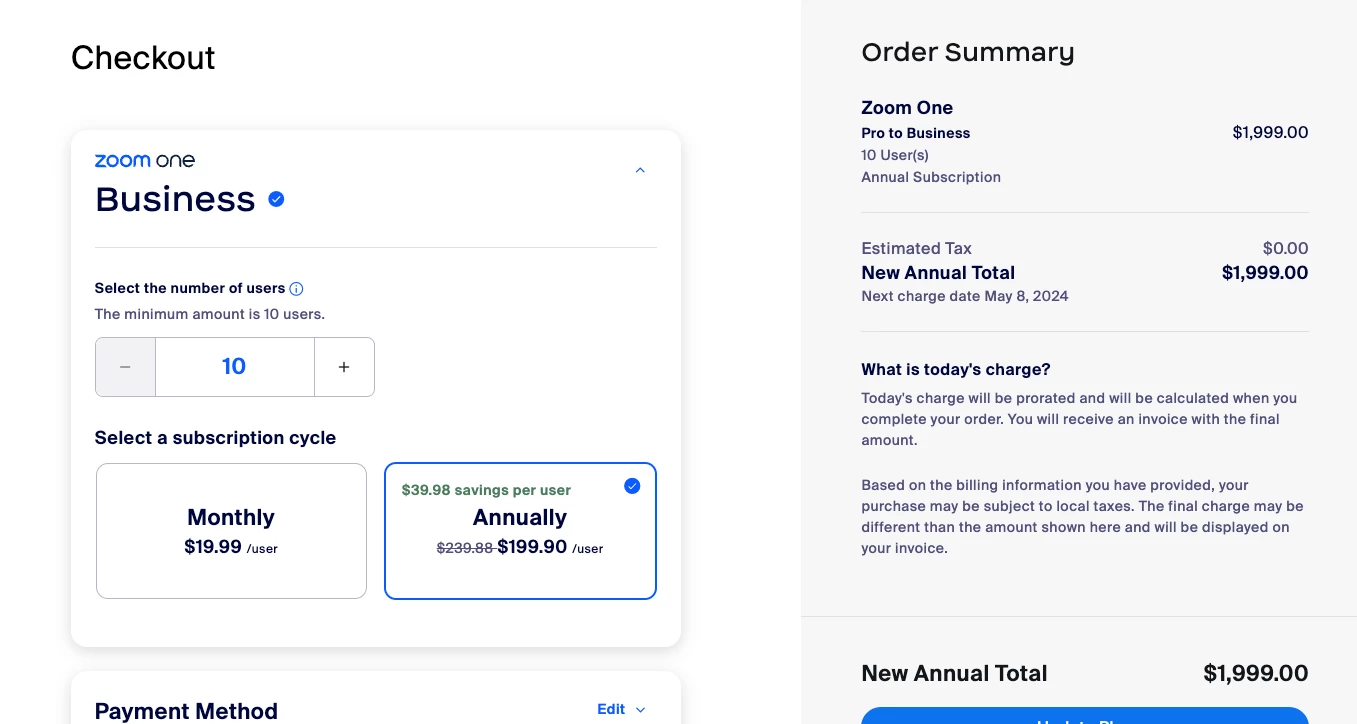
I have a meeting that may go over 100 participants, so want to either change to webinar or increase participants. But the only option I'm seeing is an option to add a minimum of 10 licenses. I just want to upgrade to Pro for 1 license. This seems impossibleScreenshot 2023-05-08 at 6.28.23 PM.png.
2 REPLIES 2

Frank_TB
Community Champion | Customer

Hello,


you can increase the capacity of a meeting by purchasing a Large Meeting Add on.


A large meeting license—depending on the license— allows up to 500 or 1000 participants to attend a Zoom meeting. The owner or the admin of the account can add this feature for Licensed users, and it can be subscribed to on a monthly or annual basis.


https://support.zoom.us/hc/en-us/articles/201362823-Hosting-large-meetings 


Regards

If my reply helped, don't forget to click the accept as solution button!

Thanks for the response. I only have 1 license at the moment. I bought the large meeting add on. Do i need to do anything else? Will this work automatically?