
Two-way chat with Waiting Room - can't find how to enable | Community
Skip to main content
Newcomer
October 26, 2021
Solved

Two-way chat with Waiting Room - can't find how to enable

  • October 26, 2021
  • 3 replies
  • 1 view

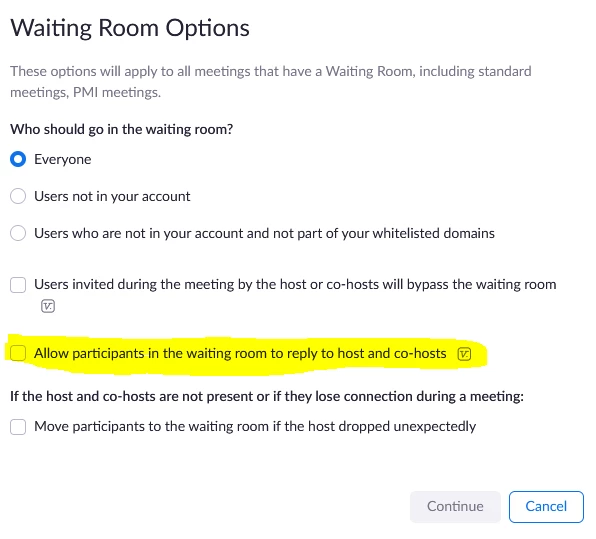
The 5.8.3 release provides two-way chat with the waiting room folks. How can I enable it?

    Best answer by ChrisO

    Account Settings or Meeting Settings>>Waiting Room Options. It requires guests as well as host to be version 5.8.0 or higher to work.
     

    3 replies

    Newcomer
    October 26, 2021

    Jimi,
    Once someone has joined the waiting room, open up your chat window and instead of selecting "Everyone in Meeting" as the recipients, you can select "Waiting Room Participants".
    See pic attached.

    ChrisO
    Participant
    ChrisOAnswer
    Participant
    October 26, 2021

    Account Settings or Meeting Settings>>Waiting Room Options. It requires guests as well as host to be version 5.8.0 or higher to work.


    Newcomer
    April 12, 2022

    Hi, where can I find the setting? Is the function available for a free account?

    Newcomer
    March 13, 2023

    Can you send a chat to only one person in the waiting room?

    Thanks,

    -Ashley

    Newcomer
    March 13, 2023

    Ashley,

    Yes, you can choose to send to only one participant in the waiting room.
    Open the participant pane, select Message in the top right corner, and then you can choose to send to Everyone in the meeting,
    Waiting room participants,
    or the individual guests.
    Thanks,
    Bryon