

Todays Zoom update has shut me out of calendar bookings | Community
Skip to main content
Newcomer
January 11, 2023
Question

Todays Zoom update has shut me out of calendar bookings

  • January 11, 2023
  • 1 reply
  • 0 views

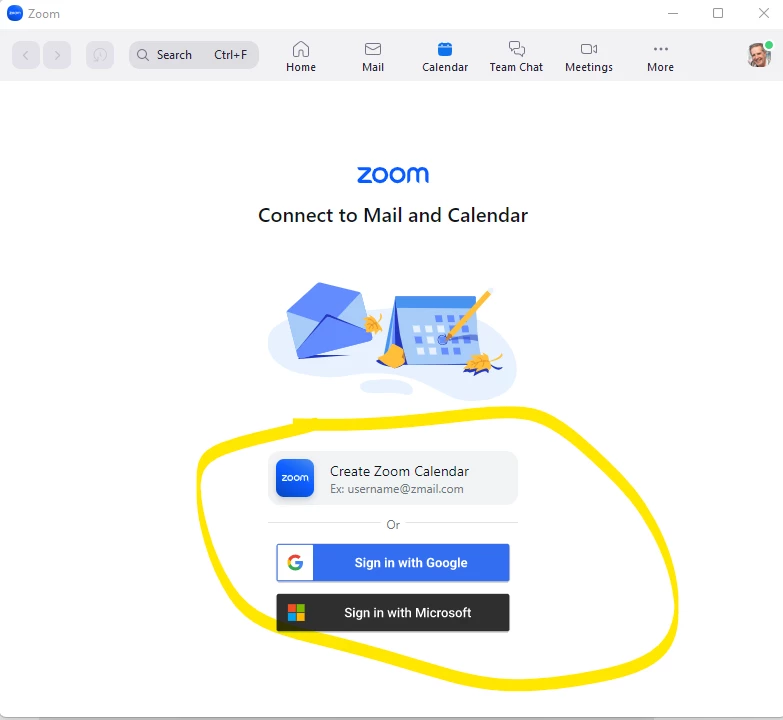
Zoom has stuffed things up again.  I installed the latest zoom update today, and now it wont display my bookings and I have zoom calls to do.  It is requiring some new login to calendar systems, instead of just continuing to use what I had linked to my Outlook 365 calendar. Can anyone help?
trying to sign into microsoft on their link does not work.
Zoom is great, if only they would stop making unneeded changes like this which are more stress than help.
 

    1 reply

    newl
    Education Ambassador
    Education Ambassador
    January 11, 2023

    Hello @markTTP ,


    What you are seeing is a new feature of the Zoom software client that allows you to manage your Google/Outlook email and calendar information directly from inside of the Zoom client.


    The reason you see this new menu item at the top of your software client is because the feature has been enabled by your Zoom Admin. The good news is it a completely optional feature and should not interfere with your current Outlook calendar sync.


    I would you suggest you ignore the Calendar and Email options altogether if you don't find them useful. 


    Here is the Zoom documentation on this new feature.

    https://support.zoom.us/hc/en-us/articles/9868737154061-Enabling-Zoom-Mail-and-Calendar-for-your-account


    Hope this helps!

    markTTPAuthor
    Newcomer
    January 11, 2023

    Thanks for that info. 

    I use Calendly App for people to make all business appointments with me, and then Calendly links to my Outlook calendar and  zoom appointments list page.

    But no appointments are showing on my zoom computer screen as you can see on that picture in included previously, and I can’t login to any of those calendar options on that zoom tab  - neither zoom calendar or Microsoft, the logins don’t work.


     I wish it would just revert to the standard system. That was there where my appointments automatically showed on that section. As is so often the case, things were better and certainly much easier to use before they made the "improvements"... the appointments showing up used to be automatic... now it's complex and they dont show at all.


    Do you have any idea how I can return it to the normal system instead of that page I’m seeing at the moment? 

    Mark

    newl
    Education Ambassador
    Education Ambassador
    January 11, 2023

    Hi @markTTP ,


    The only way to "revert" to using the Zoom Client without the Mail And Calendar options is one of the following options:


    Communicate with your Zoom Account Admin and have them disable it for all users/entire site

    or

    Ask to be put into a Zoom user group with that option disabled.


    I have attached a screenshot of what the setting looks like in the admin interface.


    Cheers!