

The recent updates on Zoom do not work for fitness/yoga instructors | Community
Skip to main content
Newcomer
April 19, 2024
Solved

The recent updates on Zoom do not work for fitness/yoga instructors

  • April 19, 2024
  • 5 replies
  • 0 views

Hi,

I have been teaching via zoom since Covid.

Happily doing so with no issues.

I share Computer Audio, pin myself to screen, with thumbnails of all attendees around the top or side of screen.

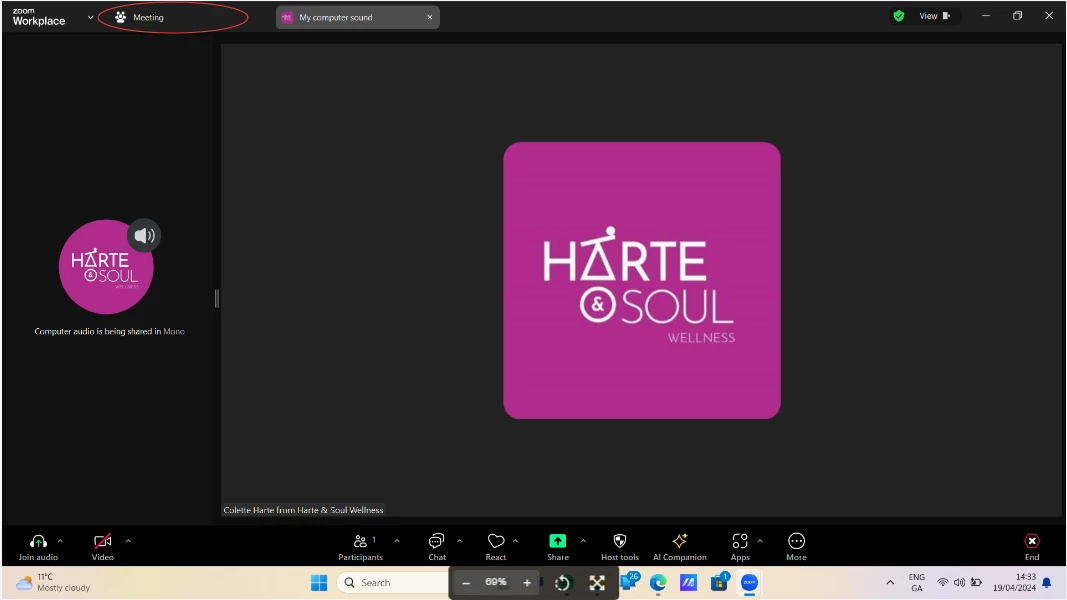
Since the recent update on zoom, when I share computer audio, this now takes up a large % of screen, and I can't make myself centre of screen with thumbnails around. Sharing Computer Audio used to appear in a small box at the top of the screen, and cannot understand for the life of me why this was changed.  See screenshot for how it appears now.

Am I missing something? Is there any way of getting rid of the big box on left telling me I am sharing computer audio?
Best answer by wayne_zhou

Could you please try to switch back to the meeting tab and check if could help? 


5 replies

Newcomer
April 19, 2024

This happened in two non-fitness meetings I attended today. It's a real problem. There is another forum post w/ some info that might help you. Still no fix for attendees, I don't think. 

HarteycAuthor
Newcomer
April 19, 2024

Thanks for reply. I'm  currently looking for competitors to zoom as I can't continue as is as is causing lots of probs

Employee
April 22, 2024

Could you please try to switch back to the meeting tab and check if could help? 


HarteycAuthor
Newcomer
April 22, 2024

Ah is that all it is?! Ok thank you so much. Life saver!

CarlaA
Community Manager
Community Manager
April 23, 2024

Hi everyone! 


Audio-only shares will appear as tabs in the new meeting experience, but we will adjust them to ensure they do not shift the presenter’s view from their current meeting tab to an audio-only share.


We're committed to improving this experience based on your feedback. Your input is crucial to us, and we'll keep refining things over time. Thank you!

Newcomer
April 29, 2024

ok

Fit-Cut-Pro
Newcomer
Newcomer
November 14, 2024

Hello online fitness trainer,

I'm going to try and help you.


First, I highly recommend that you use our special workout timer and overlays Zoom app, especially made for online workouts, it will really upgrade your fitness classes - you can get it here:
https://marketplace.zoom.us/apps/4cApKG12TJW21YzHCn3sYw


Secondly, you are welcome to reach our support team after signing up (after installing the zoom app, opening the meeting and the app, click on out logo), and we will personally help you figure out the tech problems you after facing.