

Stopping users with Otter.ai from joining meeting | Community
Skip to main content
Newcomer
March 9, 2023
Solved

Stopping users with Otter.ai from joining meeting

  • March 9, 2023
  • 20 replies
  • 11 views

Lately, we have been having a lot of users join our meetings with Otter.ai and record and transcribe the meeting.  Some of those meetings are confidential and wanted to see if there is a security setting that needs to be adjusted or what can be done to stop these users from joining the meeting with otter.ai.   We started enabling waiting rooms and allowing users in one at a time but when you have meetings with 100s of individuals, it's hard to police everyone.  Is anyone else dealing with this?
    Best answer by Freddi_G

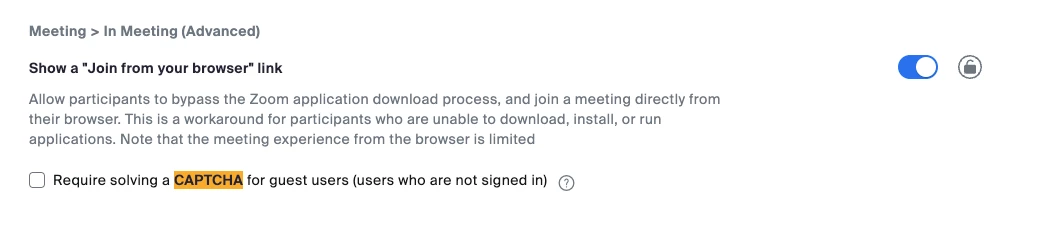
    Hello everyone, this is now available from support. Pls open a ticket with support and request to have these blocked on your account. You must be the owner or admin of the account to make the request. Pls have the account number ready and list which bot you would like removed from your account. Pls note, this type of block is for SDK type applications so make sure know if its an SDK based bot (Software based) or web (browser) based. For web based bots you can enable captcha to prevent bots from automatically joining meetings that way as well (see snapshot below). The list of bots out there is comprehensive so while we may not capture 100% of all SDK bots right now but we are doing the best we can to ensure we can protect your accounts so we are updating this list regularly.


    20 replies

    Community Manager
    March 15, 2023

    Hey @albert-rivas just to further understand, but users are joining with otter.AI enabled on their account and you are wanting to prevent users from joining or joining with otter.ai? To my understanding, Otter.ai Zoom Sync is a Business plan integration that can automatically sync and transcribe your Zoom cloud recordings, so not sure what you mean by "stopping users from joining the meeting with otter.ai."


    Have you looked into Zooms Audio transcription for cloud recordings though? 

    Newcomer
    March 15, 2023

    We are wanting to stop recordings and transcriptions of our meetings as some of them are confidential.  I was looking to hopefully enable some security settings that zoom might have to stop any user that comes in with something like otter.ai or another transcribing/recording software.


    Not all of our meetings are confidential but the ones that are, we want to enable any security settings to keep them confidential and not recorded/transcribed.

    Newcomer
    December 31, 2024

    If the bots are being invited by an external user who has connected their calendar to a notetaking bot you have a few options. You can require authentication and a waiting room to vet attendees who try to join. You could try to block by IP address although this likely will not be comprehensive as the list of possible IP addresses keeps growing. Requiring CAPTCHA in Zoom will only stop web based bots not SDKs. You can also use Salepager which lets you invite people to your Zoom meetings while verifying if they are human when they try to join to prevent unauthorized third party bots from joining. 

    Newcomer
    March 28, 2023

    Yes I have the same problem. It gets worse - people who have the option in Otter set to automatically join all their meetings, end up having Otter attend on their behalf and then broadcasting these live notes to everybody who was invited to the meeting - breaking all kinds of confidentiality.

    Newcomer
    March 28, 2023

    That is precisely the problem.  I feel that there should be a security setting that should stop automated ai bots from transcribing the meetings we don't want to be transcribed.  I am just asking if there are any settings or anything that we can activate in zoom to stop this from happening.  it doesn't seem like there is a way to do this. 🤷🏽‍♂

    Newcomer
    April 2, 2023

    I look forward to seeing a response to this. It's such an unbelievable violation of our confidentiality that we cannot prevent it. 

    Newcomer
    April 2, 2023

    YES! We have been having this issue repeatedly. I sent Otter 4 urgent emails and nobody replied to me. Absurd that they are allowed to do that. I emailed zoom with the same concerns, nobody replied. 

    Newcomer
    August 7, 2023

    Otter replied to me.  


    "you may view your guest list on the meeting and if someone's name matches that Otterpilot, that person must've created an account with Otter, and you may notify them about the recording."


    Not helpful at all. 

    Newcomer
    April 7, 2023

    We have had a similar issue with Zoom meetings at the university.

    Apparently, research students have downloaded the program for transcription. They had no idea this program would remote into any meetings (even if they had not intended to attend it - virtually or otherwise).  As one possible solution, a student deleted the program.

    Newcomer
    April 7, 2023

    Hi there - Yes, and it would be good to have a facility in Zoom to address this. I have had some people willing and able to either delete Otter or (simple enough) changes its settings so it doesn't automatically enter all their meetings. 

    However I would like to be able to block Otter.ai on a blanket basis from confidential meetings I host.

    Newcomer
    April 26, 2023

    Please consider the following:

    I can screen record anything on my computer screen using a multitude of screen tecording applications. Once I have this recording I can transcribe it using any number of methods.


    Zoom may stop Otter AI, but essentially,  a determined user will succeed. I can just point my cell phone camera at my computer monitor and press record and do everything you are concerned about.


    Maybe it’s time rethink how you conduct meetings and what should or should not be part of the meeting.


    Everything I just said is true for Microsoft Teams meetings, Google Meet, WebEx and all of the other meeting platforms.


    Hace you considered using other means such as an NDA?


    Regards


    Dear Frank, you make good points - in the event that somebody is determined to break confidentiality and record by some means. I believe what is different about Otter.AI's app is that it makes perfectly well-meaning subscribers to a meeting into unwitting breakers of confidentiality and spreads unnecessary alarm amongst participants. 

    My meetings, for example, are not of earth-shattering confidentiality but personal matters are discussed in ways that participants only want to share them live and in the moment. When somebody for some reason doesn't make it to the meeting, and then unknown to that person has a robot go into the meeting in his or her name and broadcast its contents - that is on a whole different level of disruption.

    Newcomer
    April 25, 2023

    I'd like to summarize the problems identified in this thread in one place, and ask users to verify the accuracy. If indeed all of the below is true, it is alarming:


    1. Otter automatically attends any Zoom meeting on my calendar, and records/trancribes audio?
    2. Does it do so even if I do not log in to the Zoom meeting?
    3. Does it notify all attendees it is doing so? It sounds like it does not identify which user is doing so -- thus the waiting room workaround, is that correct?
    4. Then it emails the transcription to every person who was invited to the meeting.

    Am I missing any aspect of the problem?

    Possible solutions, whether implemented by Otter, Zoom (would have to be other platforms, too) or both:


    a. It does not attend a meeting unless the user logs in.
    b. It does not record/transcribe unless the user turns it on during a meeting.
    c. The meeting host is notified WITH the user's identity and must authorize the recording.
    d. The meeting host can forbid Otter. But would have to be done on every platform -- or be built into Otter.


    I sure would like to see this prioritized by Otter. What's the best way to communicate with them? In the meantime, I will NOT be installing this app on my computer. And I'm glad I checked this forum before doing so. Thanks, everyone.

    Newcomer
    April 25, 2023

    I just uninstalled Otter from my Chrome browser, and it gave me the opportunity to describe the problems and suggest solutions. Nice. 

    Newcomer
    April 30, 2023

    Can't we just deny entry to an Otter AI as the host of a meeting? Unless you have 100 people entering all at once & need to "admit all," it's totally controllable. If you do have 100 people, it's likely you have an assistant in there looking for "bombers" anyhow, so it can be a non-issue.

    What am I missing?


    As an Otter user, I'm looking for ways to be efficient without being obnoxious to other hosts.

    Newcomer
    August 7, 2023

    That's good that Otter works for you.  But as a member of an anonymous 12-step group, our meetings are open and we don't always have someone available to host the meeting in order to turn on the waiting room and block the Otter bot from entering the meeting.  As the original poster states, Zoom should give us a security option to not allow Otter bots into our meetings.  That way someone like you does not have to enable, and others like the original poster and myself can enable.

    Newcomer
    October 19, 2023

    I have written Otter as I share membership in a group like the ine described. Its difficult to play whack a mole removing these users or begging companies like zoom and microsoft to provide a safeguard. If Otter can through their integration announce themselves and allow the meeting host to say no that may work. Otherwise zoom, ms, webex, etc etc will all have to deal with otter and any other copy cats down the road. This whole thing seems crazy to me as someone who has been in high tech for 25 years. 

    Newcomer
    August 7, 2023

    We are also very concerned about todays post in Stackdiary that Zoom will use our proprietary and personal date to train their AI monkey... Hoping to get some clarification from the CEO of Zoom very soon. Also curious if that is allowed in the European Union (likely not foreseen by the GDPR "masterminds"?)

    Newcomer
    August 10, 2023

    I found this notification inside my desktop Otter today, which I don't normally use. But the linked blog piece is dated June 2022. 


    Also: Where are the meeting recordings kept? I'm not finding any Otter folder in my hard drive Program Files or elsewhere. Are they kept in Otter's cloud without our access? And: Does our concern apply to any Zoom meeting if we have Otter installed in our browser (or hard drive?) I have it only on my phone. I host Zoom sessions all the time and have never had an attendee say they got meeting minutes. Is a "meeting" a subgroup of all Zoom sessions?

    Newcomer
    January 6, 2025

    There are a few ways to stop bots joining your meetings on behalf of external guests. You can enable a waiting room and vet attendees as they join. You can block specific IP addresses associated with bots (make sure the list is comprehensive). You can file tickets with Zoom (for SDK bots) and apply guest CAPTCHA for web based. If you want to automate this there is an app, Salepager that verifies whether attendees are human before they join your Zoom meetings and blocks bots. 

    Community Champion | Employee
    August 10, 2023

    Hello everyone, Zoom is actively working on a way for admins to control this very soon via a support ticket. We will provide updates as soon as this is available!

    Newcomer
    August 17, 2023

    this is urgent - do you have an ETA? Every one of my meetings - an I have many every day - is infested by 5+ otter pilots.