

Zoomtopia is here. Unlock the transformative power of generative AI, helping you connect, collaborate, and Work Happy with AI Companion.
Register nowEmpowering you to increase productivity, improve team effectiveness, and enhance skills.
Learn moreKeep your Zoom app up to date to access the latest features.
Download Center Download the Zoom appDownload hi-res images and animations to elevate your next Zoom meeting.
Browse Backgrounds Zoom Virtual BackgroundsEmpowering you to increase productivity, improve team effectiveness, and enhance skills.
Zoom AI CompanionUser groups are unique spaces where community members can collaborate, network, and exchange knowledge on similar interests and expertise.
Help & Resources is your place to discover helpful Zoom support resources, browse Zoom Community how-to documentation, and stay updated on community announcements.
The Events page is your destination for upcoming webinars, platform training sessions, targeted user events, and more. Stay updated on opportunities to enhance your skills and connect with fellow Zoom users.
2025-07-09 09:19 AM
Zoom 6.4.12
macOS 15.5
In a recent upgrade Zoom has resumed its normal bad behavior by launching on macOS login. I do not want this for myself for my 60 coworkers. Zoom should only run when the user wants it to run. I do not see any of the normal ways to have it not run on its own. I assume if I remove the LaunchAgent it will just create it again. I thought that Zoom was over breaking macOS conventions and sticking its nose where not wanted.
I've checked macOS user launch settings, the icon in the Dock, and settings inside of Zoom Workplace. When I see this sort of behavior there is no way in heck that I would consider buying a Zoom product, such as a Zoom phone system.
Hopefully there is a simple solution and I'm just overreacting. But while I at it how do I remove the AI Companion ad from Zoom Workplace window?
Solved! Go to Solution.
2025-07-10 06:34 AM
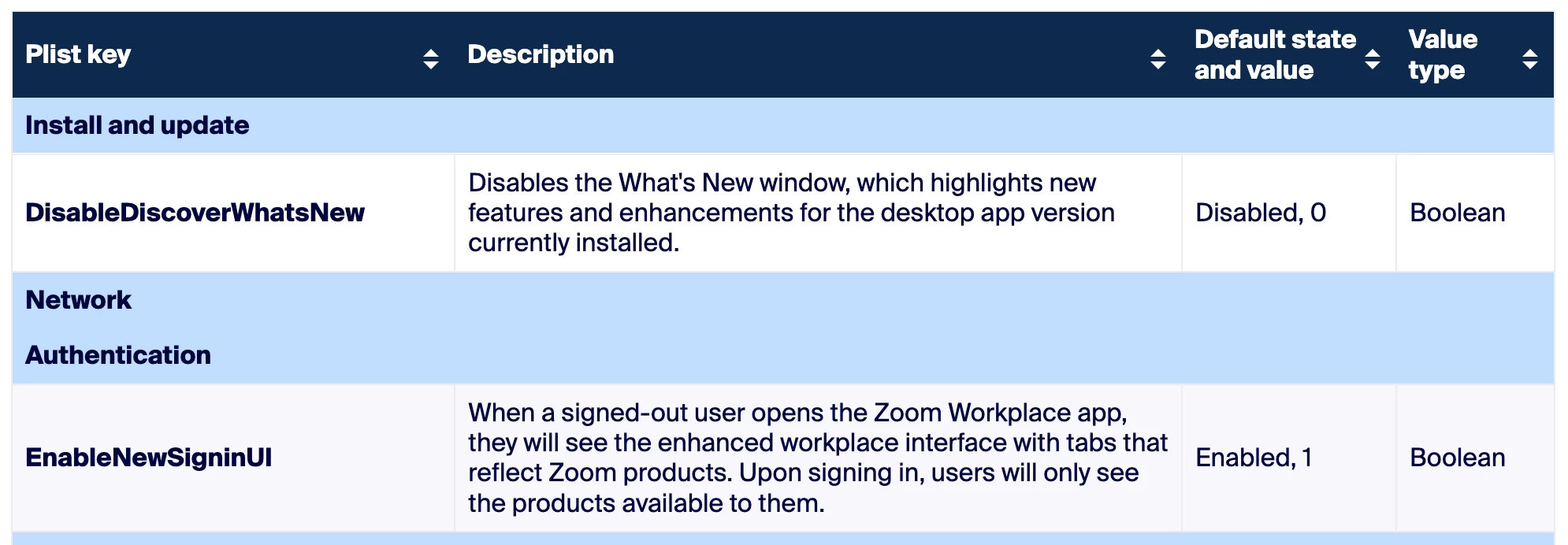
To address the second question (Companion AI ads) - these can be managed via PLIST, configuration profile, or ZDM for MacOS.
The policies are as follows:
2025-07-10 06:34 AM
To address the second question (Companion AI ads) - these can be managed via PLIST, configuration profile, or ZDM for MacOS.
The policies are as follows:
2025-07-10 06:34 AM
If it wasn't immediately obvious, you'll want the OPPOSITE values of what's shown here. 1 and 0, respectively.