


Speaker window goes dark when speaker is talking. | Community
Skip to main content
Roger_Blair
Newcomer
Newcomer
December 29, 2023
Solved

Speaker window goes dark when speaker is talking.

  • December 29, 2023
  • 11 replies
  • 0 views

I'm running the current version of Zoom on a Windows 10 laptop. When I'm in a meeting, the speaker's window goes black while he/she is speaking and the yellow line surrounds the window. In Speaker view, the speaker's thumbnail appears, but the main window is dark. I've uninstalled and reinstalled Zoom, but the same thing happens. How can I fix this?


Best answer by rn-zm

Hi @Roger_Blair welcome to the community! Are you still having this issue as of today? You referred to the internet that you're currently connected to that maybe degrading your meeting performance. Have you tried other networks recently to see if your meeting experience has changed? 


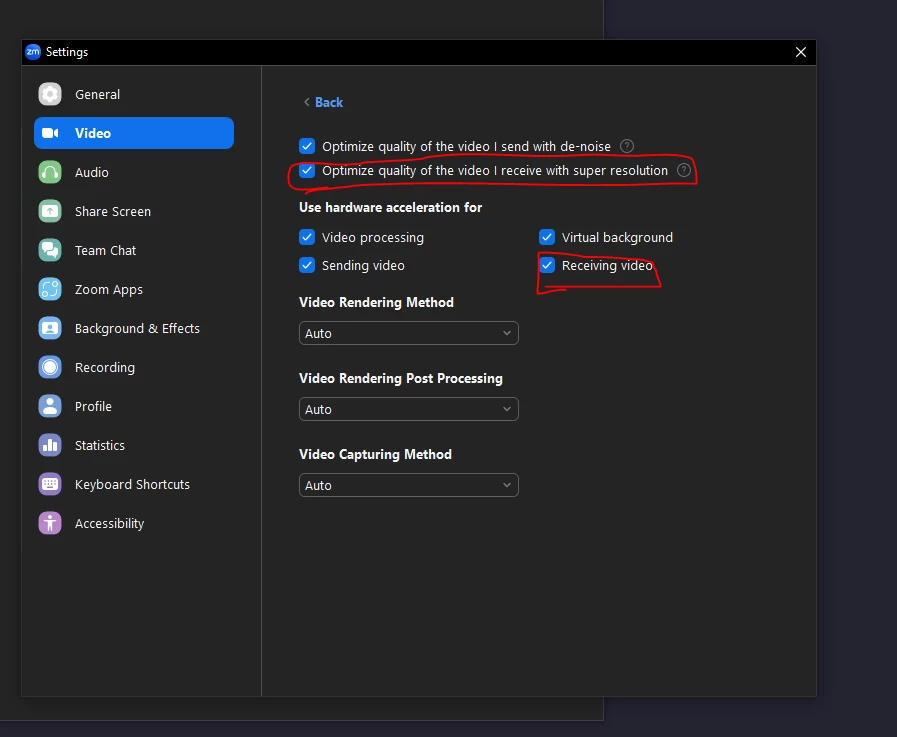
Otherwise, you could attempt to disable these video settings that maybe utilizing more hardware from your device when receiving video. 


11 replies

Newcomer
January 23, 2024

I tried updating and no go. I went to Video Settings, then Advanced, then unclicked the option that says 'optimize quality of the video I receive with super resolution' and it started working again.

Newcomer
January 30, 2024

Update:  I was able to correct the earlier problem (speaker screen goes dark) by uninstalling and installing an earlier release (thanks to Yves6 and others).  The most recent Zoom updates are working well.