

Send all participants back to the waiting room? | Community
Skip to main content
Newcomer
May 2, 2023
Solved

Send all participants back to the waiting room?

  • May 2, 2023
  • 2 replies
  • 1 view

Despite security precautions, we do experience the occasional Zoom bombers during our meetings.


When this happens, is there a one-click way to send everyone in the meeting back into the waiting room at once while we sort things out? Or can it only be done by clicking on each participant individually and sending them to the waiting room?
    Best answer by ZoomTestKitchen

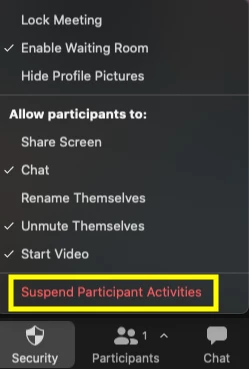
    Your request is exactly what Suspend Participant Activities is made for. It can be found under the Security icon in the toolbar.


    Suspend Participant Activities: Turn off all participant's video, audio, Zoom Apps, and ability to share their screen. Also lock the meeting to prevent participants from joining. This will apply to all participants, including those joined using a Zoom Room.


    After executing this you'll need to manually re-enable each feature.


    If you find this information helpful, please click on "Accept as Solution".

    If you have further questions, please reply, we're happy to help.


    2 replies

    ZoomTestKitchen
    Specialist
    Specialist
    May 2, 2023

    Your request is exactly what Suspend Participant Activities is made for. It can be found under the Security icon in the toolbar.


    Suspend Participant Activities: Turn off all participant's video, audio, Zoom Apps, and ability to share their screen. Also lock the meeting to prevent participants from joining. This will apply to all participants, including those joined using a Zoom Room.


    After executing this you'll need to manually re-enable each feature.


    If you find this information helpful, please click on "Accept as Solution".

    If you have further questions, please reply, we're happy to help.


    Newcomer
    October 16, 2023

    I am a Teacher using Zoom with Brightspace in a Virtual Classroom. When the building I am in has a fire drill, how do I put students back in the waiting room. The above explanation says to Turn off enabled features and turn them back on when you come back to your device. I am not sure what my default situation is to turn on or off, the features I am using.

    Chris