
Scheduling meeting on behalf of someone | Community
Skip to main content
Newcomer
November 17, 2022
Question

Scheduling meeting on behalf of someone

  • November 17, 2022
  • 2 replies
  • 0 views

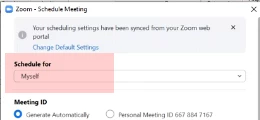
Hi, on scheduling a zoom meeting in outlook on behalf of someone else the Schedule for field remains for myself for one user, whereas it changes automatically when I schedule meetings for other executives to their name in their calendars. I have editor rights for all calendars. 

Please advise how to change it to default to that user's name on behalf of whom I schedule the meetings. 


Thanks.


For your reference:


2 replies

YaBoiB
Community Champion | Employee
November 17, 2022

Hello @Paramjit


 Are you creating this scheduled meeting in Outlook first and then attempting to edit the scheduled meeting? 


The reason that I ask is if you are creating the meeting from Zoom and then transferring the meeting to outlook, the default will always revert to yourself. 


Thanks,

Brandon

ParamjitAuthor
Newcomer
November 17, 2022

Yes, I go to the calendars. Select the user's calendar> click on schedule a meeting then this window pops up 

In Schedule for it should be user's name by default but it shows Myself every time.

Newcomer
November 18, 2022

Sign in to the Zoom mobile app.
On the Meetings tab, tap Schedule . ...
Tap Advanced Options.
Tap Scheduling Privilege.
Tap the name of the user you want to schedule the meeting for.
Adjust other meeting settings as needed.
Tap Done to finish scheduling.


Regards,

James

Newcomer
December 2, 2022

How do you do that on a desktop