
Saving Transcript of Chat | Community
Skip to main content
Newcomer
August 31, 2021
Solved

Saving Transcript of Chat

  • August 31, 2021
  • 1 reply
  • 23 views

Hi There,

Is there a way to save transcript of the chat if you are NOT the meeting host?


Thanks!

    Best answer by Bort

    Hi @ZoomMom 

    Yes, it is possible to save the chat transcript, but the host has to allow that to happen. 
    When viewing the in-meeting chat, click the ... button and then select Save Chat. 
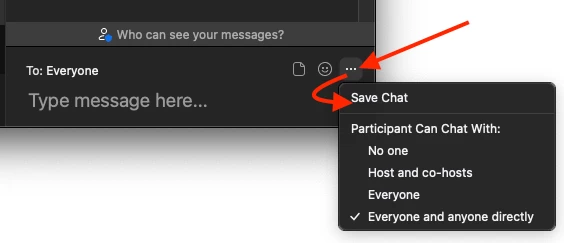
    As I said, that may not be available if the host has disabled that from their settings. 


    Hope that helps and please make sure to mark the solution as accepted if this information is what you needed.

    1 reply

    Bort
    Employee
    BortAnswer
    Employee
    September 1, 2021

    Hi @ZoomMom 

    Yes, it is possible to save the chat transcript, but the host has to allow that to happen. 
    When viewing the in-meeting chat, click the ... button and then select Save Chat. 

    As I said, that may not be available if the host has disabled that from their settings. 


    Hope that helps and please make sure to mark the solution as accepted if this information is what you needed.

    Newcomer
    July 12, 2022

    Hi -- thanks for answering this --- I have a further question.  Does clicking the ellipses and selecting Save Chat save the WHOLE chat, no matter when you click it, or do you have to select Save Chat at the VERY end in order to get the whole chat transcript (versus just at the point that you clicked Save Chat)?  Thanks much .


    Newcomer
    August 4, 2022

    Hi @BlueFireBeloved 

    Finally had a few minutes to test!

    When you click the Save Chat option, the app saves a transcript of the chat as it currently is and only your view of the chat messages. So, any private messages you sent or received, as well as all the public messages, will be included, but any private messages you were not part of, will be excluded.


    Any messages sent or received afterwards will not be included in the transcript you've just saved. 


    So, to answer your question, it would be best to save the chat transcript at the end of the meeting. If you are hosting these meetings, I would suggest enabling the Auto saving chats option in web settings, so that your chat transcript is always automatically saved at the end of the meeting. Just keep in mind this only works for the host, so any meetings you join (not as the host) will require you to manually save the transcript. 


    Hope that helps and let me know if you have any further questions! 


    Thanks so much, Bort!  Really appreciate your time!  That was my speculation, based on some scattered past experience.  Great clarification on this helpful feature.   It WOULD be great if that AUTO SAVE was available for all users, as the host is generally NOT needing this feature, and participants are.  Don't know if this is the place for this type of feedback; just thought to mention it since you are on the Zoom team. 

    Thanks again so much for your excellent help.