
Zoomtopia is here. Unlock the transformative power of generative AI, helping you connect, collaborate, and Work Happy with AI Companion.
Register nowEmpowering you to increase productivity, improve team effectiveness, and enhance skills.
Learn moreEmpowering you to increase productivity, improve team effectiveness, and enhance skills.
Zoom AI Companion사용자 그룹은 커뮤니티 구성원들이 비슷한 관심사와 전문 지식에 대해 협업하고, 교류하고, 지식을 주고받을 수 있는 특별한 공간입니다.
도움말 및 리소스는 유용한 Zoom 지원 리소스를 찾고 Zoom 커뮤니티 사용 방법 문서를 검색하며 최신 커뮤니티 공지 사항을 볼 수 있는 공간입니다.
이벤트 페이지는 다가오는 웨비나, 플랫폼 교육 세션, 대상 사용자 이벤트 등을 위한 목적지입니다. 기술을 향상시키고 다른 Zoom 사용자와 연결할 수 있는 기회에 대해 최신 정보를 유지하세요.
Hi @ZoomMom
Yes, it is possible to save the chat transcript, but the host has to allow that to happen.
When viewing the in-meeting chat, click the ... button and then select Save Chat.
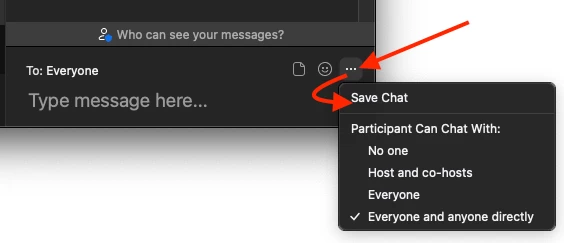
As I said, that may not be available if the host has disabled that from their settings.
Hope that helps and please make sure to mark the solution as accepted if this information is what you needed.
Hi @ZoomMom
Yes, it is possible to save the chat transcript, but the host has to allow that to happen.
When viewing the in-meeting chat, click the ... button and then select Save Chat.
As I said, that may not be available if the host has disabled that from their settings.
Hope that helps and please make sure to mark the solution as accepted if this information is what you needed.
날짜: 2022-07-12 12:44 PM
Hi -- thanks for answering this --- I have a further question. Does clicking the ellipses and selecting Save Chat save the WHOLE chat, no matter when you click it, or do you have to select Save Chat at the VERY end in order to get the whole chat transcript (versus just at the point that you clicked Save Chat)? Thanks much .
날짜: 2022-07-15 04:31 PM
I haven't forgot about your question @BlueFireBeloved , but I just haven't had the chance to test it. I will let you know when I have confirmation for you.
2022-07-16 11:53 AM - 편집 2022-07-16 11:54 AM
Thanks, Bort, for checking in! I appreciate it, and I certainly do understand.
날짜: 2022-08-03 02:11 PM
Hi @BlueFireBeloved
Finally had a few minutes to test!
When you click the Save Chat option, the app saves a transcript of the chat as it currently is and only your view of the chat messages. So, any private messages you sent or received, as well as all the public messages, will be included, but any private messages you were not part of, will be excluded.
Any messages sent or received afterwards will not be included in the transcript you've just saved.
So, to answer your question, it would be best to save the chat transcript at the end of the meeting. If you are hosting these meetings, I would suggest enabling the Auto saving chats option in web settings, so that your chat transcript is always automatically saved at the end of the meeting. Just keep in mind this only works for the host, so any meetings you join (not as the host) will require you to manually save the transcript.
Hope that helps and let me know if you have any further questions!
2022-08-04 10:39 AM - 편집 2022-08-04 11:05 AM
Thanks so much, Bort! Really appreciate your time! That was my speculation, based on some scattered past experience. Great clarification on this helpful feature. It WOULD be great if that AUTO SAVE was available for all users, as the host is generally NOT needing this feature, and participants are. Don't know if this is the place for this type of feedback; just thought to mention it since you are on the Zoom team.
Thanks again so much for your excellent help.
날짜: 2022-08-04 11:13 AM
Oh, so I just realized I did not ask for clarification on what happens when the host selects AutoSave for the Chat. Does that save it for everyone, or does just the host receive a file of the chat transcript?
Thanks!
날짜: 2022-08-04 11:41 AM
Just the host will have the chat transcript saved, other participants will have to manually save if they want their own records.
날짜: 2023-05-15 08:10 AM
Yes. It was not there. I also ran a complete search of my PC for "meeting_save_chat.txt" without luck. I submitted a ticket to support and there suggestion was to uninstall and reinstall Zoom. However, the chat file is lost.
