


Save recording to Vimeo to save Zoom Storage | Community
Skip to main content
Ed_AA_Ltd
Newcomer
Newcomer
August 25, 2021
Solved

Save recording to Vimeo to save Zoom Storage

  • August 25, 2021
  • 2 replies
  • 0 views

Hello!


I have linked Zoom to my Vimeo account and automatically upload the recording to Vimeo.


I have limited Zoom storage, and the recording also saves to my Zoom Cloud, so I have to go in after every meeting and delete the recording on Zoom.


Can anyone advise if there is a setting whereby I can continue to upload automatically to Vimeo without also saving to the Zoom cloud?


Thank you!
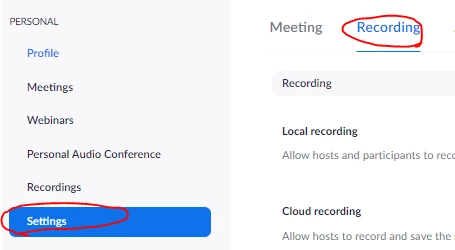
 

Best answer by Ohkawa

Hi,Ed_AA_Ltd

How about using auto-delete to look at it?

https://zoom.us>Settings>Recording>Auto delete cloud recordings after days>set 1 day


2 replies

Ohkawa
Community Champion | Customer
OhkawaAnswer
Community Champion | Customer
August 25, 2021

Hi,Ed_AA_Ltd

How about using auto-delete to look at it?

https://zoom.us>Settings>Recording>Auto delete cloud recordings after days>set 1 day


Ed_AA_Ltd
Newcomer
Ed_AA_LtdAuthor
Newcomer
August 26, 2021

Thank you Ohkawa,


I will use that solution. 👍


Kind regards,

Ed


Newcomer
September 6, 2021

Hi,

How did you set up zoom to auto save to your View account for cloud storage?

I have a high volume 3rd party cloud storage and I'd like to set up my Zoom Pro account to auto save to that online cloud storage address.

Kurt
