

Recurring not showing up on Zoom web-based verion | Community
Skip to main content
Newcomer
September 8, 2021
Solved

Recurring not showing up on Zoom web-based verion

  • September 8, 2021
  • 11 replies
  • 1 view

I have a recurring meeting.  I can see this week's occurrence on the app, but I need to edit it on the web based version and it's not showing up at all - not in current meetings and not in previous meetings. 
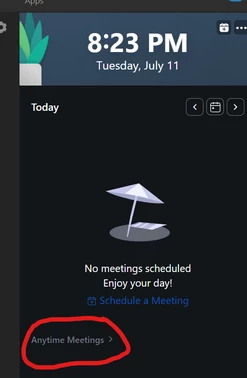
    Best answer by br63

    I found that there is a new "Anytime Meetings >" in the calendar sidebar that when clicked shows all the recurring meetings.

    I hope that helps

    11 replies

    Newcomer
    September 9, 2021

    @wendywong,

    If you are the host of the recurring meeting, you can find.

    Sign in to the Zoom web portal.

    In the navigation menu, click Meetings.

    Select the Upcoming meetings tab and scroll down and see the end it replicates. if you have multiple meetings, go to the next page and find it. 


    Note:  All recurring meetings show on the last page.

    wendywongAuthor
    Newcomer
    September 9, 2021

    Thanks.  It wasn't showing up on the web version.  Not in meetings or in previous meetings.  But it was showing on my app.  However, I ended up in an on-line chat with a Zoom rep and although they couldn't find it at first, they stuck with it and eventually found the meeting in question.  Grateful they saw it through.  We were both a bit stumped.

    Newcomer
    March 2, 2022

    As soon as I select "Recurring" in the website and save, the meeting disappears from my upcoming meetings in the app.  If I go back and uncheck recurring, the meeting shows up in my upcoming appointments again.  The recurring appointments still show up in my account in the online portal.  Do you know a workaround to fix this?

    Newcomer
    February 9, 2023

    Did you find a fix to this problem same issue with me 

    wendywongAuthor
    Newcomer
    February 9, 2023

    I logged in on the web version.  went to meetings - and then previous meetings.  I found the mtg and reset the recurring parameters.  But..I believe when I wrote this original post, that process was not working.  It's happened lots since then, and I've been able to troubleshoot in the usual way.

    Newcomer
    June 9, 2022

    After all this time it is still an issue.  I had the same issue this week.  The link would still work but I could not find, verify or edit it in the web UI.  Simply not to be found.  

    Newcomer
    August 12, 2022

    I found this knowledge base article. See bullets!!

    https://support.zoom.us/hc/en-us/articles/214973206-Scheduling-recurring-meetings

    For individual meeting occurrences to show up in the Zoom desktop client or mobile app, you must schedule the recurring meetings in the Zoom web portal.

    I know I set mine up in Outlook or my phone, not the web portal. Thus, that is why they are not showing up! Don't like it, but it is explained

    Newcomer
    February 13, 2023

    I have the opposite problem!  I can see all my recurring meetings in the web based version, but not on the app.  This problem started last Friday.  Was there an update or a change?


    Newcomer
    June 28, 2023

    I just started having the same issue. Did you have any fixes?

    wendywongAuthor
    Newcomer
    June 28, 2023

    It was glitching at that time but now I can go into past meetings, find it, and edit to include todays date range 

    Newcomer
    March 3, 2023

    Can't see my meetings in the web version.   

    Is there no QA anymore - Oh wait, that's right the end-user is the QA tech. 

    Web development strategy best-practice: Fire costly developers and QA staff, deploy buggy releases, hire more ultra-sympathetic level one support bodies at pennies on the dollar to make it seem like you "...really do care".  Then follow up with a "rate us" survey email that only asks how the rep was.  "Golly, Bobby was so nice, I can't trash him..."   Then brag "We have 110% customer satisfaction" and continue re-counting your stock options.

    - Whatever you do Mr. IT  - never EVER ask for reasons WHY the customer needed to call in the first place.

    With Zoom - they shut me out entirely - I guess $157 clams per year isn't enough to even get Chat support.   Worthless.


    Newcomer
    July 3, 2023

    I stopped seeing my recurrent meetings on the app last week after a new update. I've searched through all the settings. Please fix it!

    Newcomer
    July 3, 2023

    I am missing a bunch of meetings that I believe are set up. I am only using the web version to set up and to view.

    Newcomer
    July 11, 2023

    I have the same problem! And Zoom only directs me to a bot. How did you get to talk with someone on their team?

    wendywongAuthor
    Newcomer
    July 12, 2023

    I'm sorry lilian.  It was so long ago, I can't recall how I spoke with them.  Usually with a bot, I can put in speak to agent and it will sometimes redirect.

    Newcomer
    July 17, 2023

    Zoom will not be able to keep track of all your upcoming events if you forget to enable calendar sync. Another possible factor that can lead to scheduled meetings not showing up is when the Zoom app crashes or malfunctions due to some kind of bug or other technical issues.


    Regards,

    Diana

    Newcomer
    August 13, 2023

    zoom has helped,  can we start I will be ready according to the schedule in our calendar time.