

Piano teacher cannot hear students playing notes sound cutting in out | Community
Skip to main content
Newcomer
January 2, 2023
Question

Piano teacher cannot hear students playing notes sound cutting in out

  • January 2, 2023
  • 15 replies
  • 1 view

Teaching Piano online with zoom For the last 2 years has been excellent until now... 


Problem 

When students play piano during lesson for my mother who teaches online, audio at a certain threshold cuts out on her side / filtered. softer played notes from what I noticed so far this is a new problem so I'm all over it and monitoring. 


The problem began last week so I believe ( not 💯) it is an update that has been rolled out across Zoom community on Dec 29,2022


I am currently changing experimenting on my side


windows driver sound render raw
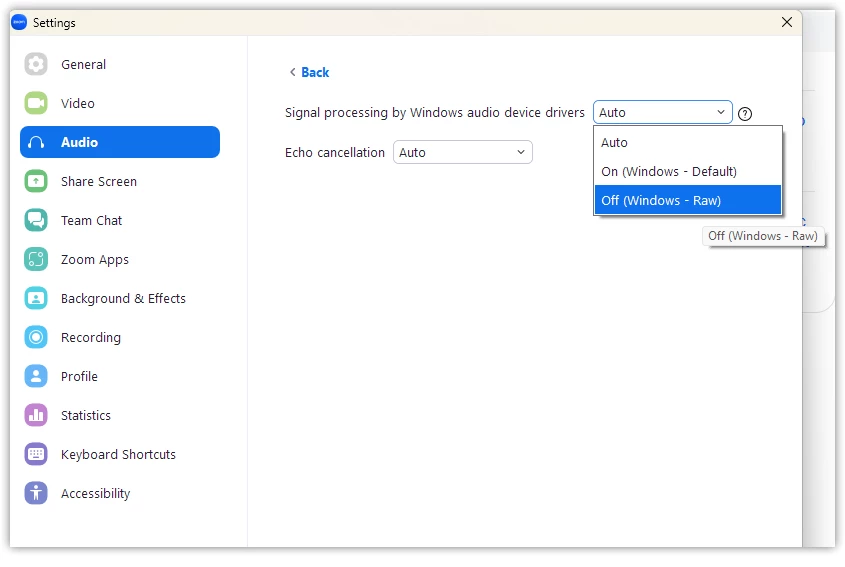
 

Original sound for musicians off ( 


Our machine is a Windows 11 machine  I have not applied any driver or Windows updates recently.

I have a Nvidia card that has not been modified or updated nothing has been changed on local machine. Also use an external webcam that is not been updated or settings changed


Students have a diverse range of devices from ipdads to iphones, Android, chrome books to windows laptops (best sounding so far) with external and internal camera/mic


Nothing was changed on our side before this problem came about I don't like to change anything on their side because most piano students are using their parents' device, and most parents are prominent CEOs celebs Etc that use their devices in meetings ( I'm an IT guy and I know for sure their it guys wouldn't be very happy campers if they picked up someone was in there changing things) and certainly don't want to mess with Apple devices. 


anyone have any ideas, or info and could share that'd be awesome happy New Year everyone! matt


    15 replies

    YaBoiB
    Community Champion | Employee
    Community Champion | Employee
    January 5, 2023

    Hello Matt, 


     Have you attempted to change the auto echo cancellation in the advanced settings of the Zoom Desktop App? 


    See screenshot (from a Mac) 


     Also, I know that Windows 11 has some aggressive echo cancellation built in to their sound settings as well. You may want to work on tweaking your sound settings on the machine in question but keep using Original Sound for musicians as we have built this to be designed to play music during a Zoom session. 


    Let me know if there is anything further that I can do to assist you on this issue. 


    Thanks, 

    Brandon

    Newcomer
    January 9, 2023

    Hi Brandon

    Already have tried that.


    [x] Zoom Settings \ Audio \ Echo Cancelation \ [auto]

    YaBoiB
    Community Champion | Employee
    Community Champion | Employee
    January 9, 2023

    Hi @BenjaminPiano


     Let me check on my Windows 11 laptop. I do not have a piano at home but I have a guitar that I can try to use to test. I know that Windows 11 came out with some aggressive audio compression algorithms as well, so the two might be in conflict with each other somehow. I will also ask around Zoom and see if anyone can test with me and see if we cannot figure out a resolution for your issues. 


    Regards,
    Brandon 

    Newcomer
    January 5, 2023

    I'm having the same issue with my flute student. I turned on Original Sound for Musicians. However, she's on an iPad and can't find the toggle to turn on her original sound, so her sound on my end is intermittent. She is able to hear me playing, however, because I could turn on my Original Sound for Musicians so she could hear me with no problem.

    YaBoiB
    Community Champion | Employee
    Community Champion | Employee
    January 6, 2023

    Hello @pollypumpkin55


     On an iPad if you go to the ellipses (three dots) that say more underneath them > then go to meeting settings > there is an audio setting there called use original sound. 


    There is also instructions here as well https://support.zoom.us/hc/en-us/articles/115003279466-Using-original-sound-for-musicians-in-a-meeting


    Please try that and let me know if that works for you. 


    Brandon

    Newcomer
    January 11, 2023

    Thank you. I will copy these instructions and send them to her and see what happens!

    Newcomer
    January 15, 2023

    I am using Zoom for our church services.  We can hear people speaking fine but not piano even when microphone or computer are right beside piano.  I have tried all of these suggestions but I still only hear one note on piano and then nothing.  I have turned off Automatically adjust microphone volume, 

    I have tried all of suggestions on this page original sound with High Fidelity and Stereo.  With Echo suppression enabled and disabled.  Advanced setting - echo suppression automatic.  Windows audio device drivers off, on and auto.  Nothing seems to help.  I also set the noise suppression at Low as suggested on one of the feeds in the community.  Help.  We need to hear the music for church services. 


    YaBoiB
    Community Champion | Employee
    Community Champion | Employee
    January 18, 2023

    Hello @Coug18


     Have you tried to add a hub and plug in an external microphone into the hub and have it right next to the piano so that this single microphone is picking up the piano sound. You could get very technical with it and use audio mixing software and use multiple channels which was just released by Zoom in the latest version 5.13.5 link below.

    Support for multiple audio input channels


    There are many ways to achieve this but I am not sure that you can achieve this using microphones and speakers that are imbedded into a laptop, I am not sure that the quality of these devices are designed to hear music and speaking simultaneously. 


    Regards,

    Brandon

    Newcomer
    January 30, 2023

    I have over 50 students all with varying devices. I have tried to help them but Zoom is not consistent with accessing the settings on the different devices. Especially frustrating when the student is only 10 years old.  Zoom is becoming impossible to use for music lessons!

    Newcomer
    January 18, 2023

    Hi Brandon-- I tried your instructions:  "On an iPad if you go to the ellipses (three dots) that say more underneath them > then go to meeting settings > there is an audio setting there called use original sound. "


    And it worked! The only annoying thing is that I need to mute myself while she's playing because if not then she gets an echo, but it's so much much better than it was. Thanks for your help with this.--Polly

    Newcomer
    January 24, 2023

    I am having the same problem. Excellent piano, top quality microphone recommended by the audio engineer at a quality classical radio station. I used all the zoom settings recommended by the audio engineer (original sound, etc). It used to work pretty well (although not compared to in person), All summer went to lessons in person, but now that covid number are off the charts again, I'm back to lessons at home and my piano teacher can't hear a thing. I have Win 11. 

    Newcomer
    January 29, 2023

    Another Piano teacher having the same problem hearing students play over zoom meetings.

    Not Good

    Newcomer
    January 31, 2023

    I've tried everything suggested here plus a few other things and I am giving up on zoom for use with an instrument.  Somehow the combination of zoom plus windows plus intel equals "no sound from piano".  I am currently using a different video platform and have had no trouble since I switched.

    Newcomer
    February 1, 2023

    not good 

    thinking about making the same decision 

    can you share platform? 

    Skype? 

    Microsoft teems meeting?


    Newcomer
    February 1, 2023

    UPDATE 

    what we have noticed is problem is iphones and ipads.


    win 11 laptops with external cams work best


    you can't blame windows, even when session is transferred from windows 11 to iPhone 11 that is using different internet provider connection with original audio and sound enabled same problem, certain notes filtered.

    If Your problem is with iPhones like ours you could try this


    Phone noise cancellation is available and on by default on iPhone 12 and earlier. Apple Support says iPhone 13 models don’t support Noise Cancellation feature available in previous iPhones.


    You can disable it all together here via support apple.com.


    https://support.apple.com/guide/iphone/mono-audio-balance-phone-noise-cancellation-iph3e2e2cdc/ios


    AND why am I troubleshooting this?!?! Zoom support should be all over this! 

    Newcomer
    February 2, 2023

    No device at any of my students homes is able to use Zoom. I'm on a Mac, I've adjusted setting as per advice and nada. Utter fail. We are supposed to have an online evaluation event in a few weeks, three people have to be in the meet at the same time. I have no other platform for a multi person event.


    Then kids are supposed to take Royal Conservatory Exams via Zoom. Examiners in Canada, kids here in New Jersey. The families pay hundreds of dollars for the exam and Zoom will be useless. What gives and why is there no response from Zoom. No answers to my emails!

    Newcomer
    February 3, 2023

    UPDATE - 2/2/2023 

    Piano teacher cannot hear students playing notes sound cutting in out


    I have done a CLEAN UNINSTALL

    REINSTALL of Zoom on our Windows 11 Machine.

    This was done to rule out our end.


    But then this…

    There was one piano student today, they where using a windows machine, in Zoom Settings they enabled  Original Sound for Musicians at our request

    Zoom / Settings / Audio / ⦿ Original Sound for Musicians


    But i noticed something on our end and theirs

    Original Sound for Musicians [OFF] was showing on meeting screen (even though enabled in settings)

    So we had them turn it on by clicking - on the SCREEN

    All notes heard but horrible echo, we could echo from us.


    I think we are starting to verify this is a zoom issue. 

    a zoom issue with latest version of software. 

    Zoom Version - 5.13.5 (12053)

    Anyone else? 

    Newcomer
    February 8, 2023

    I am having the same issue with my music students.  Zoom, what do we do?


    Newcomer
    February 3, 2023

    Hello everyone, 

    anyone out there that is having the same problem, and have a corporate plan where they can call support on this issue and post solution or update? 

    we have a Pro $149.9 per year account with zoom but cannot use chat or call for support. 

    Newcomer
    July 3, 2023

    I have read this entire thread of messages and there is no solution?


    It is July now, and I am STILL having this issue!   Zoom, we need some answers!!