

Participants see dark gray box when I screen share, but there is nothing on my screen | Community
Skip to main content
Newcomer
March 13, 2022
Solved

Participants see dark gray box when I screen share, but there is nothing on my screen

  • March 13, 2022
  • 4 replies
  • 3 views

I host Zoom meetings an an iMac running macOS Monterey 12.2.1 with an external monitor. I'm running Zoom Client version 5.9.6 (4993). Whenever I share my screen (either monitor), participants see a dark gray box in the lower right corner of the screen.

Here's the screen I'm sharing:

Here's what participants see:
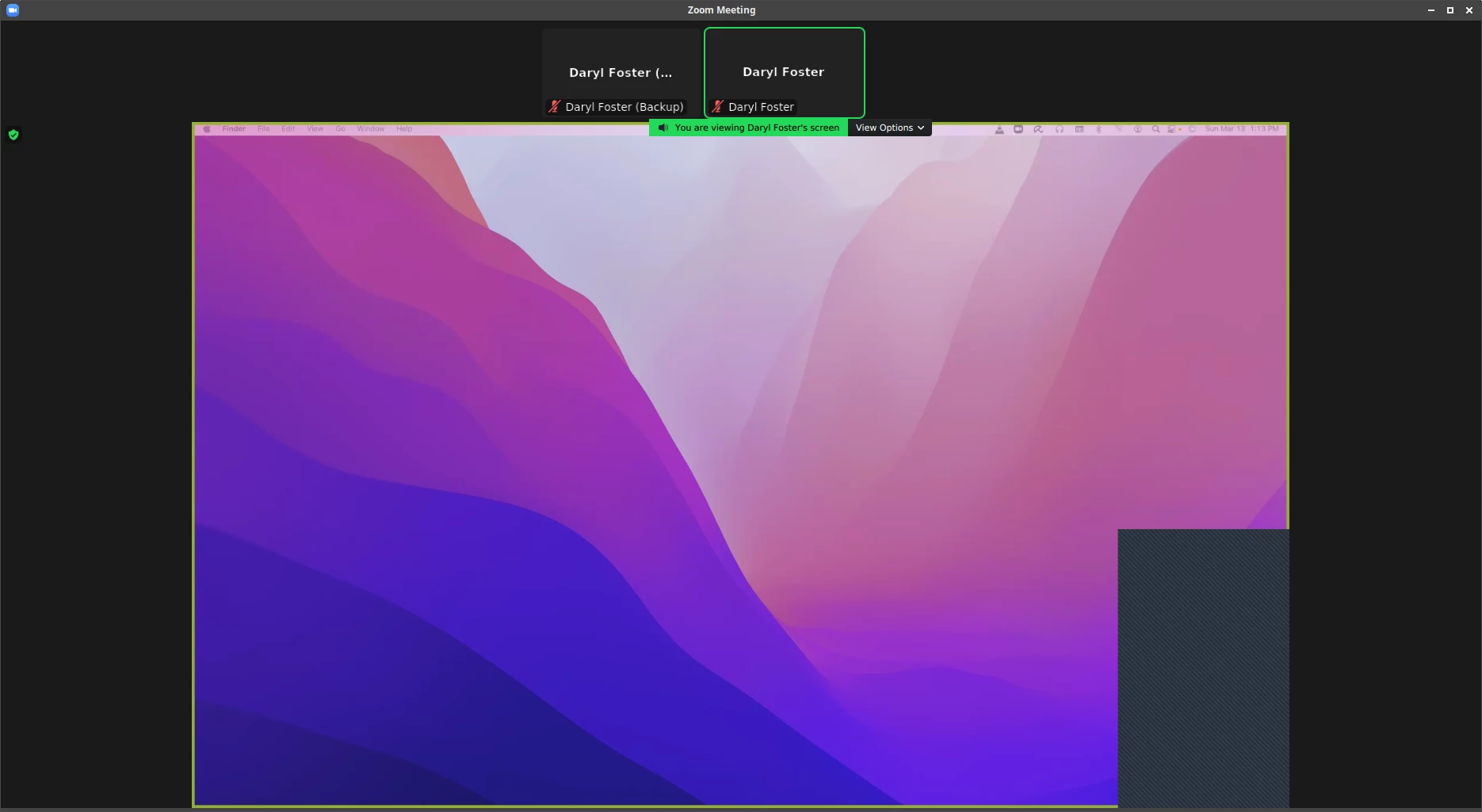
 Is there any way to figure out what's causing that gray box?

    Best answer by darylfoster

    I fixed the issue by setting Screen capture mode to "Capture with window filtering".

    I accessed this setting by going to Settings -> Share Screen -> Advanced -> Screen capture mode

    4 replies

    Newcomer
    March 13, 2022

    By the way, the box only appears when I select "Optimize for video clip".

    Community Manager
    March 14, 2022

    Hey @darylfoster if you hide windows but do a optimize for full screen, you may see those boxes in some cases. You can also try enabling/disabling the Hardware Acceleration.


    Lastly, update the Zoom client if there's an update available 5.9.6 or uninstall Zoom and try reinstalling. 

    Newcomer
    March 16, 2022

    I fixed the issue by setting Screen capture mode to "Capture with window filtering".

    I accessed this setting by going to Settings -> Share Screen -> Advanced -> Screen capture mode


    When I go to settings>screen sharing ... I don't see "Advanced" or "Screen capture mode" ??

    here's a pic of what I see:

    Newcomer
    March 14, 2022

    Is that the videos of the participants? 


    Newcomer
    March 14, 2022

    Sometime I see this gray box during screen sharing too. It might be the videos of the participants. Or maybe the chat window. Or the meeting controls. You can close them if it is. 

    Newcomer
    March 14, 2022

    The first screen shot shows the host screen. I closed ALL open windows on that screen, but participants still see the gray box.

    Newcomer
    April 4, 2022

    Here's a great short vid that explains it!

    https://www.youtube.com/watch?v=OQpR56a3pi0

    Newcomer
    July 20, 2022

    I've tried everything that was mentioned here. I've even uninstalled and reinstalled Zoom client. 
    Nothing worked. 😞
    My participants keep seeing the gray boxes covering shared screen. 

    I'm using Windows 8.1

    The workaround has been using two monitors, one to share screen and the other to see the participants video and zoom annotation tools. 

    I've been using Zoom since 2018...never had this issue