

Participant videos freezing | Community
Skip to main content
Newcomer
August 16, 2021
Solved

Participant videos freezing

  • August 16, 2021
  • 34 replies
  • 0 views

I have used Zoom for over 19 months with no issue. Suddenly, in the last 3 weeks, my clients videos are freezing, I can hear them but can't see them. They can see and hear me. I have tested the internet connection speed and have done the check from multiple locations. I have a feeling this started after my last software update. Anyone else experiencing the same? BTW this is happening with multiple groups of clients. 


Thanks!
    Best answer by ZoomVA

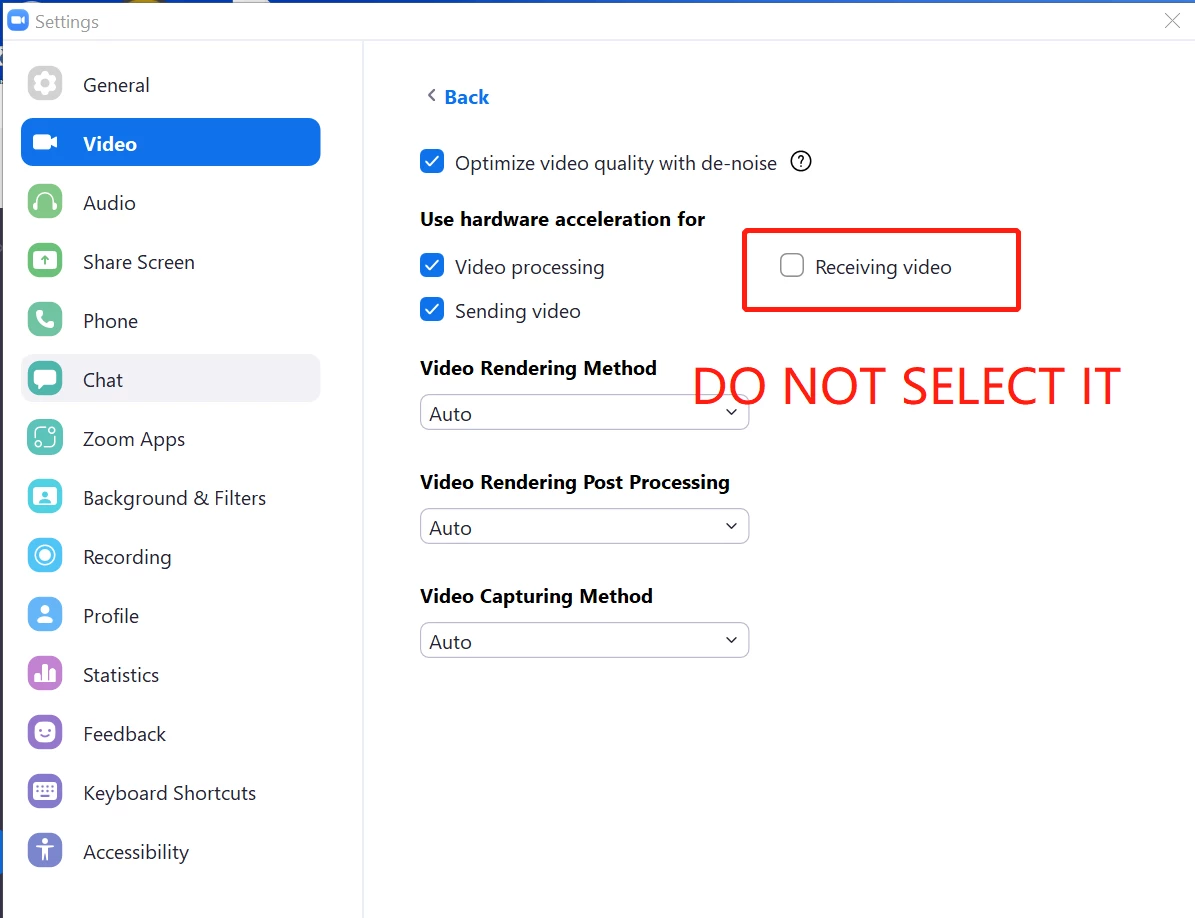
    Hi @CN29_2 Please try adjusting the video settings in Zoom Client -> Settings -> Video -> Advanced -> Uncheck Receiving Video in the section (Use hardware acceleration for), and see if this solves the issue. 

    34 replies

    Newcomer
    September 3, 2021

    Exactly same issue, recently

    Newcomer
    September 3, 2021

    Do solution work for me try it

    Newcomer
    September 17, 2021

    where is zoom client? 

    HLAA-SF-EastBay
    Newcomer
    Newcomer
    September 6, 2021

    I been having the same problem for several weeks, both as host and as participant.

    I have experienced the problem on versions  5.7.7 and 5.7.6.  (Maybe even 5.7.5, I do not remember).


    I am running Win10, 

       - With August 10, 2021—KB5005033 (OS Builds 19041.1165, 19042.1165, and 19043.1165)

      - and September 1, 2021—KB5005101 (OS Builds 19041.1202, 19042.1202, and 19043.1202) Preview

    Another machine with Win10

    - With August 10, 2021—KB5005033 (OS Builds 19041.1165, 19042.1165, and 19043.1165)

    - without September 1, 2021—KB5005101 (OS Builds 19041.1202, 19042.1202, and 19043.1202) Preview

    A third machine with Win11 beta (via Windows Insiders)

    - With Windows 11 Insider Preview 10.0.22000 (co_release)

    - with 2021-08 Cumulative Update for Windows 11 for x64-based Systems (KB5006050)

    Newcomer
    May 13, 2022

    i'm sorry but i don't know. please look through some solutions and try. mine doesn't freeze anymore. good luck.

    Newcomer
    May 20, 2022

    What does unchecking 'Receiving Video' actually do?

    Newcomer
    July 22, 2022

    Doesn't work!😥

    Newcomer
    July 22, 2022

    to be clear, did you check video processing and sending video and uncheck receiving video? if so, i'd call your internet provider and make sure you are getting the mb you should. you need a great high-speed to zoom. good luck.

    Newcomer
    October 3, 2022

    I have been having the same problem with videos freezing. I switched from trying to show them within my Keynote presentation to putting the vids on my desktop,  going to screen share, then opening the vids with Quicktime.

    This system worked well for a short while but failed during the last webinar.

    PLEASE try to fix this -- it creates HUGE anxiety and uncertainty because some of my webinars RELY on video demonstrations.


    Newcomer
    October 6, 2022
    Respectfully, Zoom always reverts it back to there being a problem on our end. Not to say it can't be, but this is a recurring issue, and the problem is most likely on Zoom's end.
     
    I'm using a MacBook Pro (16-inch, 2021, with the Apple M1 Max chip and loaded with extra power/RAM0; Marcos Monterey 12.6, and my Zoom app is updated.
     
    We ought to simply be able to show vids in our presentations without the unreliability that they will freeze.
     
    Please, employ a tech team to fix the problem on your end!
    Newcomer
    October 7, 2022

    Respectfully and with no sarcasm intended, here's a suggestion for the Zoom techies: so many people play vids while leading webinars and meetings, right? For me, they are essential to what I teach, as they are to so many other Zoom users. And when they freeze, it's DISASTROUS!  So why not simply fix the problem from Zoom's end by having a single box we can check that says, "I want to play videos"?  (Yes, we need to have our Zoom app updated.) Even better, why can't that just happen automatically? Do we really need a default that does not let us play videos (no)?

    Newcomer
    October 12, 2022

    Unchecking Receiving video did not fix video freezing in Oct, 2022.  Video freezes on a driver updated computer, but on a cellphone the video plays fine.

    Newcomer
    October 13, 2022

    I THINK THERE WAS A TAD MORE THAN JUST UNCHECKING THAT.  NOT SURE, BUT "THE FIX" DID FIX MY ISSUE.  GOOD LUCK.

    Newcomer
    October 12, 2022

    Yes, even when everything on our end is up to date, speed, and checked and unchecked properly, vids can still freeze. Some techy friends claim the problem is too many people are probably using Zoom at a time for the platform to handle the load.