

Participant videos freezing | Community
Skip to main content
Newcomer
August 16, 2021
Solved

Participant videos freezing

  • August 16, 2021
  • 34 replies
  • 0 views

I have used Zoom for over 19 months with no issue. Suddenly, in the last 3 weeks, my clients videos are freezing, I can hear them but can't see them. They can see and hear me. I have tested the internet connection speed and have done the check from multiple locations. I have a feeling this started after my last software update. Anyone else experiencing the same? BTW this is happening with multiple groups of clients. 


Thanks!
    Best answer by ZoomVA

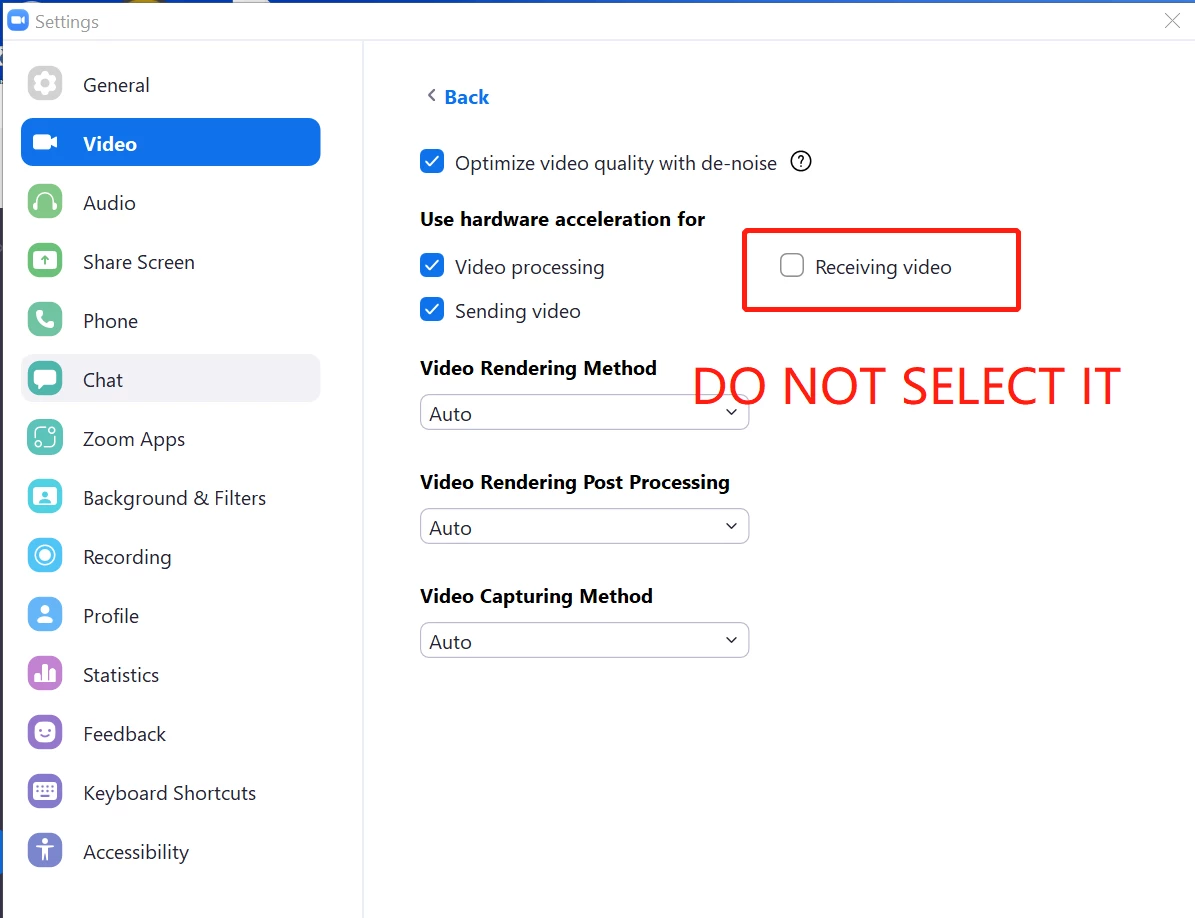
    Hi @CN29_2 Please try adjusting the video settings in Zoom Client -> Settings -> Video -> Advanced -> Uncheck Receiving Video in the section (Use hardware acceleration for), and see if this solves the issue. 

    34 replies

    ZoomVA
    Community Manager
    ZoomVAAnswer
    Community Manager
    August 19, 2021

    Hi @CN29_2 Please try adjusting the video settings in Zoom Client -> Settings -> Video -> Advanced -> Uncheck Receiving Video in the section (Use hardware acceleration for), and see if this solves the issue. 

    Newcomer
    January 11, 2022

    My video freezes over the last 2 months.  I went to Zoom.us/download and downloaded the Zoom client, but I cannot find any icon that says "Zoom Client" to click on.  Therefore I can't go to settings-video etc as suggested on how to correct this problem.  How do I get to "Zoom Client" so I can uncheck "Receiving Video"?  Rod


    Newcomer
    January 12, 2022

    Hi, you don't need to go into Zoom client to fix the problem. Go into settings (the wheel) - video - advanced (at the bottom of the screen) - uncheck 'receiving video' - should solve the problem.

    Newcomer
    August 23, 2021

    I'm facing the same problem here! I'll try your tips"

    Thanks!

    Newcomer
    August 23, 2021

    Thank you for the tip.  I will try it today.  Fingers, toes, and eyes crossed.  

    Newcomer
    August 24, 2021

    Exactly the same thing here, both on my HP desktop and my HP laptop.  I can briefly unfreeze the other client's videos by changing from gallery view to speaker view, or back again.  I will  try this solution and post again with results.

    Newcomer
    August 25, 2021

    Yes! Finally! This very thing is happening to me! Is there a fix???


    Newcomer
    August 25, 2021

    See above for fix - follow the step and it works for groups and individuals


    Newcomer
    August 25, 2021

    You would think that with so many folks having this very same issue that Zoom would fix it!!! Come on Zoom, I am paying good money! 


    Newcomer
    August 30, 2021

    if you are paying good money, zoom offers you support, i'm fairly certain.  i have the free set-up, so i get no help, except for here.


    Newcomer
    August 26, 2021

    Hi i have followed the instructions for the fix. It is better in that it is not constantly freezing, with me having to unfreeze throughout the meeting. However it will now pause audio and video it will start again on its own but there is then a delay and miss some of what is said.  Any advice for this please

    Newcomer
    August 28, 2021

    Exact same issue for me too! Only over the past 3 weeks. To survive my meetings, I've been changing the view from "speaker" to "gallery" and it will unfreeze their video, but only for 1-3 minutes. Sooo frustrating.

    Newcomer
    September 3, 2021

    Try the solution, it worked for me.

    Newcomer
    August 30, 2021

    did the recommended solution work for you? i'm in the process of working with DELL. i need help.  

    Newcomer
    August 30, 2021

    The same thing is happening to me.  It started about 4 weeks ago.

    Newcomer
    August 30, 2021

    yep.  have tried everything. dell was going to replace my motherboard on a 6th-month old computer.  i hope the suggested setting change helps.  i'll find out tomorrow when i go to work! And...it worked!