

Participant videos freezing | Community
Skip to main content
Newcomer
August 16, 2021
Solved

Participant videos freezing

  • August 16, 2021
  • 34 replies
  • 0 views

I have used Zoom for over 19 months with no issue. Suddenly, in the last 3 weeks, my clients videos are freezing, I can hear them but can't see them. They can see and hear me. I have tested the internet connection speed and have done the check from multiple locations. I have a feeling this started after my last software update. Anyone else experiencing the same? BTW this is happening with multiple groups of clients. 


Thanks!
    Best answer by ZoomVA

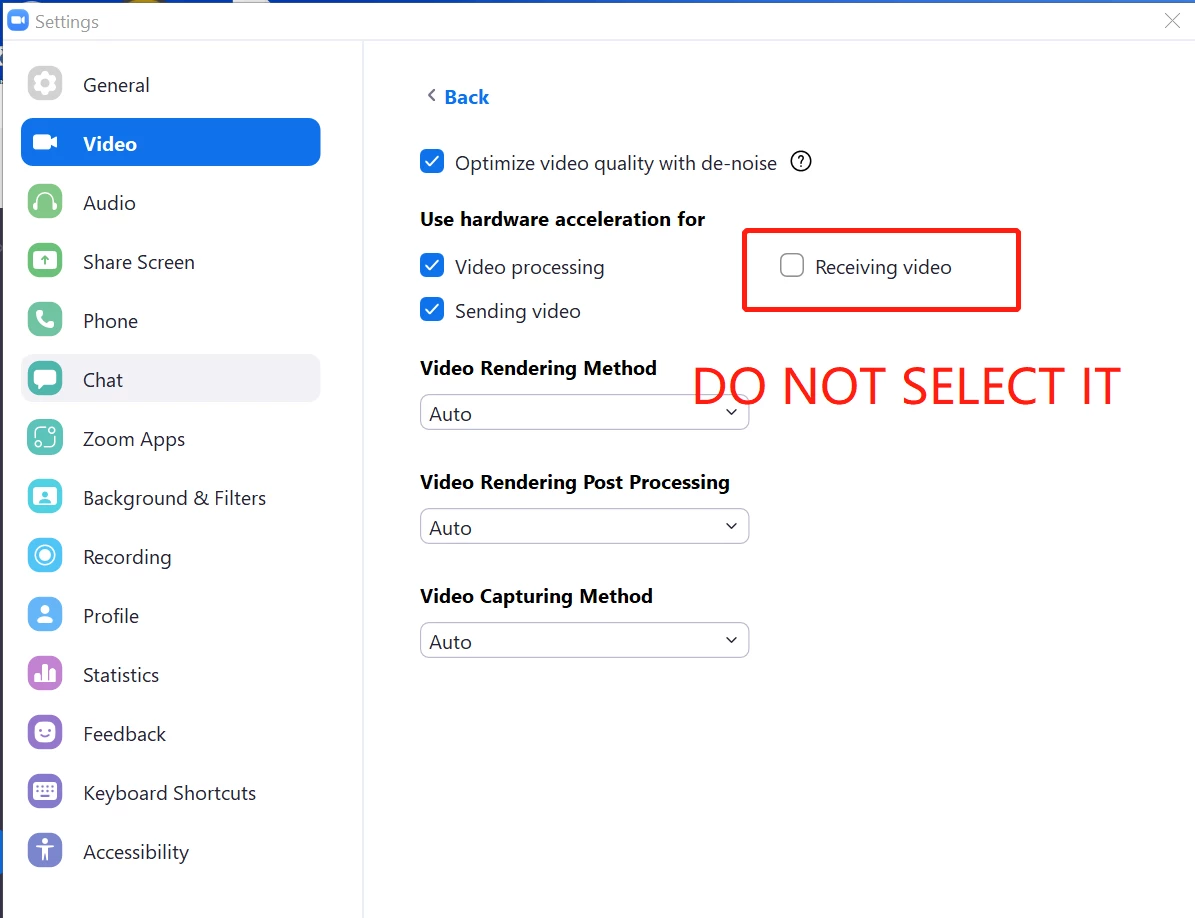
    Hi @CN29_2 Please try adjusting the video settings in Zoom Client -> Settings -> Video -> Advanced -> Uncheck Receiving Video in the section (Use hardware acceleration for), and see if this solves the issue. 

    34 replies

    Newcomer
    January 16, 2023

    I am having the same problem. I have used Zoom for several years, and I have had no problems at all. A few days ago I updated the Zoom platform as requested, and now my screen keeps freezing. The student can hear me, but my picture is frozen. This problem comes and goes. I think it has everything to do with the update. Is anyone else having this same problem?

    Newcomer
    July 22, 2023

    I have exactly the reverse problem. I appear perfect on my computer, but my video is fozen or jerkey for all other participants.  Everything was fine until a few weeks ago.  

    Newcomer
    July 22, 2023

    Our belief is Zoom was overloaded with vid capacity during covid, which caused freezing. But it's been fine the past year. If participants' vids are freezing and not yours, maybe they all have poor IN connections, need to update their Zoom app, etc.

    Newcomer
    July 22, 2023

    It is consistently occuring many different Zoom conferences and many different participants. I am the only person they seem to be having a problem with.


    Newcomer
    November 22, 2023

    For me, changing 'Video Rendering Method' (settings>video>advanced) to anything other than 'Auto' or 'Direct3D11 Flip Mode' solved the frozen video problem.  In my case, changed to 'Direct3D11' (without flip mode). -mb