

Only Authenticated Meeting Participants and Webinar Attendees can Join Meetings and Webinars | Community
Skip to main content
Newcomer
January 4, 2022
Solved

Only Authenticated Meeting Participants and Webinar Attendees can Join Meetings and Webinars

  • January 4, 2022
  • 1 reply
  • 0 views

This setting is available to Pro account holders but I cannot find the setting for Basic account holders.
The setting is of paramount importance when setting-up the Save Video Order feature in 5.9.0. The setting to enable the Save Video Order is available, but turning it on is pointless if the Authentication cannot be enabled, as Authentication is a prerequisite of using Save Video Order.

Is the Save Video Order feature available to Basic account holders when Hosting a meeting?
    Best answer by Ray_Harwood

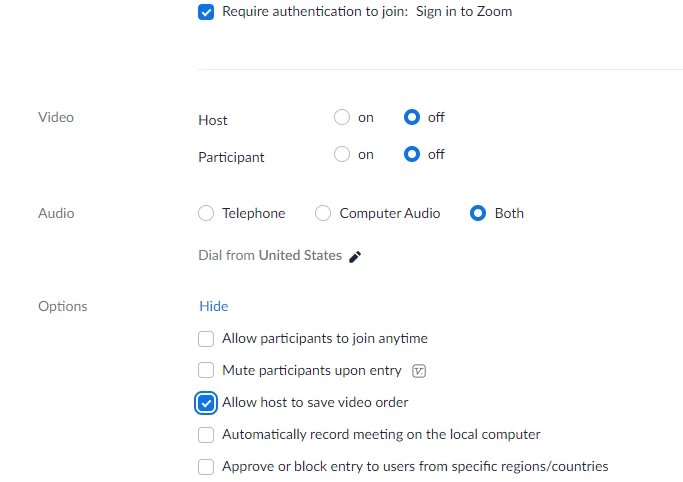
    First, check that the Save Gallery View switch is enabled on the user's Settings/Meetings (Advanced) page.  If the user's account is part of a group, the Save Gallery View switch must also be set on the Account Settings/Meeting/In Meeting (Advanced) page.

    I confirmed this with one of my "Monitor" accounts which are all Basic accounts used to join meetings as attendees.

    The Require authentication to join checkbox is on the Add Meeting web page (and on the Zoom desktop app). 

    If the user (and if applicable, account) setting is set, once the Require authentication to join is checked, the Allow host to save video order checkbox setting will appear in the Options section (click Show to view).

    NOTE: The Allow host to save video order checkbox is not visible on the Zoom desktop client (as of 5.9.1).  This final checkbox can only be set on the web version.

    1 reply

    Ray_Harwood
    Community Super Champion | Customer
    Community Super Champion | Customer
    January 4, 2022

    First, check that the Save Gallery View switch is enabled on the user's Settings/Meetings (Advanced) page.  If the user's account is part of a group, the Save Gallery View switch must also be set on the Account Settings/Meeting/In Meeting (Advanced) page.

    I confirmed this with one of my "Monitor" accounts which are all Basic accounts used to join meetings as attendees.

    The Require authentication to join checkbox is on the Add Meeting web page (and on the Zoom desktop app). 

    If the user (and if applicable, account) setting is set, once the Require authentication to join is checked, the Allow host to save video order checkbox setting will appear in the Options section (click Show to view).

    NOTE: The Allow host to save video order checkbox is not visible on the Zoom desktop client (as of 5.9.1).  This final checkbox can only be set on the web version.

    MikeGDTEAuthor
    Newcomer
    January 4, 2022

    Hi Ray

    The Save Gallery View is set on as per image below

    You say "The Require authentication to join checkbox is on the Add Meeting web page (and on the Zoom desktop app). "

    But where on the Desktop app please?

    Sorry if I am being thick but I just don't see where to enable the Authentication.

    Regards. Mike


    Ray_Harwood
    Community Super Champion | Customer
    Community Super Champion | Customer
    January 4, 2022

    No worries, Mike. Zoom is a moving target - we all have troubles keeping up with the changes!


    Anyway, it doesn't help that the desktop app nomenclature is different:

    And as I mentioned previously... checking the Only authenticated users can join on the desktop app will NOT reveal any additional checkbox on the desktop app... you still have to go over to the web interface to check the Allow host to save video order checkbox.  I hope at some point this checkbox will also be present on the desktop app.