No sound output from any device with Zoom app | Community
Skip to main content
Newcomer
August 5, 2021
Solved

No sound output from any device with Zoom app

  • August 5, 2021
  • 16 replies
  • 0 views

Have an issue with Zoom where the speaker does not work on any output device - built in speakers, headphones, Bluetooth, etc. The 'test speaker' in the app does not give any output and actually makes Zoom run very slow almost to the point where it locks up and have to kill the app in Task Manager.

Sound output works with every other device works with any other app - Teams, WebEx, GoToMeeting, YouTube, Windows sounds, etc, so 99% sure it is Zoom.

This is on a Dell Latitude 7410 with Windows 10 21H1, all updates done, all drives up to date.

Wondering if anyone has any thoughts.

    Best answer by Sg57_2

    Having the exact same problem, since the update. Mic seems to be working. But there is no sound output to any device. Getting the "Failed to Detect Speaker error".  Have tried all sorts of troubleshooting. Pretty sure the problem is in the app. 


    Audio works fine in Meet etc.


    Haven't been able to use zoom in over a week on the laptop, which is an Omen 15!  It's making things rather difficult since I do a lot of online trainings which are all scheduled on zoom. Please help.


    EDIT:

    I just checked the Release Notes for this version 5.7.4(804) and it seems there was to be another release on 2nd Aug to fix this problem, which has been delayed. 

    It specifically says it intended fix this Audio problem for a subset of users. It seems to have broken it for others.... 

    Link is here: https://support.zoom.us/hc/en-us/articles/201361953-New-Updates-for-Windows


    Putting it here incase it helps others....save you some time looking for a solution that does not currently exist. Its not your system that is at fault. 


    Hope we get the fixed update soon! 


    EDIT 2: SOLUTION

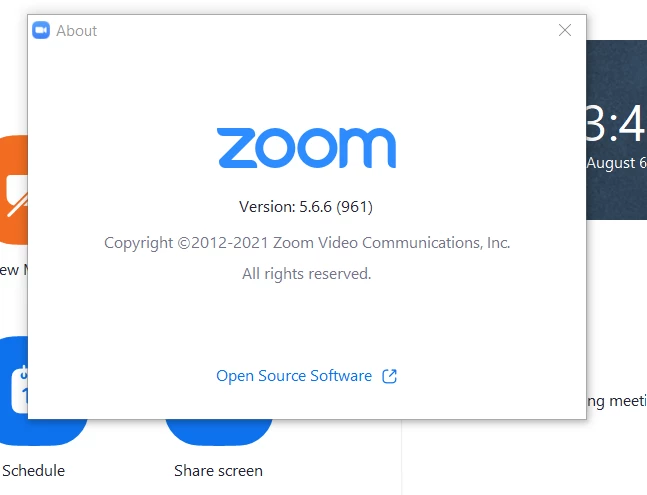
    I found a temporary solution. I just installed the previous versions 5.6.6 and audio is now working again. 

    You can get it from here:  https://zoom.us/client/5.6.6.961/ZoomInstaller.exe

    (Link updated to official zoom source)

    I installed it without uninstalling anything and it went back to the previous version. 
     

    16 replies

    angelo_112020
    Employee
    Employee
    August 15, 2021

    hi everyone, 


    For anyone having "Failed To Detect Speaker" kindly uninstall your current Zoom App then download the 64-bit version from the zoom.us/download page:


    Let me know if you will still encounter the same issues with the app detecting your speaker. 

    Always stay healthy and safe!


    Newcomer
    August 20, 2021

    I'm having this exact same problem as we speak. It's a recurring problem.

    Newcomer
    August 20, 2021

    Hello kmwilson,


    Have you tried updating to the newest version 5.7.5 ?   That fixed it for me. Otherwise you can revert to the last version that worked for you. In my case that was 5.6.6. The links are all available above. 


    And yes both the browser and the app versions still work. 


    Best of luck. 

    Sg

    Newcomer
    February 10, 2022

      Dear Sg,My problem is very similar to yours. My speaker is working well in any other Clients while no sound came out in my Zoom Client, no matter in meeting or in the audio testing (Thinkpad, windows 10, 64 bit). Everything is fine if I use the online Zoom in browser. So the problem only exists in Zoom Client.

    But I tried the as-mentioned solutions in this post, to install the previous versions. Still no sound came out... I also tried to reinstall my zoom by using different versions and reinstall my Audio Driver. Failed all the time...

    Any other suggestions or solutions, please?  Thanks

    @Sg57_2

    Newcomer
    February 10, 2022

    This sounds like exactly the same problem I had on my ThinkPad about a year ago.  I am sorry to hear that you are experiencing the same problem.


    Back then, it took at least a week for Zoom to post anything acknowledging that a problem existed and several weeks after that for Zoom to deliver a client update to fix my problem.


    I did not revert my Zoom app to an earlier level. I just used Zoom in my browser until a fix was finally delivered.

    Help > About Zoom (after clicking on my account icon/image in my Zoom client) shows that my client is at the V5.9.1 (2581) level, running Windows 10 on a Lenovo ThinkPad P52. I hear sound when I navigate to Settings > Audio > Test Speaker in my client.


    What is the level of your Zoom client? We will all need to avoid updating to that level until Zoom acknowledges the problem and announces that the problem is fixed in a later level.

    Newcomer
    February 11, 2022

    Thanks a lot for your kind reply. Good to hear that Zoom will fix it...

    I checked my version is 5.9.3 (3169), which is autoupdated recently.  I also tried to reinstall the old version like 5.6.6 and 5.7.0. Cannot work. 

    So maybe you avoid to update to the newest version. 

    Newcomer
    February 18, 2022

    Thanks 1yao! Very good to know!

    It was not trivially obvious how to "check the volume mixer". I opened Windows Settings via the gearbox icon on the left side of the Windows Start menu and chose System > Sound > Advanced sound options > App volume and device preferences. When I scrolled to the bottom of the window, I saw:

    So, which of the two Zoom entries need to be adjusted? More to the point, why are there two Zoom entries? Even more to the point, how do I remove the bogus entry so that there is no question which Zoom entry needs to be adjusted? And even more to the point, how/why is it not possible in audio settings within the Zoom app itself to discover that Zoom sound is muted? Put another way, why is it necessary to navigate to the Windows App volume and device preferences window to discover that Zoom sound is muted?

    It seems evident to me that the Zoom app has a dysfunctional relationship with Windows audio settings. Perhaps a technicist from Zoom can chime in on this thread to help all of us Zoom users on Windows get Windows audio settings for Zoom straightened out?

    Newcomer
    June 13, 2022

    I had the same issue with a Samsung laptop - no sound from only the Zoom App or website.  The fix for me was to use the Zoom App, go to Settings > Audio > Advanced, then turn OFF signal processing from Windows audio drivers.  I now have sound from laptop speakers or connected headset.

    Newcomer
    December 9, 2022

    With the help of a Zoom Tier 2 tech person I solved this problem.  He suggested that I see if Zoom were muted in the Volume Mixer.  I didn't even know that Zoom had a separate entry in Volume Mixer, but when I looked it was there, and it was muted.  When I clicked to unmute it the problem was solved.

