

No monitor can be selected for screen sharing | Community
Skip to main content
Newcomer
March 12, 2024
Solved

No monitor can be selected for screen sharing

  • March 12, 2024
  • 1 reply
  • 0 views

For some months now, when I want to share my screen, I can no longer select in advance which of the two monitors (the one on the laptop or the external monitor) should be shared. The laptop screen is always shared immediately. I can only change the screen afterwards once sharing is already running. Is it possible to set the system to ask in advance which screen should be shared? My colleagues do not have this problem. Thank you very much!
Best answer by ZoomZoom

Hi, Cmennenga.

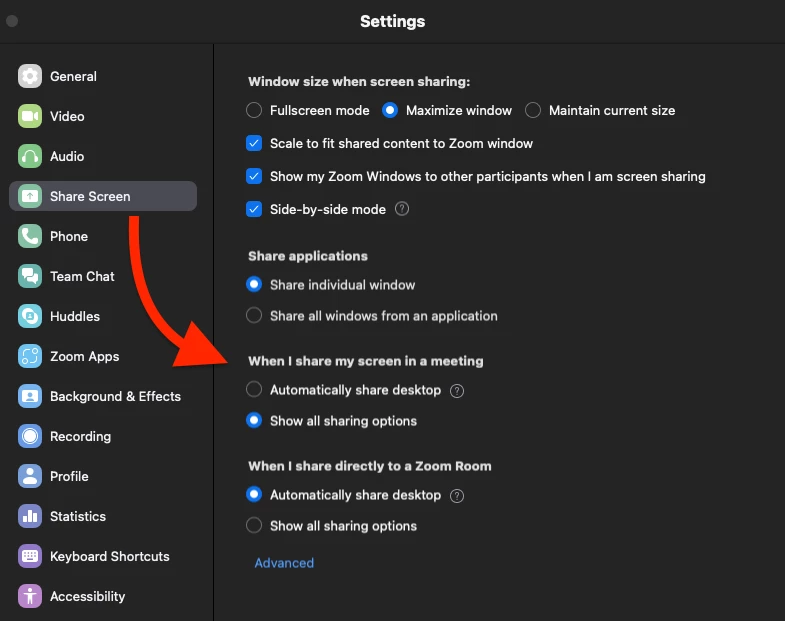
Sounds like your app is automatically sharing. You can change that by going to the Settings > Share Screen > When I share my screen in a meeting > and choosing Show all options.


More on settings: https://support.zoom.com/hc/en/article?id=zm_kb&sysparm_article=KB0060612


1 reply

ZoomZoomAnswer
Community Champion | Employee
March 12, 2024

Hi, Cmennenga.

Sounds like your app is automatically sharing. You can change that by going to the Settings > Share Screen > When I share my screen in a meeting > and choosing Show all options.


More on settings: https://support.zoom.com/hc/en/article?id=zm_kb&sysparm_article=KB0060612


cmennengaAuthor
Newcomer
March 12, 2024

That worked. Thank you very much!