

cancel
Showing results for 
Search instead for 
Did you mean: 
Effective January 9th, 2026 through January 22nd, 2026: The Zoom Community is currently in read-only mode with login disabled, to deliver you a new and improved community experience!

The site is still accessible to view, however, the ability to login, create content, or access your community account is temporarily unavailable. We appreciate your patience during this time. If seeking support, please browse existing community content or ask our Zoom Virtual Agent.

No background blur option!

Julia_Balabina
Newcomer
Newcomer

No background blur option!
Zoom Desktop Client version 5.16.5 (24269).
Operating system Windows 10.
Processor AMD A6-3650 APU with Radeon(tm) HD Graphics 2.60 GHz, 64-bit operating system.
If I access Zoom through a browser, there is a background blur function, but the video quality and speed are very poor, so it is impossible to hold a conference through a browser.
1 ACCEPTED SOLUTION

bstrelko
Community Champion | Customer

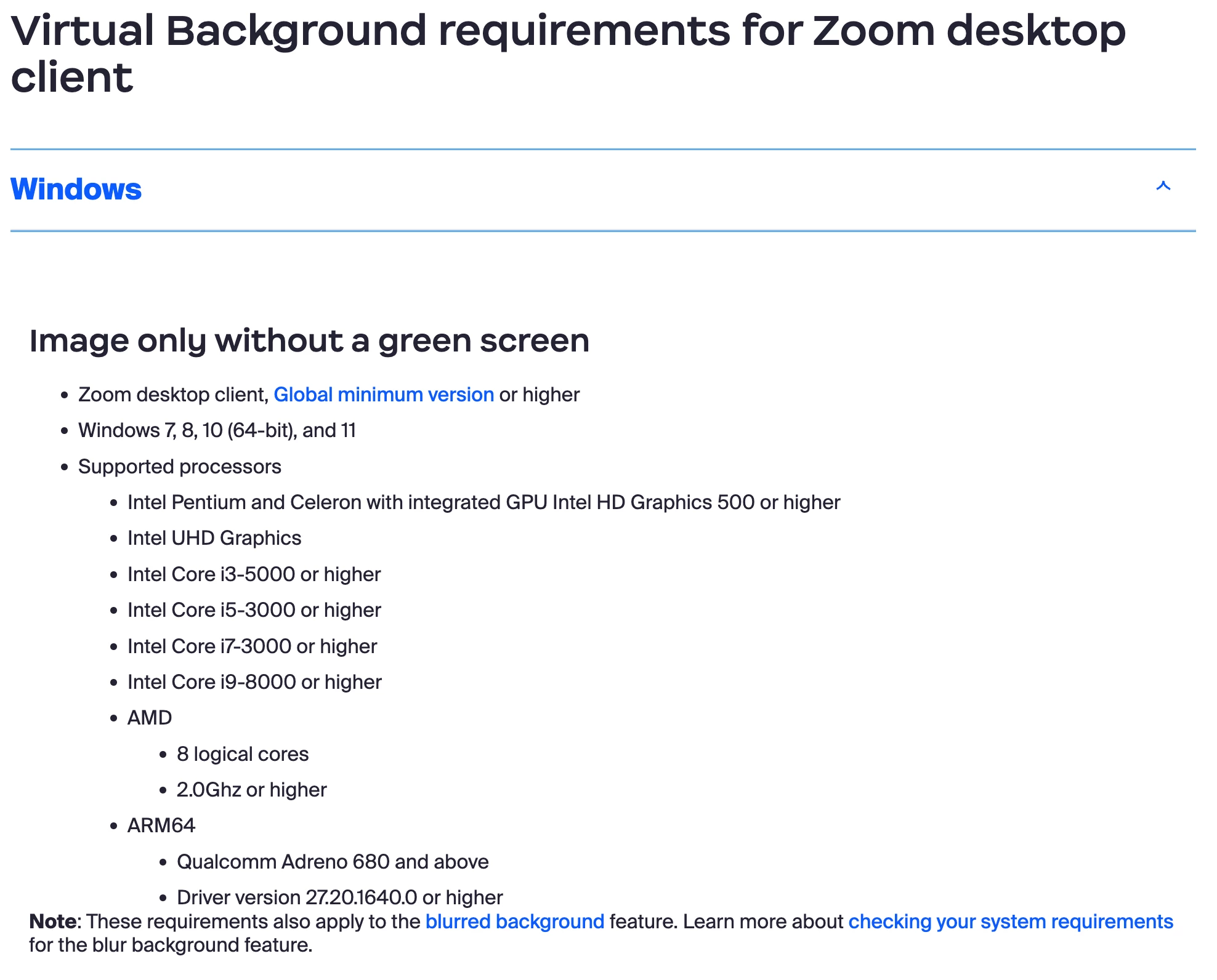
The A6-3650 does not meet the Windows Zoom Client's baseline for blurred backgrounds. More info below:

https://support.zoom.com/hc/en/article?id=zm_kb&sysparm_article=KB0059090

bstrelko_0-1699796132888.png


In this case, your AMD processor only has 4 logical cores - 8 are required for this feature to work.


There is a fair amount of frustration regarding these requirements and how they were determined in forums across the web - you are not alone! However, the requirement baseline definitely seems to be what is preventing you from blurring your video in the application.


View solution in original post

1 REPLY 1

bstrelko
Community Champion | Customer

The A6-3650 does not meet the Windows Zoom Client's baseline for blurred backgrounds. More info below:

https://support.zoom.com/hc/en/article?id=zm_kb&sysparm_article=KB0059090

bstrelko_0-1699796132888.png


In this case, your AMD processor only has 4 logical cores - 8 are required for this feature to work.


There is a fair amount of frustration regarding these requirements and how they were determined in forums across the web - you are not alone! However, the requirement baseline definitely seems to be what is preventing you from blurring your video in the application.