
No Way to add a "cohost" to a scheduled meeting | Community
Skip to main content
Newcomer
June 28, 2022
Question

No Way to add a "cohost" to a scheduled meeting

  • June 28, 2022
  • 1 reply
  • 0 views

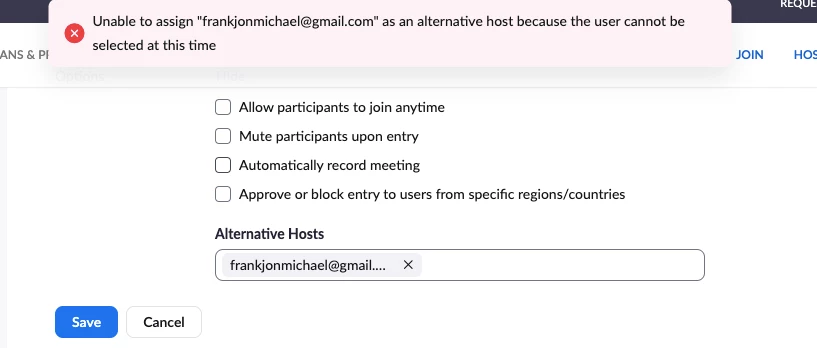
Hello Zoom Community - I host a zoom meeting account and under "options" it never allows me to add co-hosts. No matter what email I put it - this is the message I get. 
    1 reply

    Bort
    Employee
    Employee
    June 28, 2022

    Hi @nwdsongs 


    There is no way to assign a co-host outside of a meeting. That is only something that can be done within a live meeting. 

    Assigning someone as alternative-host will likely make them a co-host in the meeting if you still plan on attending, but an alternative host must be a licensed user on your same account. Read more about alternative hosts here: https://support.zoom.us/hc/en-us/articles/208220166-Designating-an-alternative-host


    Hope that helps and please make sure to mark the solution as accepted if this information is what you needed.

    Newcomer
    August 15, 2022

    I have a similar situation where Im unable to add a co-host to a meeting. everyone is on the same account. I can only add a co-host 2 ways. when the meeting has started and that person has joined, (Not optimal) the other way is to create the meeting and then go back into the meeting from the zoom icon (not using the outlook plug-in), select the edit option and them add that person, it then ADDs a duplicate meeting to the calendar. How can I get around all the unneeded back/forth to get something setup?
