

cancel
Showing results for 
Search instead for 
Did you mean: 
The Zoom Community will be placed in read-only mode January 9th, 2026 through January 22nd, 2026 to deliver you a new and improved community experience!

The community will still be accessible, however, the creation of any new discussions or replies will be temporarily unavailable. We appreciate your patience during this time.

No Annotation option when screen is shared by participants

LJY
Newcomer
Newcomer

I see several queries on this, and I followed all the instructions, but the annotation option did not show up when screen is shared by participants


I am the host, and I am able to annotate when I share screen

But when my participants share their screen, the annotation option is not available for me


I have tried this out with different participants and it is always the same


The following is my setting for Annotation 


Please help
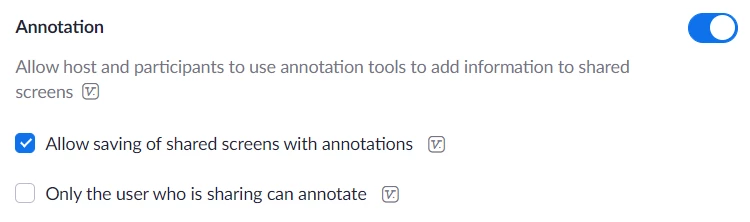
 

LJY_0-1655344135597.png


3 REPLIES 3

mkinoax
Newcomer
Newcomer

I had the same problem today for the first time.  I use Zoom for teaching all the time, usually with my students sharing their screen and me annotating.  Today, no annotation available.  Maybe the student was using Zoom via his browser?  I didn't think to ask at the time.


Like the OP, I have the settings right in my account.  And I haven't changed them in months.  Any ideas?

Was this ever answered?  I am having the same problem and I never had that problem before.


rven
Newcomer
Newcomer

I'm  having same issue. This used to work just fine